

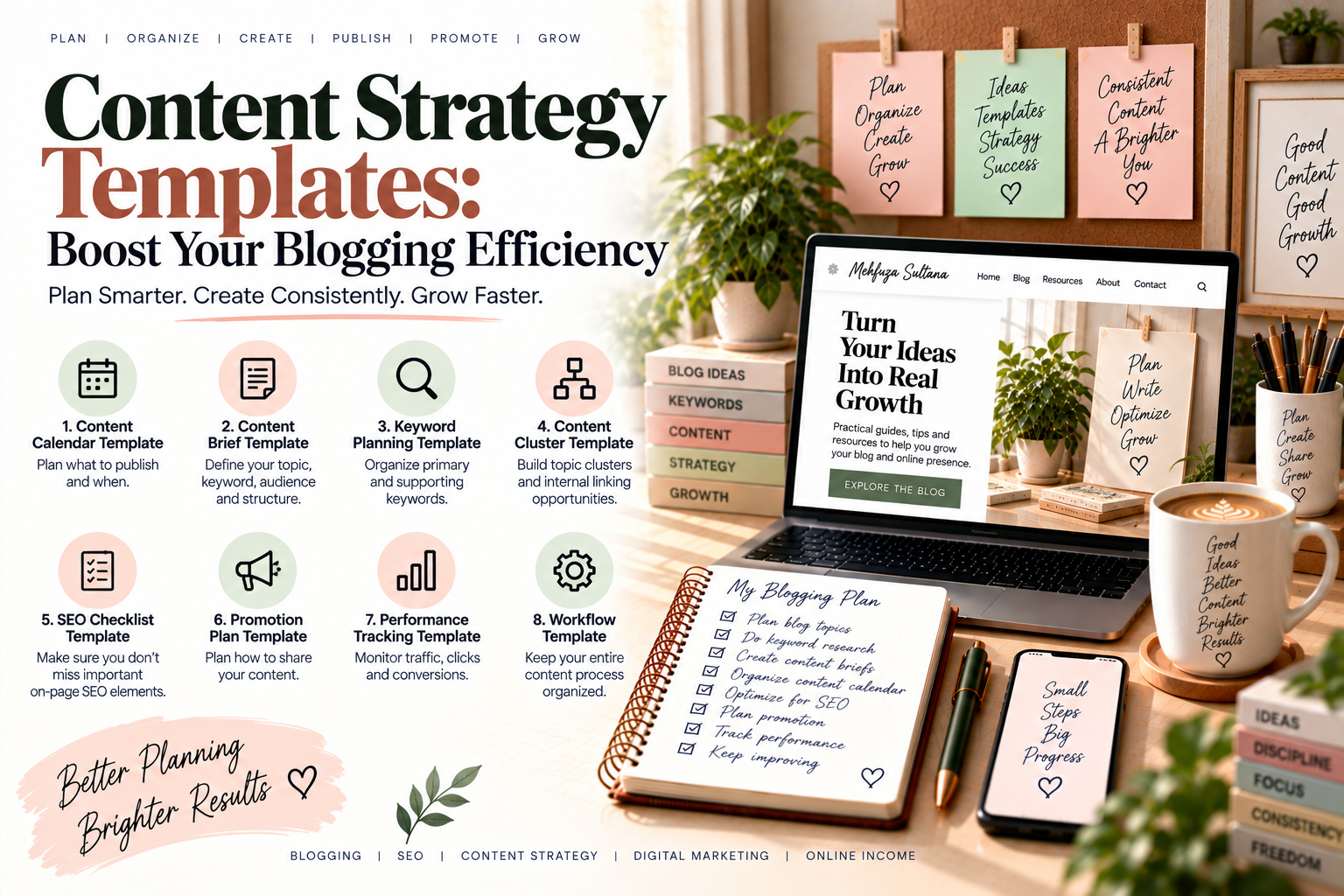
Creating consistent blog content sounds simple until you actually have to decide what to write, which keywords to target, when to publish, and how each article connects to the rest of your website. This is where content strategy templates can make blogging easier, more organized, and more efficient.
Instead of starting every article from a blank page, you can use a repeatable system for planning topics, keywords, content briefs, publishing schedules, SEO, and performance tracking. The goal is not to make your blogging process complicated. It is to make the important steps easier to repeat.
Whether you are starting a new blog or trying to manage an existing content library, the right templates can help you turn random ideas into a structured content strategy.
What Are Content Strategy Templates?
Content strategy templates are ready-to-use frameworks that help you plan, create, optimize, publish, and measure content.
A useful template can organize information such as:
- Blog topic
- Target audience
- Search intent
- Primary keyword
- Secondary keywords
- Content format
- Article outline
- Internal links
- Publishing date
- Content status
- Performance metrics
For example, instead of writing down:
“Write a blog about SEO.”
you could use a content planning template to define:
Topic: SEO for Beginners
Audience: New bloggers
Search intent: Informational
Primary keyword: SEO for beginners
Supporting topics: On-page SEO, technical SEO, internal linking
Format: Beginner’s guide
Internal links: Keyword research, on-page SEO, internal linking
This simple structure makes the idea much easier to develop into a complete article.
Why Use Content Strategy Templates for Blogging?
Blogging becomes difficult when every decision has to be made from scratch.
You may have plenty of ideas but still struggle with:
- What to publish first
- Which keyword to target
- How to structure an article
- When to publish
- Which older posts to link
- Whether an article supports your overall strategy
- How to measure results
A template gives you a repeatable process.
Instead of asking “What should I do next?”, you can follow the same workflow for every article.
This can help you:
- Save planning time
- Maintain consistency
- Reduce missed SEO steps
- Organize your content calendar
- Build stronger topic clusters
- Improve internal linking
- Track content performance
- Create content more efficiently
The biggest benefit is not the template itself. It is having a system you can actually follow.
What Should a Good Content Strategy Template Include?
A useful template should contain enough information to guide your work without becoming overwhelming.
At minimum, your template can include:
| Planning Element | What to Record |
|---|---|
| Topic | The main subject |
| Audience | Who the content is for |
| Search intent | Informational, commercial, transactional, or navigational |
| Primary keyword | Main search phrase |
| Secondary keywords | Related terms and subtopics |
| Content format | Guide, tutorial, comparison, checklist, etc. |
| Outline | Main sections and headings |
| Internal links | Relevant existing articles |
| CTA | Desired next action |
| Status | Idea, writing, editing, published, updating |
| Publish date | Planned publication date |
You do not need a complicated spreadsheet with dozens of columns. Start with the information that actually helps you make better content decisions.
Content Strategy Template 1: Blog Content Calendar
A blog content calendar template helps you decide what to publish and when.
A simple calendar can include:
| Date | Topic | Keyword | Intent | Status | CTA |
|---|---|---|---|---|---|
| Week 1 | Keyword Research Guide | keyword research | Informational | Published | Read next guide |
| Week 2 | Low-Competition Keywords | low competition keywords | Informational | Planned | Explore SEO |
| Week 3 | Keyword Mapping | keyword mapping | Informational | Drafting | Read SEO guide |
Your calendar does not need to contain a year’s worth of content immediately.
Start with the next 4–8 weeks.
This gives you enough structure to stay consistent without locking yourself into a plan that may change.
Related resource: [How to Create a Social Media Content Strategy That Actually Works]
Content Strategy Template 2: Blog Content Brief
A content brief gives you a plan before you begin writing.
A simple blog content brief can include:
Blog title:
Your working headline
Target audience:
Who should find this article useful?
Primary keyword:
The main search term
Search intent:
What does the reader want to accomplish?
Secondary keywords:
Related terms and questions
Article goal:
What should the reader understand or do after reading?
Suggested structure:
H2 and H3 sections
Internal links:
Relevant existing content
External references:
Useful authoritative sources
CTA:
The next step for the reader
For example, if you are writing about keyword research, your brief might identify keyword research as the main topic while also covering search intent, long-tail keywords, competition, keyword difficulty, and keyword mapping.
This prevents the article from becoming a collection of disconnected information.
Content Strategy Template 3: SEO Content Planning
An SEO content planning template connects your content ideas with your search strategy.
Before writing an article, record:
- Primary keyword
- Search intent
- Supporting keywords
- Related topics
- Existing competing pages
- Content gaps
- Internal linking opportunities
- Potential title
- Main headings
- Content format
For example:
Topic: Low-Competition Keywords
Primary keyword: low-competition keywords
Intent: Informational
Supporting keywords: keyword difficulty, long-tail keywords, keyword research
Related content: keyword research guide
Internal link: SEO for beginners
Next article: keyword mapping
This creates a connection between individual blog posts instead of treating every article as an isolated piece of content.
For broader SEO guidance, Google’s Search Central provides an official SEO Starter Guide and other documentation for website owners.
Content Strategy Template 4: Keyword Research
Your keyword research template can help you organize potential search terms before assigning them to articles.
Use columns such as:
| Keyword | Search Intent | Relevance | Competition | Content Idea |
|---|---|---|---|---|
| keyword research | Informational | High | Medium | Beginner guide |
| low competition keywords | Informational | High | Medium | Detailed tutorial |
| long-tail keywords | Informational | High | Medium | Practical guide |
| keyword mapping | Informational | High | Low | SEO tutorial |
The important part is not collecting hundreds of keywords.
The goal is to identify keywords that are relevant to your audience and can be connected to useful content.
You can learn more about this process in How to Conduct Effective Keyword Research for Your Blog.
Content Strategy Template 5: Content Cluster Planning
A content cluster template helps you organize related articles around a broader topic.
For example:
Main topic: Keyword Research
Pillar article:
How to Conduct Effective Keyword Research for Your Blog
Supporting articles:
- How to Find Low-Competition Keywords for Your Blog
- Long-Tail Keywords: How to Find and Use Them in Blog Content
- How to Choose the Right Keywords for Your Blog Posts
- Keyword Mapping for SEO
The pillar page provides the broader explanation while supporting articles explore specific subtopics.
This structure can also create natural internal-linking opportunities throughout your website.
Content Strategy Template 6: Blog Post Planning
Before writing an individual article, use a simple blog post planning template.
Step 1: Define the reader
Ask:
Who is this article for?
A beginner may need definitions and examples. An experienced marketer may need deeper analysis and practical frameworks.
Step 2: Define the search intent
Determine what the reader wants.
For example:
- Learn something
- Compare options
- Solve a problem
- Find a product
- Complete a task
Step 3: Choose the primary keyword
Select one main keyword that closely matches the topic and search intent.
Step 4: Build the outline
Create your H2 and H3 headings before writing.
Step 5: Add supporting information
Include examples, steps, mistakes, practical tips, and useful context.
Step 6: Add internal links
Connect the article to relevant existing content.
For example, an SEO article could link naturally to your guides on:
- Keyword research
- On-page SEO
- Internal linking
- Topical authority
Step 7: Define the CTA
Decide what you want the reader to do next.
That could be reading another article, downloading a resource, subscribing to your newsletter, or exploring a service.
Content Strategy Template 7: Content Performance Tracking
Creating content is only one part of blogging.
You also need to understand what happens after publication.
A simple performance template can track:
| Article | Published | Organic Traffic | Clicks | Impressions | Position | Update Needed |
|---|---|---|---|---|---|---|
| Article A | Jan | 500 | 80 | 4,000 | 12 | Yes |
| Article B | Feb | 1,200 | 210 | 8,000 | 7 | No |
| Article C | Mar | 150 | 20 | 2,000 | 25 | Yes |
You can use this information to identify articles that may need:
- Better titles
- Stronger introductions
- Additional sections
- More internal links
- Updated examples
- Better keyword alignment
- Content refreshes
Google Search Central also provides documentation and Search Console resources for understanding how websites perform in Google Search.
How to Choose the Right Content Strategy Templates
You do not need every template available.
Choose templates according to the stage of your blogging workflow.
If you are just starting
Begin with:
- Blog content calendar
- Keyword research template
- Blog content brief
If you already publish regularly
Add:
- Content cluster template
- SEO content planning template
- Blog post planning template
If you have a large content library
Add:
- Content performance template
- Content update tracker
- Internal linking tracker
The goal is to create a system that makes blogging easier not another administrative task.
Keep Your Content Strategy Templates Simple
One common mistake is creating templates that are so detailed that you stop using them.
If your template requires 30 fields before you can start an article, it may slow you down instead of helping.
Start with the essentials:
Topic → Audience → Search Intent → Keyword → Outline → Internal Links → CTA → Status
Once this becomes part of your workflow, you can add more fields when they become useful.
Use Templates as a Repeatable Blogging Workflow
The real power of content strategy templates comes from using them together.
A simple workflow can look like this:
1. Find a topic
↓
2. Research keywords
↓
3. Choose search intent
↓
4. Add the topic to your content calendar
↓
5. Create a content brief
↓
6. Build the article outline
↓
7. Write and optimize the article
↓
8. Add internal and external links
↓
9. Publish and promote
↓
10. Track performance and update
This creates a content production system instead of relying on inspiration every time you want to publish.
Connect Your Content Strategy Templates With SEO
Templates become even more useful when they connect content planning with SEO.
For example, your planning process can move from:
Keyword Research → Search Intent → Content Brief → On-Page SEO → Internal Linking → Content Cluster → Performance Tracking
This makes your content strategy more connected.
You can also review your existing articles and identify opportunities to strengthen connections between related posts.
For example:
Keyword Research Guide
↓
Low-Competition Keywords
↓
Long-Tail Keywords
↓
Choosing the Right Keywords
↓
Keyword Mapping
Each article can support the next stage of the reader’s learning journey.
Common Mistakes When Using Content Strategy Templates
Templates are helpful, but they can be misused.
1. Creating too many templates
You do not need a separate document for every tiny task.
2. Focusing only on keywords
Keywords are useful, but the content still needs to solve the reader’s problem.
3. Ignoring search intent
A keyword alone does not tell you what kind of article to create.
4. Never updating the templates
Your blogging process will change as your website grows.
5. Forgetting internal links
Good content should connect naturally with other useful content on your website.
6. Publishing without measuring
A content strategy should improve over time based on what your audience actually responds to.
A Simple Content Strategy Template for Beginners
If you want to start immediately, use this basic framework:
Topic:
What will you write about?
Audience:
Who needs this information?
Primary keyword:
What main search phrase are you targeting?
Search intent:
What does the reader want?
Secondary keywords:
What related topics should you cover?
Outline:
What H2 and H3 sections will you include?
Internal links:
Which existing articles should you connect?
External sources:
Which trustworthy resources can support the article?
CTA:
What should the reader do next?
Status:
Idea / Research / Writing / Editing / Published / Update
That’s enough to build a consistent content planning system without making the process complicated.
Content strategy templates can turn blogging from a collection of random tasks into a repeatable system.
You can use templates to organize your content calendar, research keywords, create better briefs, plan SEO, build content clusters, manage internal links, and track performance.
You do not need a complicated system from day one. Start with a content calendar, keyword research template, and blog content brief. As your website grows, add SEO planning, content clusters, and performance tracking.
The most useful template is the one you will actually use consistently.
Build Your Next Content Workflow
A practical content journey can look like:
Content Writing & Blogging
→ Keyword Research for Your Blog
→ Content Strategy Templates
→ On-Page SEO
→ Internal Linking
→ Topical Authority
This approach helps each new article become part of a larger website strategy instead of standing alone. Explore more practical SEO, blogging, content strategy, and digital marketing resources at MehfuzaSultana.com.
Add a Comment