

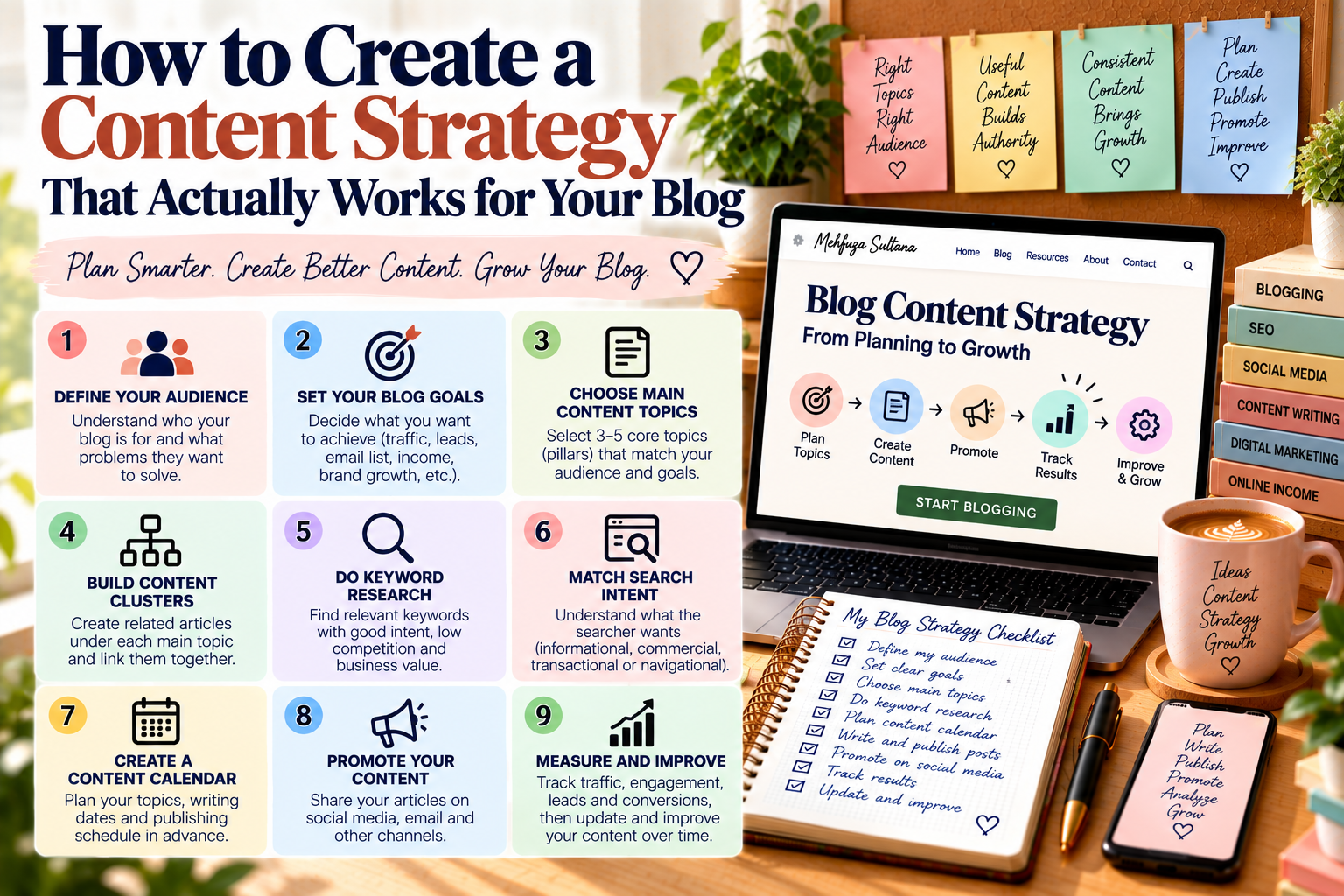
A clear content strategy for your blog helps you stop guessing what to publish and start creating content with a purpose. You can also use our keyword mapping guide to connect related pages and organize your content.
Without a plan, you may publish many articles but still struggle to attract the right readers. Therefore, a practical blog content strategy gives every article a clear role and helps your content work together.
What Is a Content Strategy for a Blog?
A content strategy for a blog is a simple plan for deciding what content to create, who it is for, how you will publish it, and how you will measure its results.
A good strategy answers questions such as:
- Who is your target audience?
- What problems do they have?
- Which topics should you cover?
- What keywords do they search for?
- What type of articles should you create?
- How often should you publish?
- How will you promote your content?
- How will you measure results?
The goal is not to publish as many posts as possible. Instead, the goal is to create useful content that helps your readers and supports your website goals.
Content Strategy for a Blog Starts With Your Audience
Before choosing topics, understand who you want to reach.
Your audience could include:
- Beginners
- Students
- Freelancers
- Bloggers
- Content writers
- Small business owners
- Content creators
- Marketing professionals
Next, identify their questions, problems, goals, and interests.
For example, someone new to blogging may search for:
- How to start a blog
- How to write a blog post
- How to find blog topics
- How to do keyword research
- How to get blog traffic
- How to make money blogging
These questions can become the foundation of your content plan.
For more ideas, read How to Find Blog Topics and Content Ideas Your Audience Will Actually Search For.
Set Goals for Your Blog Content Strategy
Your blog should have a clear purpose.
Common goals include:
- Growing organic traffic
- Building authority
- Generating leads
- Growing an email list
- Promoting services
- Supporting affiliate income
- Selling products
- Building a personal brand
Your goal will influence the type of content you create.
For example, a website focused on organic traffic may need more educational SEO content. On the other hand, a service-based website may also need articles that explain problems and guide readers toward a service.
Therefore, clear goals make it easier to decide which topics deserve your time.
Choose Topics for Your Blog Content Strategy
Next, decide which broad subjects your website will cover.
These broad subjects become your content pillars.
For a digital marketing website, the pillars might include:
- Content Writing & Blogging
- SEO & Website Growth
- Digital Marketing & Social Media
- Online Income & Freelancing
Each pillar can then contain smaller, closely related topics.
As a result, your website gets a clear structure instead of becoming a collection of unrelated articles.
Build Content Clusters for Your Blog Strategy
After choosing your main topics, create groups of related articles.
For example, under Keyword Research, you could create:
- How to Conduct Effective Keyword Research for Your Blog
- How to Find Low-Competition Keywords for Your Blog
- Long-Tail Keywords: How to Find and Use Them in Blog Content
- How to Choose the Right Keywords for Your Blog Posts
- Keyword Mapping for SEO
These articles can link to one another and to the main keyword research guide.
This creates a connected website structure. It also gives readers a clear path to discover related information.
For a deeper look at this process, read How to Build Topic Clusters for Your Blog.
Use Keyword Research in Your Blog Content Strategy
Keyword research helps you discover what people are actually searching for.
Start with a broad topic. Then, find specific search phrases around it.
For example, the topic blogging can lead to keywords such as:
- Blogging for beginners
- How to start a blog
- Blog content ideas
- How to write a blog post
- Blogging schedule
- How to make money blogging
However, do not choose keywords based only on search volume.
Also consider:
- Relevance
- Search intent
- Competition
- Content quality in the search results
- Your website’s authority
- Business value
For a detailed process, read How to Conduct Effective Keyword Research for Your Blog.
Match Your Blog Content Strategy With Search Intent
Every keyword has a reason behind the search.
Understanding that reason helps you create the right type of content.
Informational Intent
The reader wants to learn something.
For example:
What is keyword research?
Commercial Intent
The reader is researching options before making a decision.
For example:
Best keyword research tools for bloggers
Transactional Intent
The reader is ready to take an action.
For example:
Buy SEO content writing service
Navigational Intent
The reader is looking for a specific website, brand, or page.
Therefore, your article should match the searcher’s purpose instead of simply repeating the keyword.
For more help with this process, read How to Plan Blog Content Around Keywords and Search Intent.
Create a Content Calendar for Your Blog Strategy
Once you have your topics, organize them in a content calendar.
A simple calendar could look like this:
| Week | Topic | Focus Keyword | Content Type | Status |
|---|---|---|---|---|
| Week 1 | Keyword Research Guide | keyword research for blog | Guide | Planned |
| Week 2 | Long-Tail Keywords | long-tail keywords | How-to | Planned |
| Week 3 | Keyword Mapping | keyword mapping | Guide | Planned |
| Week 4 | Low-Competition Keywords | low-competition keywords | How-to | Planned |
A content calendar helps you avoid last-minute topic decisions.
It also makes your publishing routine easier to manage.
For a practical planning system, read How to Create a Content Calendar for Your Blog.
Plan Different Types of Blog Content
Your blog content strategy should include different article formats.
Beginner Guides
These explain a subject from the basics.
Example:
SEO for Beginners: A Complete Guide to Growing Your Website
How-To Articles
These teach readers how to complete a specific task.
Example:
How to Create a Content Calendar for Your Blog
Comparison Articles
These explain differences between two choices.
Example:
Freelancing vs Blogging: Which Is Better for Making Money Online?
Problem-Solving Articles
These answer a specific problem.
Example:
Why Is My Website Not Ranking on Google?
Templates and Checklists
These give readers practical resources they can use right away.
Example:
Content Strategy Templates: Plan, Organize & Grow Your Blog
Using different formats helps you serve readers at different stages of their journey.
Build a Blog Content Strategy for Every Stage
Not every reader is ready to take the same action.
A simple content journey can look like:
Awareness → Consideration → Action
At the awareness stage, create educational content that answers basic questions.
Next, at the consideration stage, create detailed guides, comparisons, tutorials, and solution-focused articles.
Finally, at the action stage, create content that supports relevant services, products, tools, or other business goals.
This approach helps your articles work together instead of functioning as separate pieces of content.
Add Internal Links to Your Blog Content Strategy
Internal links connect related pages on your website.
For example:
Content Strategy
↓
Keyword Research
↓
Blog Content Planning
↓
Blog Writing
↓
Content Monetization
Use descriptive anchor text that tells readers what they will find on the next page.
You should also review older articles when publishing new content. If an older post can naturally support your new article, add a link between them.
As a result, your website can develop a stronger content network.
For more guidance, read Internal Linking: How to Connect Your Content and Help Google Understand Your Website.
Choose a Publishing Schedule for Your Blog Strategy
You do not need to publish every day.
Instead, choose a schedule you can realistically maintain.
For example:
- One article per week
- Two articles per week
- Three articles per month
Consistency matters more than an unrealistic publishing target.
If you work alone, one useful article each week may be more sustainable than trying to publish several posts and struggling to maintain quality.
For more help, read How to Create a Blogging Schedule You Can Actually Follow.
Include Content Promotion in Your Blog Strategy
Publishing an article is only one part of content marketing.
After publishing, promote your content through relevant channels such as:
- Email newsletters
- Relevant communities
You can also repurpose one article into several smaller pieces of content.
For example:
1 Blog Post → 1 LinkedIn Post → 3 Social Posts → 1 Email → Multiple Short Tips
This allows you to get more value from the work you have already completed.
Improve Your Blog Content Strategy Over Time
Your strategy should not remain unchanged forever.
Therefore, review your content regularly and look for:
- Declining traffic
- Outdated information
- Broken links
- Missing internal links
- New search queries
- Weak sections
- Low conversions
If an article has useful information but is outdated, update it instead of immediately creating another article on the same topic.
A regular content refresh can help you keep older content useful and relevant.
For more help, read Content Refresh Strategy: How to Update Old Blog Posts for Better SEO.
Measure Your Blog Content Strategy Performance
Your metrics should match your goals.
For an SEO-focused blog, you might track:
- Organic clicks
- Search impressions
- Search rankings
- Organic traffic
- Engaged sessions
- Leads
- Conversions
- Revenue
For example, if an article is designed to attract search traffic, organic clicks and impressions may be important.
On the other hand, if another article supports a service, leads or conversions may matter more.
You can use Google Search Console to understand how your pages perform in Google Search.
Follow a Simple Blog Content Strategy Workflow
You can turn your strategy into a repeatable process.
Start by defining your audience and setting a clear goal. Then, choose a topic that fits one of your content pillars.
Next, research keywords and related questions. After that, check search intent and review the search results.
Once you understand the topic, create your outline. Then write useful content with clear explanations, examples, and practical advice.
After writing, optimize the article. Check the headings, keywords, links, images, and readability.
Finally, publish and promote the article. Over time, measure its performance and update the content when needed.
This simple workflow helps you stay organized. More importantly, it turns content creation into a repeatable process.
Common Blog Content Strategy Mistakes to Avoid
Writing Without a Clear Audience
Trying to reach everyone can make your content too general.
Instead, create content for a clear group of readers.
Choosing Topics Randomly
Random topics can make your website difficult to organize.
Therefore, choose topics that fit your main content pillars.
Focusing Only on Search Volume
High search volume does not automatically mean a keyword is right for your website.
Consider relevance, intent, competition, and business value as well.
Ignoring Search Intent
An article may target the right keyword but still fail to satisfy the searcher’s needs.
For this reason, always check what people expect to find before writing.
Publishing and Forgetting
Content often needs updates, internal links, promotion, and improvement.
So, review important articles from time to time.
Creating Too Much Content
More articles do not always mean better results.
Instead, focus on useful and relevant content that supports your audience and website goals.
Final Thoughts on Building a Content Strategy for Your Blog
A successful content strategy for your blog gives every article a clear purpose.
Start with your audience and goals. Then choose content pillars, research keywords, understand search intent, build content clusters, create a content calendar, add internal links, and measure your results.
Most importantly, think of your blog as a connected system rather than a collection of random posts.
When your articles support one another, your website becomes easier to navigate, easier to manage, and more useful to your audience.
Add a Comment