

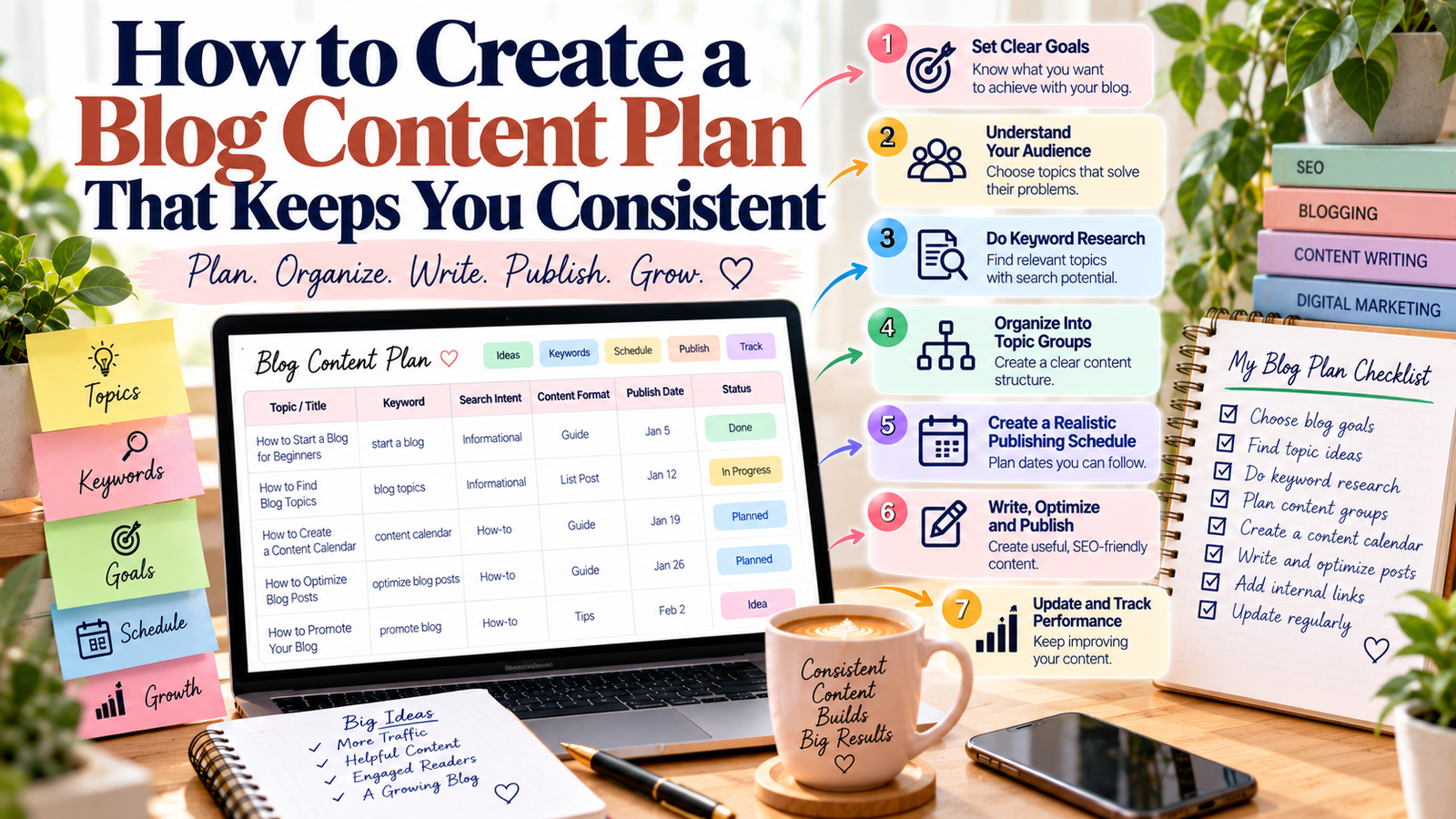
Publishing a blog post once in a while is easy. Staying consistent is much harder when you do not know what to write next. A clear blog content plan can solve this problem by helping you organize topics, keywords, publishing dates, and content goals in one place.
Instead of choosing a topic every time you want to publish, you can prepare your ideas in advance. As a result, writing becomes more organized and less stressful.
A good plan also helps you create content that supports your bigger website goals. You can use it to cover important topics, connect related articles, and keep your publishing schedule realistic.
In this guide, you will learn how to create a practical blog content plan that you can actually follow.
What Is a Blog Content Plan?
A blog content plan is a simple system for deciding what you will publish, when you will publish it, and why the content matters.
It usually includes:
- Blog topics
- Target keywords
- Search intent
- Content format
- Publishing dates
- Internal links
- Content goals
- Updates and revisions
For example, imagine you have a blog about digital marketing. Instead of randomly publishing articles about SEO, Instagram, email marketing, and blogging, you can group related topics together.
One month could focus on beginner SEO. Another month could cover social media marketing. This approach makes your website easier to organize.
More importantly, your readers can follow a clear learning path.
Why You Need a Blog Content Plan
Without a plan, blogging can quickly become difficult. You may spend too much time choosing topics, repeat similar ideas, or publish articles that do not support your main goals.
A structured plan helps you avoid these problems.
It Saves Time
Topic research takes time when you start from zero for every article. Having a list of planned topics gives you a starting point.
You can also prepare titles, keywords, and outlines before your writing day. Therefore, more of your time can go toward creating the actual content.
It Helps You Stay Consistent
Consistency does not mean publishing every day. Instead, it means following a schedule that you can maintain.
For example, publishing one useful article every week is often more realistic than planning five articles and then stopping after one month.
A simple content plan helps you choose a publishing frequency that fits your available time.
It Keeps Your Content Focused
A website should not feel like a collection of unrelated articles.
Your topics should connect to your main subjects. This creates a stronger content structure and gives readers more useful information to explore.
For example, a beginner SEO topic can lead readers to articles about keyword research, on-page SEO, internal linking, and technical SEO.
Start Your Blog Content Plan With Clear Goals
Before choosing topics, decide what you want your blog to achieve.
Your goal could be to:
- Increase organic traffic
- Build authority in a topic
- Generate leads
- Promote a service
- Grow an email list
- Support affiliate income
- Educate your audience
- Build a personal brand
One blog does not need to achieve every goal at the same time.
Choose the most important goal for your current stage. Then, select topics that support it.
For example, if your goal is organic traffic, focus on useful search-based topics. If your goal is lead generation, create content that answers customer questions and naturally connects readers with your services.
This simple decision makes the rest of your planning easier.
Choose Topics Your Audience Actually Needs
A useful topic should solve a real problem for your audience.
Start by thinking about the questions your readers ask. Look at common problems, beginner concerns, mistakes, and tasks they want to complete.
You can also use keyword research to discover what people search for online.
For a blog about freelancing, for example, your audience may search for:
- How to start freelancing
- How to create a freelance portfolio
- How to find freelance clients
- Freelancing skills for beginners
- How to write a freelance proposal
These topics can become the foundation of your content plan.
You can also explore related searches and questions to find smaller topics that support your main subject.
Build Your Blog Content Plan Around Topic Groups
Once you have several ideas, organize them into topic groups.
A topic group contains several related articles that support one broader subject.
For example:
Main topic: SEO for Beginners
- What Is SEO?
- How to Do Keyword Research
- How to Optimize Blog Posts
- What Is Internal Linking?
- What Is Technical SEO?
- How to Track SEO Performance
This structure gives your blog a clear direction.
It also makes internal linking easier because related articles can naturally point to one another.
For example, your keyword research article can link to your guide about choosing keywords. Your on-page SEO article can then link to your internal linking guide.
If you are building a larger content system, your topic cluster strategy can help you connect related articles around broader subjects.
Add Keywords Before You Start Writing
Keywords should be part of your planning process, not something you add at the end.
For every planned article, choose one main keyword that matches the topic and search intent.
Then, note a few related phrases that can help you cover the subject naturally.
For example:
Topic: How to Start a Blog
Main keyword: start a blog
Related phrases: blogging for beginners, create a blog, blogging guide
Do not force these phrases into every paragraph. Instead, use them where they make sense.
A separate keyword research guide can help you build a stronger list of search terms before adding topics to your plan.
Match Each Topic With Search Intent
Search intent means the reason behind a search.
Someone searching for “what is SEO” probably wants to understand the basic concept. A person searching for “best SEO tools for bloggers” may be comparing different options.
These searches need different types of content.
Informational Intent
The reader wants to learn something.
Examples include:
- What is content writing?
- How does SEO work?
- How do I start a blog?
Commercial Intent
The reader is researching products, tools, or services.
Examples include:
- Best keyword research tools
- SEO tools for small businesses
- Best blogging platforms
Transactional Intent
The reader is ready to take an action, such as buying or signing up.
Examples include:
- Buy SEO software
- Sign up for an email marketing tool
- Hire a content writer
Understanding intent before writing helps you create content that matches what readers expect.
Create a Realistic Publishing Schedule
A content plan becomes useful when you turn it into a schedule.
However, avoid creating a schedule that is too difficult to maintain.
If you can realistically publish four articles a month, plan four articles. You can always increase your publishing frequency later.
For example:
| Week | Content Topic | Type | Goal |
|---|---|---|---|
| Week 1 | SEO Basics for Beginners | Educational | Organic traffic |
| Week 2 | Keyword Research Guide | Educational | Search visibility |
| Week 3 | On-Page SEO Tips | Educational | Website growth |
| Week 4 | Internal Linking Guide | Educational | Content discovery |
This simple system gives you a clear publishing path without making the process complicated.
You can also use a blog content calendar to organize your publishing dates and upcoming topics.
Turn One Topic Into Multiple Content Ideas
One broad subject can produce many useful articles.
Suppose your main subject is content writing.
You could create articles about:
- What content writing is
- How to write a blog post
- Content writing tips for beginners
- How to find content writing clients
- Content writing tools
- Common content writing mistakes
This approach saves research time because the topics are connected.
It also helps you build depth around an important subject instead of publishing random articles.
Keep Track of Your Content Ideas
Do not depend on memory to manage your blog ideas.
Create one simple spreadsheet or document with columns such as:
| Topic | Keyword | Intent | Status | Publish Date |
|---|---|---|---|---|
| SEO Basics | SEO for beginners | Informational | Planned | Week 1 |
| Keyword Research | keyword research | Informational | Writing | Week 2 |
| On-Page SEO | on-page SEO | Informational | Planned | Week 3 |
You can add more columns as your needs grow.
For example, you might include the article URL, internal links, content update date, and traffic results.
The goal is not to create a complicated system. Your plan should make blogging easier, not create more work.
Review Your Blog Content Plan Regularly
A content plan should not remain unchanged for months.
Search behavior can change. New questions can appear. Some articles may perform better than expected, while others may receive little traffic.
Therefore, review your plan regularly.
Check which topics are bringing visitors. Look for articles that need more detail. Find older posts that contain outdated information.
You can then adjust upcoming topics based on what you learn.
Google Search Console can help you review search performance, queries, clicks, impressions, and other useful data. Google Search Console
You can also review Google’s guidance about creating helpful, people-first content before planning new articles. Google Search Central: Creating Helpful Content
Follow a Simple Content Planning Workflow
A practical workflow can make your blogging routine much easier.
Start by defining your main audience and blog goal. Next, choose a broad topic that supports that goal. Then, research keywords and related questions that your audience may search for.
After that, group similar ideas together and check the search intent for each topic. Select the topics that provide the most useful value to your readers.
Once your topics are ready, add them to your publishing calendar. Include the target keyword, content format, publishing date, and any important internal links.
Finally, review your published content regularly. Update older articles when information changes, add useful internal links, and adjust your future plan based on performance.
This workflow keeps your content creation organized without making it complicated.
Common Blog Planning Mistakes to Avoid
Even a simple plan can fail if it is built around the wrong priorities.
Publishing Too Much Too Quickly
More content does not always mean better results. Focus on useful articles that answer real questions.
Choosing Topics Only Because They Sound Interesting
A topic may sound interesting but have little value for your audience. Always connect your ideas to reader needs and your overall blog goals.
Ignoring Search Intent
A keyword alone does not tell you what type of article to create. Check what information searchers are actually looking for before writing.
Making the Schedule Too Difficult
An unrealistic schedule can quickly lead to missed deadlines. Choose a publishing frequency you can maintain.
Forgetting Older Content
Your work does not end when an article is published. Review older posts and improve them when necessary.
A useful content refresh strategy can help you decide which older articles need attention.
How to Keep Your Blog Content Plan Simple
Your content plan does not need dozens of columns or complicated software.
Start with five basic details:
- Topic
- Main keyword
- Search intent
- Publishing date
- Content status
Once you become comfortable with the system, add other details such as internal links, content goals, performance data, and update dates.
The best system is the one you can actually use every week.
Final Thoughts
A blog content plan gives your blogging work direction. Instead of deciding what to publish at the last minute, you can prepare topics, keywords, search intent, and publishing dates in advance.
Start small. Choose a realistic publishing schedule and focus on topics your audience genuinely needs.
Over time, connect related articles, review your results, and update your plan when your audience or goals change. With a simple system, blogging becomes more organized and easier to maintain.
Add a Comment