

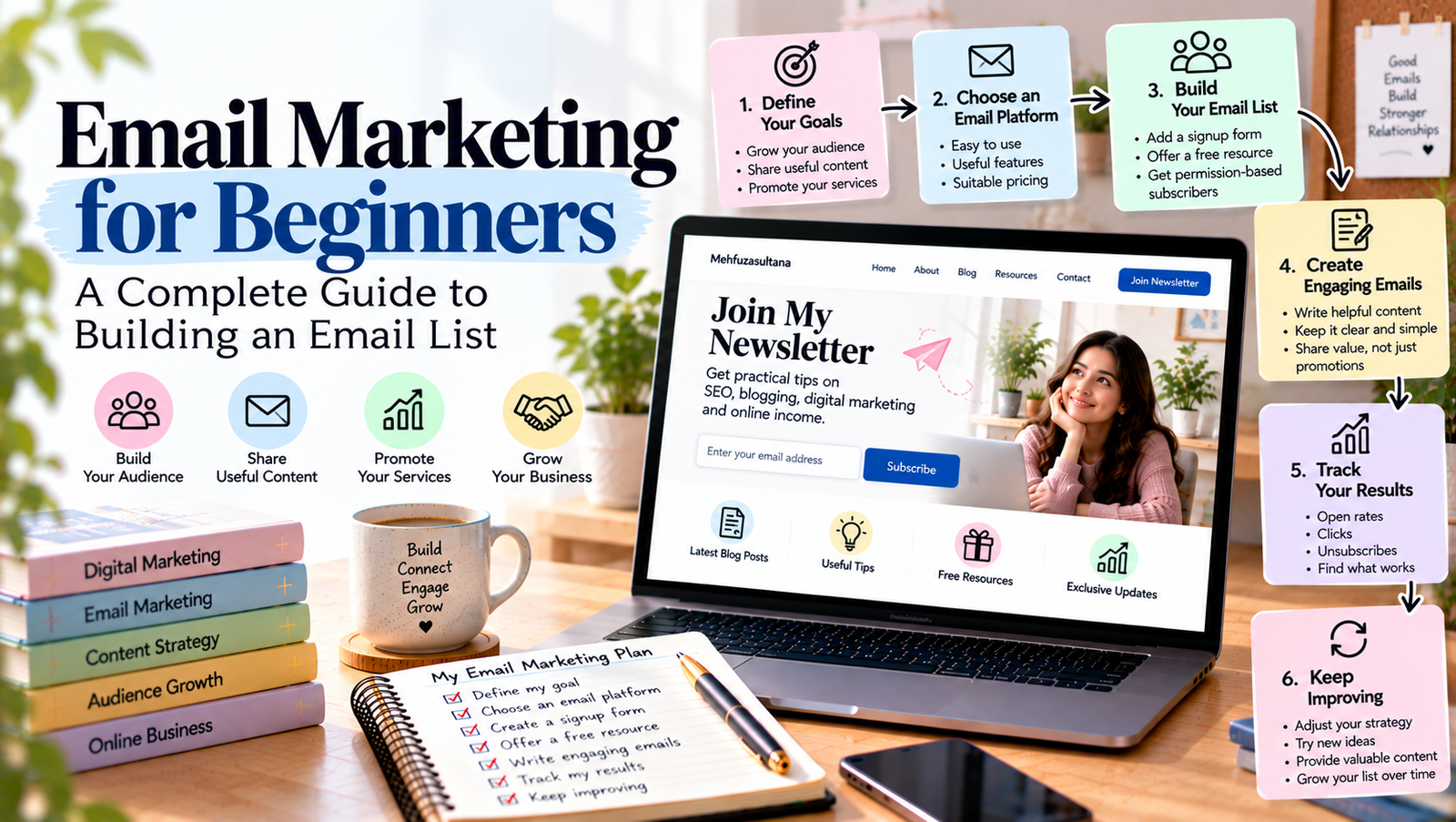
Email marketing can help you build stronger relationships with your audience, share useful information, and promote your products or services. However, if you are new to digital marketing, you may not know where to begin.
Email marketing for beginners does not need to be complicated. You can start with a simple email list, useful messages, and a clear plan. Over time, you can use email to connect with readers, nurture potential customers, and support your business goals.
In this guide, you will learn how email marketing works, how to build an email list, how to write effective emails, and how to measure your results. You will also discover common mistakes to avoid when starting your email marketing journey.
What Is Email Marketing?
Email marketing is a digital marketing method that uses email to communicate with people who have agreed to receive your messages.
Businesses, bloggers, freelancers, and creators use email to share updates, educate subscribers, announce new products, and build customer relationships.
For example, a blogger can send a weekly newsletter with helpful tips and links to new articles. A freelancer can share useful resources with subscribers who want to learn about their services. An online store can send product updates or order-related messages.
Unlike social media, where your posts compete for attention in a public feed, email gives you a direct communication channel with your subscribers. However, messages may still land in spam folders or go unread.
The goal is not to send as many emails as possible. Instead, focus on sending relevant information that people actually want to receive.
Why Is Email Marketing Important for Beginners?
Email marketing can support your online growth in several ways.
1. Build Direct Relationships With Your Audience
An email list gives you a way to communicate with people who have chosen to hear from you.
You can share practical advice, answer common questions, and provide useful updates. As a result, subscribers have more opportunities to become familiar with your work.
2. Bring Readers Back to Your Website
If you publish blog posts regularly, email can help you bring readers back to your website.
For example, you can send a newsletter that highlights a new article about SEO, blogging, or digital marketing. Interested subscribers can then visit your website to read the full post.
3. Promote Your Services or Products
Email can help freelancers and small businesses explain their services, share relevant examples, and introduce new offers.
However, promotional messages should not be the only emails you send. A useful balance of educational and promotional content can make your newsletter more valuable.
4. Measure Your Marketing Results
Most email marketing platforms provide reports about delivery, clicks, unsubscribes, and other useful metrics.
These insights can help you understand which topics interest your audience and where you may need to improve.
Step 1: Define Your Email Marketing Goals
Before choosing an email marketing platform, decide what you want to achieve.
A clear goal helps you choose the right type of emails and measure your progress.
For example, your goal might be to:
- Send new blog posts to subscribers.
- Build a community around your website.
- Share helpful tips with your audience.
- Generate enquiries for freelance services.
- Promote relevant products or digital resources.
- Encourage previous customers to return.
Choose one primary goal when you begin. You can add more goals as your email list grows.
For example, if your main goal is to grow your blog, start with a newsletter that shares useful content and links to your latest articles. This gives subscribers a clear reason to stay connected.
Step 2: Choose an Email Marketing Platform
An email marketing platform helps you collect subscribers, create emails, organize contacts, and review campaign performance.
Several platforms offer tools for beginners, although their features and pricing can change.
When comparing platforms, consider these factors:
- Ease of use.
- Signup form options.
- Email templates.
- Contact management.
- Automation features.
- Performance reports.
- Pricing as your list grows.
Choose a platform that meets your current needs rather than paying for advanced features you may not use.
Before signing up, check its current plan limits and rules for sending emails. Also, review how it handles subscriber consent, unsubscribes, and contact data.
Your first setup can remain simple. You need a way to collect permission-based subscribers, send useful emails, and monitor results.
Step 3: Build an Email List From Scratch
Your email list contains people who have agreed to receive your messages. Building this list takes time, but you can start with a few simple steps.
Add a Signup Form to Your Website
Place a clear signup form on your website. You might add it to your homepage, blog sidebar, or the end of relevant articles.
Explain what people will receive after subscribing.
For example:
“Join our newsletter for beginner-friendly SEO tips, blogging advice, and practical digital marketing strategies.”
A clear description helps visitors decide whether the newsletter matches their interests.
Offer a Useful Free Resource
A free resource, often called a lead magnet, gives people an extra reason to subscribe.
You could offer:
- A blog content calendar template.
- A beginner’s SEO checklist.
- A social media planning worksheet.
- A simple freelance proposal template.
- A short educational guide.
Choose a resource that solves a specific problem for your target audience. Make sure it delivers the value you promise.
Promote Your Newsletter on Relevant Channels
You can share your signup page through your blog, social media profiles, and professional network.
For example, a social media post could explain what your newsletter covers and invite interested readers to subscribe.
Do not buy email lists or add people without permission. These practices can damage trust, increase spam complaints, and violate applicable rules.
For more ideas, read our guide on how to build an email list from scratch.
Step 4: Write Emails That People Want to Read
Once people subscribe, focus on creating useful messages. A long email is not always better. Clear writing and relevant information matter more.
A basic marketing email usually contains four elements.
A Clear Subject Line
The subject line tells readers what the email is about.
For example:
- “5 Simple Ways to Improve Your Blog Posts”
- “Your Weekly SEO Checklist”
- “A Beginner’s Guide to Content Planning”
Keep subject lines relevant to the message. Avoid misleading claims or promises that the email does not fulfil.
A Friendly Opening
Start with a short introduction that explains why you are writing.
You can introduce a new article, discuss a common problem, or share a useful tip. Get to the main point quickly.
Useful Main Content
Give readers something they can learn, use, or explore.
For example, a newsletter for beginner bloggers might explain one simple SEO tip and link to a detailed guide on your website.
Use short paragraphs, clear language, and relevant links. If you have several topics to cover, organize them with headings or bullet points.
A Clear Call to Action
A call to action tells readers what they can do next.
Examples include:
- Read the full article.
- Download the checklist.
- Explore the service page.
- Reply with a question.
- View the latest resource.
Choose one main action for each email. This helps readers understand the next step without feeling overwhelmed.
Step 5: Create a Simple Email Marketing Plan
You do not need to send emails every day to get started. Choose a schedule that you can maintain consistently.
For example, a beginner blogger could follow this monthly plan:
| Week | Email idea | Main purpose |
|---|---|---|
| Week 1 | Share a useful beginner’s guide | Educate subscribers |
| Week 2 | Send practical tips or a checklist | Provide value |
| Week 3 | Share a new blog post | Bring readers to your website |
| Week 4 | Answer a common audience question | Build trust |
Treat this as a starting point, not a strict rule. Your ideal schedule depends on your audience, available time, and the value you can provide.
You can plan email topics alongside your blog content. This makes it easier to reuse useful ideas without copying entire articles into every message.
For more help with planning, explore our guide on creating a content strategy for your blog.
Step 6: Use Email Automation When You Are Ready
Email automation allows certain messages to be sent automatically when a subscriber takes an action or meets a condition.
For beginners, a simple welcome email is a useful place to start.
For example, when someone joins your newsletter, they could receive a welcome message that explains what to expect and links to a useful resource.
Other possible workflows include:
- A short educational email series.
- A follow-up after someone downloads a guide.
- A reminder for a permitted event or activity.
- A relevant sequence introducing your services.
Start with one simple workflow and test it carefully. Make sure the timing, links, and content work as intended.
Automation should make communication more useful, not overwhelm subscribers with unnecessary messages.
As your email strategy grows, you can explore our upcoming guide on email marketing automation for beginners.
Step 7: Measure Your Email Marketing Performance
Tracking results helps you understand whether your emails are meeting their goals.
Start with a few useful metrics.
Delivery rate: The percentage of sent emails that were successfully delivered. Check this alongside bounce reports.
Click-through rate: The percentage of delivered emails that generated clicks on links, based on your platform’s reporting method.
Conversion rate: The percentage of recipients or visitors who completed a desired action, such as submitting an enquiry or making a purchase. Define the measurement clearly before comparing results.
Unsubscribe rate: The percentage of subscribers who opt out of future emails.
Spam complaint rate: The rate at which recipients report your messages as spam.
Open rates can also appear in reports, but privacy features and automated email activity can make them less reliable. Do not use open rates alone to judge success.
Review the results over time. If readers rarely click a particular type of link, consider whether the topic, email structure, or call to action needs improvement.
Focus on useful outcomes rather than trying to improve every metric at once.
Common Email Marketing Mistakes to Avoid
Beginners often make a few mistakes that can weaken their email marketing efforts.
Sending Too Many Promotional Emails
If every email tries to sell something, subscribers may lose interest. Share helpful information alongside relevant promotions.
Ignoring Subscriber Permission
Only send marketing emails to people who have agreed to receive them. Follow the rules that apply to your audience and location.
Writing Vague Subject Lines
A subject line should help readers understand the message. Avoid unclear wording and misleading promises.
Ignoring Mobile Readers
Many people check email on their phones. Use readable text, short paragraphs, and links or buttons that are easy to tap.
Forgetting to Test Emails
Before sending a campaign, check the subject line, links, spelling, formatting, and mobile layout. Also, make sure the unsubscribe option works.
Failing to Review Results
Sending emails without checking performance makes it harder to learn what your audience values. Review your reports and improve your next campaign.
Conclusion
Email marketing for beginners becomes easier when you start with a clear goal and a simple plan.
Choose a suitable platform, build a permission-based email list, and send useful messages that match your audience’s interests. Then create a realistic schedule, introduce automation when needed, and review your results regularly.
You do not need a huge subscriber list to begin. Focus on attracting people who genuinely want your content and giving them a good reason to stay subscribed.
With consistent effort and thoughtful communication, email marketing can become a useful part of your broader digital marketing strategy.
Add a Comment