

Creating a successful blog takes more than writing a few articles. You need to find useful topics, research your audience, plan content, improve readability, and make every post easy to discover. These tasks can take hours, especially when you manage a blog on your own.
This is where AI tools for bloggers can help. They can support brainstorming, research, outlining, editing, and content planning. As a result, you can spend less time on repetitive tasks and more time creating useful content for your readers.
However, AI is not a replacement for your knowledge, experience, or judgment. The best results come when you combine AI assistance with human creativity and careful fact-checking.
In this guide, you will learn how AI tools work, which blogging tasks they can support, how to use them in your workflow, and what to avoid when creating content with AI.
What Are AI Tools for Bloggers?
AI tools for bloggers are software applications that use artificial intelligence to assist with content creation and website tasks.
Depending on the tool, you may be able to generate topic ideas, organize research, create article outlines, improve grammar, design images, or summarize information.
For example, a conversational AI assistant can help you brainstorm blog topics. A writing assistant can suggest clearer sentences. An image design tool can help you create a feature image for your article.
These tools serve different purposes. Therefore, you do not need to use every available tool. Start with the tasks that take the most time in your blogging routine.
Why Should Bloggers Use AI Tools?
AI can make parts of the blogging process easier, especially for beginners and solo creators.
1. Generate Blog Ideas Faster
Finding fresh topics can be difficult when you publish regularly. AI can suggest article ideas based on your niche, audience, and existing content.
For example, if your blog covers SEO, you could ask for beginner-friendly topics about keyword research, internal linking, or website traffic.
Next, review the suggestions and choose topics that match your readers’ needs. Check search demand and competition before committing to a topic.
2. Save Time on Content Planning
Planning helps you publish consistently without deciding what to write every day.
AI can organize ideas into topic groups, suggest a publishing calendar, and help you create outlines. It can also help identify related articles that belong in a content cluster.
For a practical planning process, read how to create a content strategy for your blog.
3. Improve Writing and Readability
Writing assistants can help you spot grammar mistakes, simplify complex sentences, and improve the flow of your article.
This is useful when you want your content to be easy for beginners to understand.
However, do not accept every suggested change. Review each edit to make sure it preserves your meaning, tone, and intended message.
4. Support Research and Organization
AI can help you create research questions, organize notes, and identify areas that need further investigation.
Still, AI-generated answers can contain mistakes or outdated information. Verify important facts using reliable sources before publishing.
For statistics, product details, legal requirements, health information, and current events, use trustworthy original sources whenever possible.
Best Types of AI Tools for Bloggers
You do not need a large collection of tools to run a blog. Choose tools based on your workflow and budget.
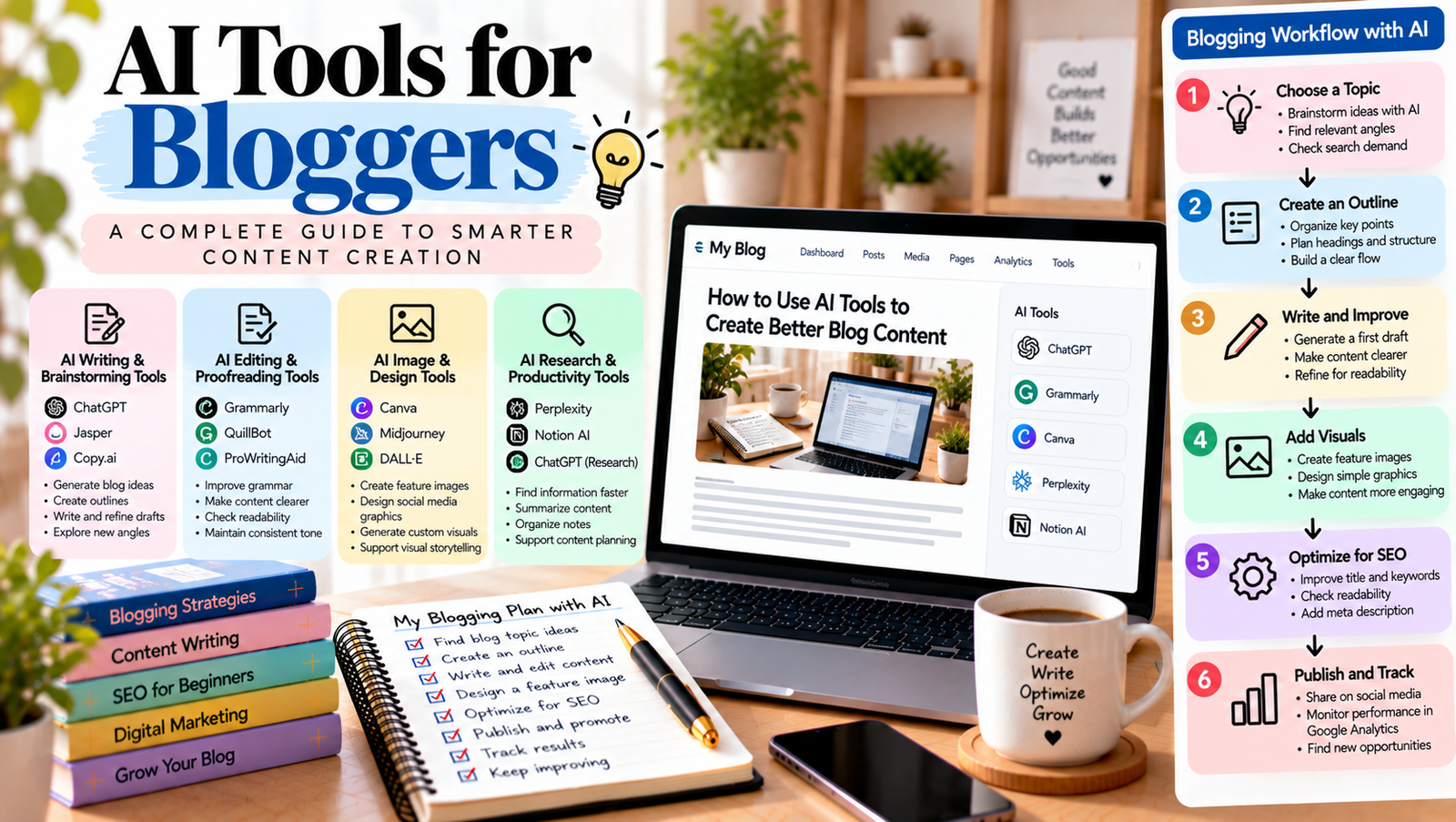
1. AI Writing and Brainstorming Tools
These tools help you generate ideas, create outlines, explore different angles, and refine drafts.
For example, ChatGPT can help you brainstorm article ideas, organize your thinking, and turn a rough topic into a structured outline.
Use it to create a first draft or explore alternatives, then add your own examples, experience, and insights.
2. AI Editing and Proofreading Tools
Writing assistants can identify grammar issues, suggest clearer wording, and help maintain a consistent tone.
Grammarly offers writing assistance that can help you review and refine your content.
Before using any suggestion, check whether it makes your writing clearer. A sentence does not need to sound formal or complicated to be effective.
3. AI Image and Design Tools
Visuals help readers understand content and make blog pages more appealing.
Design tools with AI features can assist with creating feature images, social media graphics, and visual layouts. For example, Canva offers design tools that can support your content workflow.
Choose visuals that match the article. Avoid images that are decorative but unrelated to the topic. Also, check the tool’s licensing terms before using generated or stock assets commercially.
4. AI Research and Productivity Tools
Some AI tools can summarize supplied documents, organize notes, or help you compare information from different sources.
These features can reduce manual work. However, a summary is not a substitute for checking the original source, especially when accuracy matters.
Before publishing, confirm important claims and add links to sources that support your article.
How to Use AI Tools in Your Blogging Workflow
You can use AI at different stages of content creation. A simple process helps you work efficiently without losing control of the final article.
Step 1: Choose a Topic for Your Audience
Start with your readers’ problems, questions, and goals. Use AI to explore possible topics, but do not choose an idea simply because it sounds interesting.
Ask yourself whether the topic fits your niche and offers something useful to your audience.
Step 2: Research Keywords and Search Intent
Once you select a topic, identify the main search term and related questions.
AI can help you brainstorm possible keywords and understand different search intents. However, validate your keyword choices with keyword research tools and search results.
For more guidance, read how to conduct keyword research for your blog.
Step 3: Create an Article Outline
Ask AI to organize your topic into a logical outline. Include an introduction, clear H2 headings, useful examples, and a conclusion.
Review the outline before drafting. Remove repetitive sections and add any important points that AI missed.
Your outline should answer the reader’s main question without adding unnecessary sections.
Step 4: Draft and Improve the Article
You can use AI to create a rough draft, explain difficult concepts, or improve individual paragraphs.
Then revise the content in your own voice. Add practical steps, original examples, relevant experience, and useful details that make the article more valuable.
Do not publish a draft without reviewing it. Check every important claim and remove generic statements that do not help the reader.
Step 5: Optimize the Article for SEO
AI can help you check whether your headings are clear, whether the article covers important subtopics, and whether the introduction answers the reader’s question.
You should still review the SEO title, URL slug, meta description, internal links, image alt text, and readability yourself.
For more guidance, explore SEO for beginners.
Remember that using AI does not automatically improve rankings. Helpful content, accuracy, originality, and a good reader experience remain essential.
Step 6: Fact-Check and Publish
Before publishing, verify names, dates, statistics, quotations, and technical instructions. Check external links and make sure your images are relevant.
Read the article from the reader’s perspective. Does it answer the question clearly? Does it offer practical value? Is anything repetitive or misleading?
Once the article passes these checks, publish it and review its performance over time.
How to Write Better Prompts for Blogging
The quality of AI output often depends on the instructions you provide.
A vague prompt such as “Write a blog about SEO” gives little direction. A specific prompt explains the audience, goal, tone, and expected result.
Try this example:
“Create a beginner-friendly outline for a blog post about internal linking. Use simple English, clear H2 headings, practical examples, and a logical order. Avoid repeated points and include questions a beginner may have.”
You can improve the result by adding your target audience, preferred article length, primary keyword, and content requirements.
However, treat the result as a starting point. Review it and add the information your audience needs.
Common Mistakes to Avoid When Using AI
AI can save time, but careless use can reduce the quality of your blog.
- Publishing without editing: Drafts may contain repeated ideas, vague explanations, or errors.
- Trusting every answer: AI tools can produce inaccurate or outdated information.
- Creating content only for search engines: Articles should solve readers’ problems, not simply repeat keywords.
- Ignoring your own voice: Readers should recognize your style, experience, and point of view.
- Using too many tools: Managing several overlapping tools can waste time and money.
- Ignoring copyright and privacy: Check image licences and avoid sharing confidential information with tools unless their terms and your permissions allow it.
Google’s guidance on generative AI content emphasizes accuracy, quality, and relevance. Using AI is not automatically a problem, but creating large amounts of low-value content to manipulate search rankings can violate Google’s spam policies.
Focus on making each article useful and original.
How to Choose the Right AI Tools for Your Blog
Before paying for a tool, consider what you actually need.
First, identify your biggest challenge. You may struggle with writing, research, visual design, or content planning.
Next, compare the tool’s features, pricing, usage limits, privacy terms, and ease of use. Test the free version if one is available.
Finally, keep only the tools that improve your workflow. A simple combination of an AI assistant, an editing tool, and a design tool may be enough for many beginners.
Review your process regularly. If a tool does not save time or improve quality, you may not need it.
AI tools for bloggers can make brainstorming, research, writing, editing, and content planning easier. They are especially useful when you need a starting point or want to reduce repetitive work.
The key is to use AI as an assistant, not as a replacement for your judgment. Choose relevant topics, verify information, add original insights, and edit every article before publishing.
Start with one or two tools that solve a real problem in your workflow. As you gain experience, build a process that helps you create useful, trustworthy content consistently.
Your goal is not to publish more articles at any cost. It is to help readers find clear answers and valuable information.
Add a Comment