

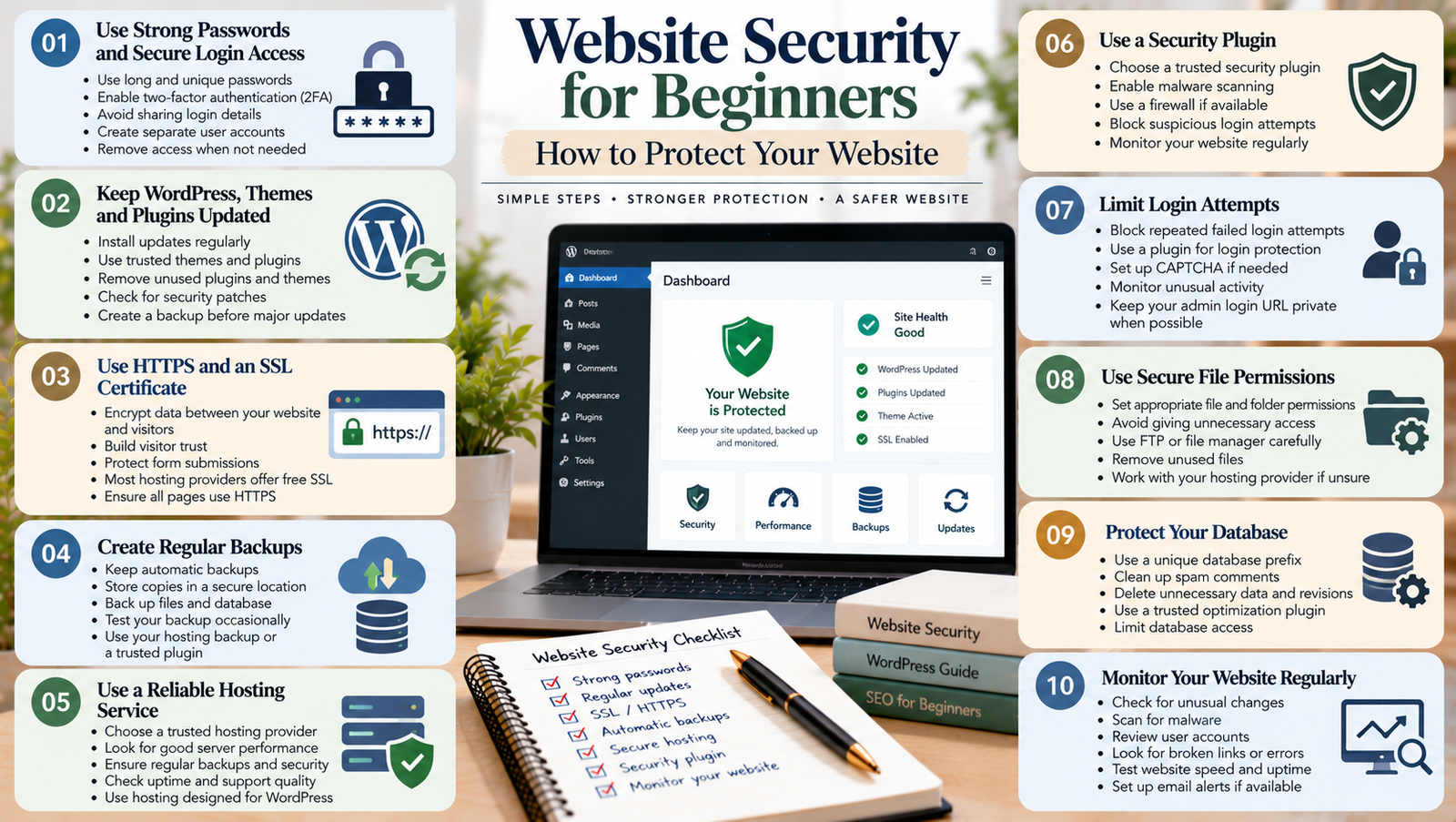
Your website is an important part of your online presence. Whether you run a blog, a business website, or a freelance portfolio, you want visitors to browse safely and trust your content. However, websites can face security risks such as stolen passwords, malicious files, outdated software, and unauthorized access.
The good news is that website security for beginners does not have to be complicated. You can reduce many common risks by using strong passwords, keeping your website updated, creating regular backups, and choosing reliable hosting.
In this guide, you will learn the basics of website security, common threats to watch for, and practical steps you can take to protect your website.
What Is Website Security?
Website security refers to the steps you take to protect your website, its files, user information, and administrative access from unauthorized activity.
These steps help prevent attacks, reduce the risk of data loss, and keep your website available to visitors.
For example, a secure website should use appropriate access controls, keep its software updated, and protect information sent between the website and its visitors.
Website security is especially important if you use WordPress, collect contact form submissions, manage customer information, or publish content regularly.
However, no website is completely risk-free. The goal is to reduce avoidable risks and prepare for problems before they happen.
Why Is Website Security Important?
Website security supports both your website and your visitors.
1. Protect Your Website Data
Regular backups and suitable access controls can help protect your work.
2. Build Visitor Trust
Visitors are more likely to feel comfortable when your website works correctly and handles their information responsibly.
For example, a website that uses HTTPS helps protect information exchanged between the visitor’s browser and the website.
3. Reduce Downtime
Malware, unauthorized changes, and other security problems can make a website unavailable.
Good security practices can reduce the likelihood of some incidents. They also help you recover more quickly if something goes wrong.
4. Support Your Website’s Long-Term Growth
A website may become more valuable as you publish articles, attract visitors, and build your brand.
Protecting that investment should be part of your regular website maintenance routine, alongside SEO for beginners and website performance improvements.
Common Website Security Threats
Before protecting your website, it helps to understand some common risks.
Weak Passwords
Simple passwords are easier to guess. Reusing the same password across several services can also put multiple accounts at risk if one account is compromised.
Outdated Software
Old versions of WordPress, themes, plugins, and server software may contain known security weaknesses.
Updates often include security fixes, so delaying them can leave your website exposed.
Malware
Malware is harmful software that may steal information, change website files, redirect visitors, or perform other unwanted actions.
It can enter a website through compromised accounts, vulnerable software, or unsafe files.
Unauthorized Login Attempts
Attackers may repeatedly try passwords or use stolen login details to access your website.
Strong passwords, multi-factor authentication, and suitable login protections can reduce this risk.
Missing Backups
If your website is damaged or compromised, a recent backup can help you restore important files and data.
Without a reliable backup, recovery may become more difficult.
1. Use Strong Passwords and Secure Login Access
One of the simplest ways to improve website security is to protect your login accounts.
Choose a long, unique password for your WordPress administrator account and hosting account. Avoid using your name, birthday, or other details that people could easily guess.
A password manager can help you create and store unique passwords.
You should also consider enabling multi-factor authentication (MFA). This adds another verification step when you sign in.
Follow these practices:
- Use unique passwords for important accounts.
- Enable MFA where available.
- Avoid sharing administrator login details.
- Create separate accounts for people who manage your website.
- Remove access when someone no longer needs it.
- Keep your recovery email account secure.
These steps help limit unauthorized access to your website.
2. Keep WordPress, Themes, and Plugins Updated
If you use WordPress, regular updates are an important part of website security for beginners.
Updates can fix known vulnerabilities, improve compatibility, and address software problems.
Check your WordPress dashboard regularly for available updates. Review updates for your theme and plugins as well.
Before making major changes, create a backup. If your website is important to your business, consider testing updates on a staging site first.
Also, remove themes and plugins that you no longer use. Unused software can create unnecessary maintenance work and may introduce additional risks if it becomes outdated.
Do not install plugins from unknown or untrusted sources. Choose software with a reliable development history and appropriate maintenance.
3. Use HTTPS and an SSL/TLS Certificate
HTTPS helps protect data exchanged between a visitor’s browser and your website.
This protection relies on TLS, which is commonly associated with SSL certificates. Although people often use the term SSL certificate, modern websites generally use TLS for secure connections.
A website using HTTPS displays a secure connection in the browser.
To set it up:
- Check whether your hosting provider offers an SSL/TLS certificate.
- Install or activate the certificate through your hosting service.
- Confirm that your website loads using HTTPS.
- Update website settings and links where necessary.
- Check for mixed-content warnings caused by resources still loading over HTTP.
Many hosting providers offer certificates at no additional cost.
Remember that HTTPS protects data in transit, but it does not automatically protect your website from malware, weak passwords, or other security problems.
4. Choose Reliable Website Hosting
Your hosting provider plays an important role in website security.
A reliable provider may offer server maintenance, security monitoring, malware detection, backups, and technical support. The exact features depend on the hosting plan.
When comparing hosting services, look for:
- Regular server maintenance.
- Clear backup and recovery options.
- Security monitoring or related tools.
- Timely software updates.
- Reliable technical support.
- Protection against common network attacks.
Ask your provider which security features are included. This can help you avoid paying for tools that your hosting plan already provides.
If your website handles sensitive customer information, review your security requirements carefully and seek professional advice when necessary.
5. Create Regular Website Backups
Backups are copies of your website files and database that you can use to restore your website after a problem.
They are useful if an update breaks your site, important content disappears, or a security incident damages your files.
A suitable backup plan should include:
- Website files, including themes and uploads.
- Your WordPress database.
- A regular backup schedule.
- Copies stored separately from the live website.
- A way to restore the backup.
- Periodic restoration tests.
How often you back up your website depends on how frequently it changes. A blog that publishes every day may need more frequent backups than a static portfolio.
Do not assume a backup works simply because a tool says it completed successfully. Test the restoration process periodically.
6. Install a Suitable Security Plugin
A WordPress security plugin can help with tasks such as monitoring suspicious activity, scanning for malware, or applying certain login protections.
However, a plugin is only one part of your security setup.
Before installing one, check its features, maintenance history, compatibility, and resource requirements.
Avoid installing several security plugins that perform the same functions. They may conflict or make your setup harder to manage.
Also, review the security features already provided by your hosting service. You may not need a separate tool for every task.
7. Limit User Permissions
Not everyone who works on your website needs full administrator access.
WordPress provides different user roles with different permissions. Assign each person the lowest level of access needed to complete their work.
For example, someone who only writes blog posts may not need permission to install plugins or change website settings.
Review your user accounts regularly and remove accounts that are no longer required.
If you work with freelancers or agencies, avoid sharing one administrator account. Individual accounts make it easier to manage access and identify activity.
8. Protect Contact Forms and Visitor Information
If your website includes contact forms, newsletter signups, or customer inquiries, think carefully about how you collect and store personal information.
Collect only the information you need. Restrict access to submissions and keep your form plugins updated.
You should also:
- Use HTTPS.
- Choose reputable form tools.
- Apply suitable spam protection.
- Avoid exposing private information in public pages.
- Publish a clear privacy policy when appropriate.
- Follow the privacy rules that apply to your audience and business.
Security and privacy are related, but they are not the same. A secure connection does not automatically make every data collection practice appropriate.
9. Monitor Your Website for Problems
Regular monitoring can help you notice unusual activity before a small issue becomes a larger problem.
Check your website for unexpected changes, unfamiliar administrator accounts, suspicious redirects, and security warnings.
You can also review security alerts from your hosting provider or security tools.
If your website suddenly displays unfamiliar content or redirects visitors to unrelated pages, investigate promptly.
If you suspect a compromise, contact your hosting provider or a qualified security professional. Avoid making random changes that could destroy useful evidence or complicate recovery.
10. Create a Simple Website Security Routine
You do not need to check every setting every day. A regular maintenance routine can make website security easier to manage.
Weekly:
- Review important security alerts.
- Check that your website works correctly.
- Confirm that expected backups are running.
Monthly:
- Review WordPress, theme, and plugin updates.
- Remove unused software and unnecessary accounts.
- Check your website’s security settings.
Periodically:
- Test backup restoration.
- Review hosting security features.
- Check account permissions.
- Review your recovery plan.
Adjust this routine based on your website’s size, activity, and risk level.
Common Website Security Mistakes to Avoid
Avoid these common mistakes when protecting your website.
Using weak passwords: Choose unique passwords and enable MFA where possible.
Ignoring updates: Review and apply appropriate security updates promptly.
Relying only on a security plugin: Use multiple layers of protection instead of depending on one tool.
Skipping backups: Maintain separate backups and test restoration.
Giving everyone administrator access: Assign permissions according to each person’s responsibilities.
Ignoring security warnings: Investigate unexpected changes or alerts rather than dismissing them.
Assuming HTTPS makes everything safe: HTTPS protects data in transit but does not remove every website security risk.
Conclusion
Website security for beginners starts with a few practical habits. Use strong passwords, enable multi-factor authentication, keep your software updated, use HTTPS, and create regular backups.
If you use WordPress, review your plugins, user permissions, hosting features, and security settings regularly. Also, prepare a recovery plan so you know what to do if your website experiences a problem.
You do not need to implement every advanced security measure at once. Start with the basics, check your setup regularly, and improve your protection as your website grows.
A secure website helps protect your work, supports visitor trust, and gives you a stronger foundation for long-term growth.
Add a Comment