

Your website may have a great design, but visitors will not stay if the content does not answer their questions. Similarly, search engines need clear and useful information to understand your pages.
This is why website content optimization matters.
It helps you improve your website content so visitors can find useful information, understand your message, and take the next step. It also helps search engines understand what each page is about.
Whether you run a blog, business website, or personal portfolio, optimizing your content can improve your online presence.
In this beginner-friendly guide, you will learn what website content optimization means, why it matters, and how to improve your website content step by step.
What Is Website Content Optimization?
Website content optimization is the process of improving the text, images, headings, links, and other content on your website.
The goal is to make your pages useful for both visitors and search engines.
For example, imagine you have a blog about digital marketing. You publish an article about social media marketing. However, the article has unclear headings, missing keywords, long paragraphs, and no helpful links.
You can improve it by:
- Adding a clear introduction.
- Organizing information with useful headings.
- Including relevant keywords naturally.
- Adding helpful examples.
- Linking to related articles.
- Using suitable images with descriptive alt text.
- Making the content easy to read.
These changes help visitors understand your content and make your pages more useful.
Why Is Website Content Optimization Important?
Publishing content is only the first step. You also need to make sure that people can find and understand it.
Here are some important reasons to optimize your website content.
1. Helps Improve Search Visibility
Search engines use different signals to understand website pages.
Clear headings, relevant information, descriptive titles, and useful internal links help search engines understand your content.
However, adding keywords alone does not guarantee better rankings. Your content should also answer the searcher’s needs.
2. Improves User Experience
Visitors usually want quick and clear answers.
If your content is difficult to read, they may leave without exploring other pages.
Short paragraphs, simple language, and clear headings make your website easier to use.
3. Helps Visitors Find Relevant Information
Internal links connect related pages on your website.
For example, an article about SEO can link to your guides on keyword research, on-page SEO, and internal linking.
As a result, visitors can explore more useful information without searching for every topic separately.
4. Builds Trust and Credibility
Helpful content can make your website more trustworthy.
You can build credibility by sharing accurate information, explaining concepts clearly, providing useful examples, and linking to reliable sources.
Avoid making claims that you cannot support.
5. Supports Business and Marketing Goals
Your website content should guide visitors towards useful actions.
Depending on your goals, these actions may include:
- Reading another blog post.
- Subscribing to a newsletter.
- Downloading a free resource.
- Exploring your services.
- Contacting your business.
- Purchasing a product.
Clear content and relevant calls to action help visitors understand what to do next.
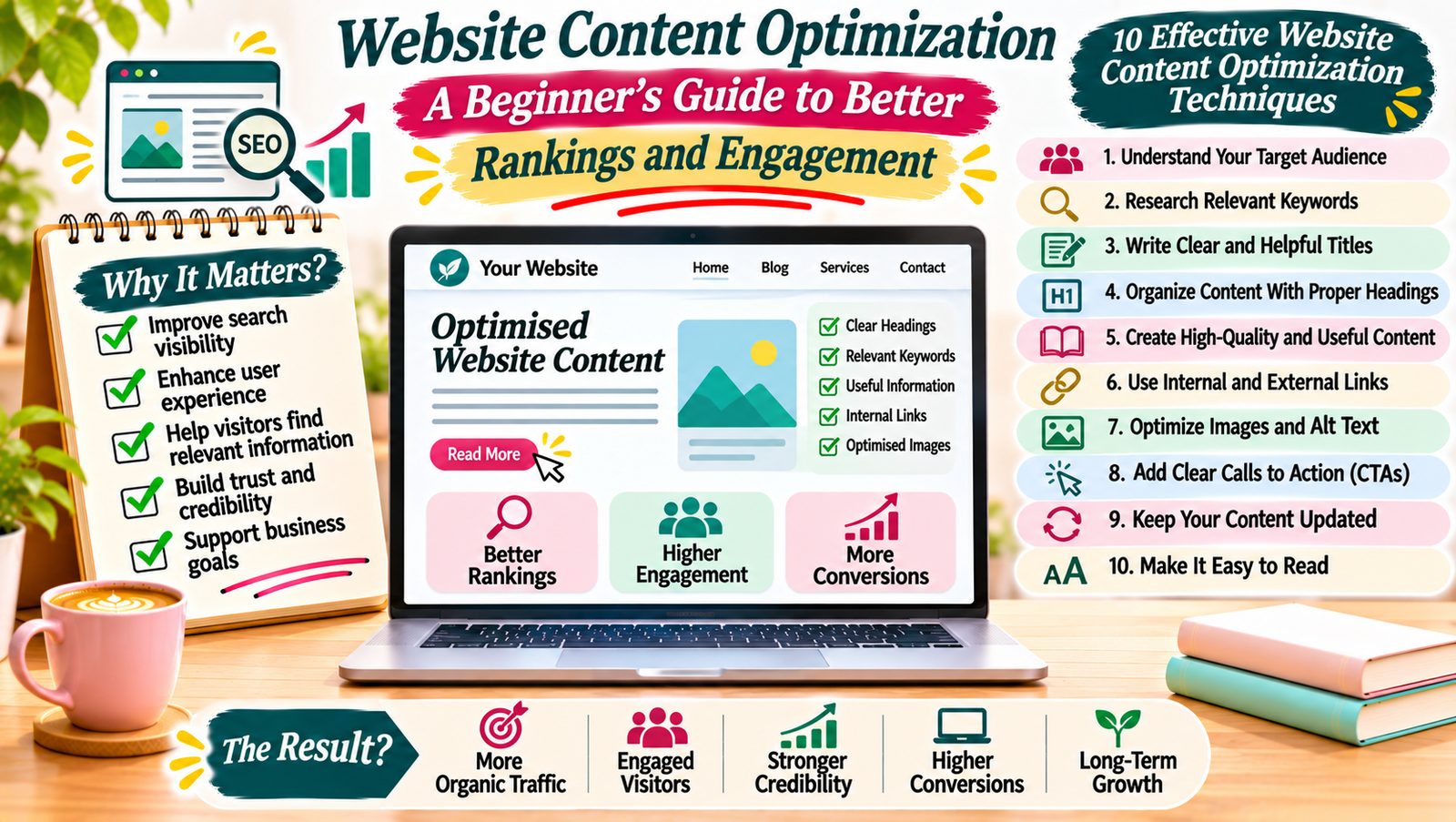
10 Effective Website Content Optimization Techniques
You do not need advanced technical skills to start improving your website. Follow these practical techniques.
1. Understand Your Target Audience
Before writing or updating content, understand who you want to reach.
Think about your audience’s interests, questions, and problems.
For example, a beginner visiting a digital marketing website may want to learn:
- How to start a blog.
- How to find keywords.
- How to improve website traffic.
- How to use social media.
- How to earn money through freelancing.
Create content that answers these questions.
When you understand your audience, it becomes easier to choose useful topics and explain them in the right way.
2. Research Relevant Keywords
Keyword research helps you understand what people search for online.
Choose a primary keyword for each important page. Then, identify related terms that support the main topic.
For example, if your primary keyword is “website content optimization”, related keywords may include:
- Content optimization techniques.
- Website SEO content.
- Improve website content.
- SEO content strategy.
- Content improvement tips.
Use keywords naturally in your title, introduction, headings, and body text.
Do not repeat the same keyword unnecessarily. Focus on explaining the topic clearly.
3. Write Clear and Helpful Titles
Your page title gives visitors an idea of what they will find.
A good title should be clear, relevant, and easy to understand.
For example:
Instead of writing:
“Some Important Things About Website Content”
Try:
“Website Content Optimization: 10 Practical Ways to Improve Your Pages”
The second title explains the topic and gives readers a clear reason to visit.
Keep your SEO title concise and include your primary keyphrase naturally.
4. Organize Content With Proper Headings
Headings make your content easier to scan.
They also help readers understand how different sections connect.
Use one main H1 heading for the article title. Then, use H2 headings for major sections and H3 headings for smaller topics within those sections.
For example:
- H1: Website Content Optimization
- H2: Why Content Optimization Matters
- H2: Effective Optimization Techniques
- H3: Understand Your Audience
- H3: Research Relevant Keywords
Avoid using headings only to make text look bigger. Each heading should introduce the information that follows.
5. Improve Content Readability
Readers should understand your content without struggling through long sentences or complicated words.
Follow these simple practices:
- Use short and clear sentences.
- Keep paragraphs focused on one idea.
- Explain technical terms in simple language.
- Use bullet points when listing information.
- Add examples to explain difficult topics.
- Use transition words naturally.
For example, instead of writing a long paragraph about keyword research, divide the explanation into smaller sections.
Tools such as Yoast SEO can help you review sentence length, passive voice, paragraph length, and transition words.
However, readability tools should support your writing, not control every sentence.
6. Add Relevant Internal Links
Internal links connect one page of your website to another.
They help visitors discover related content and make your website easier to navigate.
For example, in an article about website content optimization, you can link to:
- Your guide to SEO for beginners.
- Your article about keyword research.
- Your guide to internal linking.
- Your article about content writing.
Use descriptive anchor text so readers understand what they will find after clicking.
Avoid adding unrelated links just to increase the number of links on a page.
7. Include Reliable External Links
External links connect your content to useful resources on other websites.
For example, if you explain how Google Search works, you can link to official Google documentation.
Useful sources may include:
- Google Search Central.
- Google Analytics documentation.
- WordPress documentation.
- Official tool guides.
Choose trustworthy and relevant sources. External links should help readers learn more about the topic.
8. Optimize Images and Other Media
Images can make your website content more interesting and easier to understand.
However, large or poorly described images can create problems.
Follow these practices:
- Use relevant images.
- Compress images before uploading.
- Choose suitable image dimensions.
- Use descriptive file names.
- Add meaningful alt text.
- Avoid using unnecessary decorative images.
Alt text describes an image for visitors who use screen readers. It also helps search engines understand the image.
For example:
Image file name: website-content-optimization.jpg
Alt text: “Website content optimization checklist displayed on a laptop.”
Use your primary keyphrase in alt text only when it naturally describes the image.
9. Add Clear Calls to Action
A call to action tells visitors what they can do next.
Without a clear next step, visitors may finish reading and leave your website.
Examples include:
- Read our beginner’s SEO guide.
- Subscribe to our newsletter.
- Explore more blogging tips.
- Download the free content planning checklist.
- Contact us to learn more.
Choose a call to action that matches the purpose of the page.
For example, an educational blog post can encourage readers to explore a related guide instead of pushing an unrelated product.
10. Update Old Website Content
Website content can become outdated over time.
Information, tools, examples, and recommendations may change. Therefore, review your existing pages regularly.
During a content update, check:
- Whether the information is still accurate.
- Whether links are working.
- Whether examples need updating.
- Whether the introduction is still relevant.
- Whether headings are clear.
- Whether images need replacement.
- Whether the page answers the current search intent.
You do not need to rewrite every old article. Make changes where they improve accuracy, usefulness, or clarity.
How to Optimize Website Content Step by Step
If you are new to content optimization, follow this simple workflow.
| Step | What to Do | Main Goal |
|---|---|---|
| 1 | Identify your target audience | Understand reader needs |
| 2 | Choose a primary keyword | Define the page topic |
| 3 | Review search intent | Match the reader’s purpose |
| 4 | Create a clear content structure | Organize information |
| 5 | Write useful and original content | Answer reader questions |
| 6 | Add relevant links and images | Improve navigation and context |
| 7 | Review readability | Make content easy to understand |
| 8 | Publish and monitor performance | Find opportunities to improve |
Start with one important page. Once you understand the process, apply it to other pages on your website.
Common Website Content Optimization Mistakes to Avoid
Even useful content can become less effective when it is poorly optimized.
Watch out for these common mistakes.
Keyword Stuffing
Repeating the same keyword too many times makes content unnatural.
Instead, use related terms where they fit and focus on answering the reader’s question.
Writing Only for Search Engines
Your content should help people first.
Do not sacrifice clarity just to include more keywords or headings.
Using Duplicate Content
Publishing the same information across multiple pages can confuse visitors and make it harder to understand the purpose of each page.
Create distinct content for each page and give it a clear focus.
Ignoring Mobile Readers
Many visitors use smartphones to browse websites.
Check that your text, images, buttons, and layouts work well on smaller screens.
Forgetting to Update Old Pages
Outdated information can reduce the usefulness of your website.
Review important pages and update them when necessary.
Useful Tools for Website Content Optimization
You can use several tools to plan, write, and improve your website content.
| Tool | How It Helps |
|---|---|
| Google Search Console | Monitor search performance and indexing |
| Google Analytics | Understand website traffic and user behaviour |
| Google Keyword Planner | Research keyword ideas |
| Yoast SEO | Review basic SEO and readability elements |
| Grammarly | Check grammar and writing clarity |
| Canva | Create blog graphics and visual content |
| PageSpeed Insights | Review page performance |
You do not need to use every tool at once. Start with Google Search Console and Yoast SEO if you run a WordPress blog.
How to Measure Website Content Performance
After publishing optimized content, review how it performs.
Do not judge success only by keyword rankings. Look at several useful indicators.
Organic Search Clicks
Google Search Console shows how many clicks your pages receive from Google Search.
This helps you understand whether people are visiting your pages through search results.
Impressions
Impressions show how often your pages appear in search results.
A page may receive many impressions but fewer clicks. In that case, review the page title and meta description to see whether they clearly explain the content.
Click-Through Rate
Click-through rate, or CTR, measures the percentage of impressions that result in clicks.
A clear title and relevant description can help users understand why your page is useful.
Engagement and User Behaviour
Use Google Analytics to understand how visitors interact with your website.
Review relevant engagement metrics, such as engaged sessions and interactions with important links or buttons.
Conversions
If your website has a specific goal, track actions such as newsletter sign-ups, contact form submissions, or purchases.
These results help you understand whether your content supports your business goals.
Website content optimization is an ongoing process. It does not end when you publish a blog post or create a new page.
Start by understanding your audience and choosing relevant keywords. Then, organize your content with clear headings, useful links, descriptive images, and simple language.
Most importantly, focus on providing genuine value to visitors.
You do not need to optimize every page in one day. Improve one page at a time, review its performance, and make changes when needed.
With consistent effort, website content optimization can help you create a more useful website and build a stronger online presence.
Add a Comment