

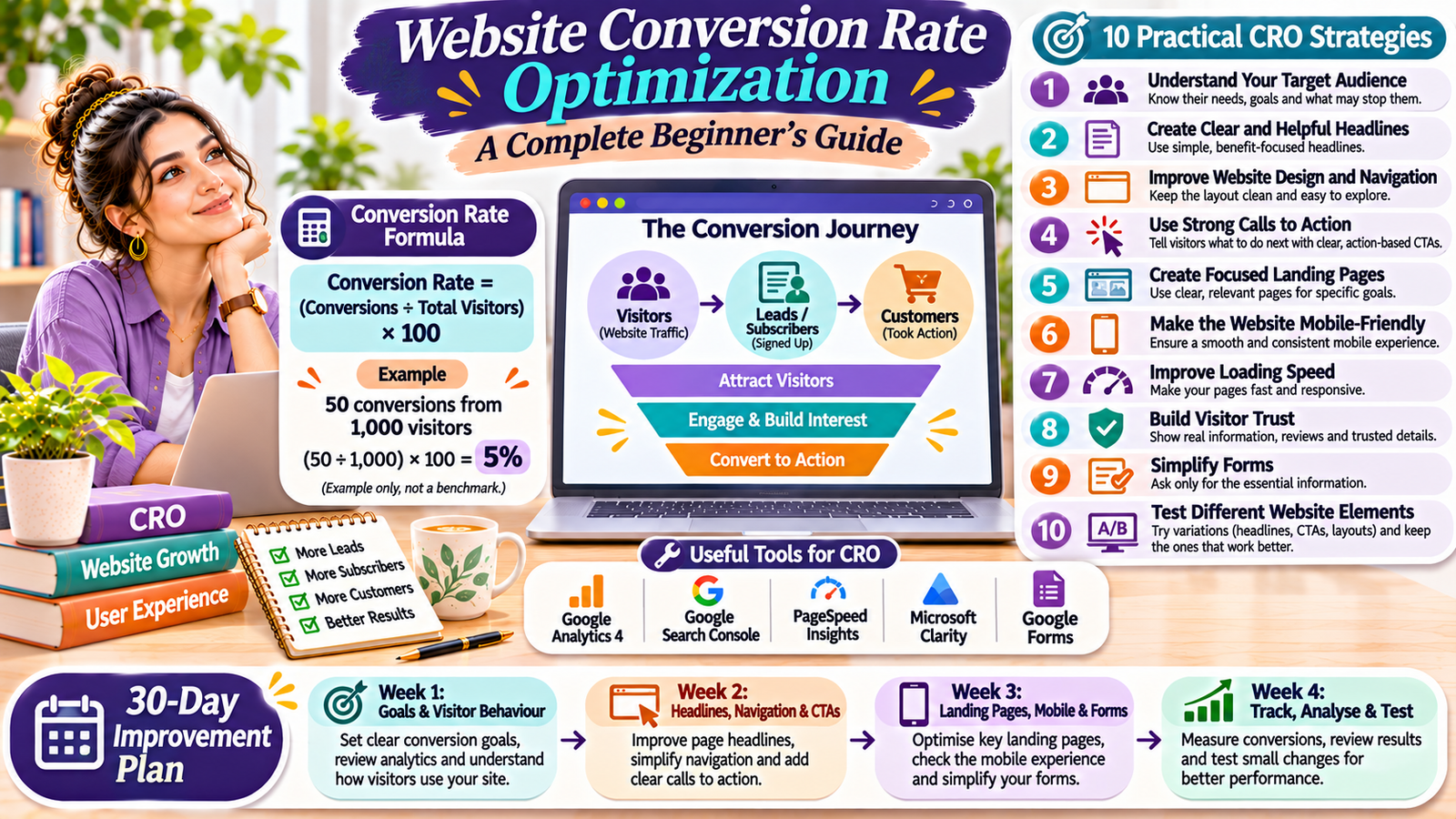
Getting visitors to your website is important. However, website traffic alone does not guarantee business growth. You also need visitors to take meaningful actions.
For example, someone may visit your website, read your content, and leave without subscribing, contacting you, or purchasing anything. This means you have attracted a visitor, but you have not achieved your desired result.
This is where website conversion rate optimization becomes important.
Conversion rate optimization helps you improve your website so more visitors complete useful actions. These actions may include filling out a contact form, subscribing to a newsletter, downloading a resource, or purchasing a product.
You do not always need more website traffic to improve results. Sometimes, small changes to your website design, content, navigation, and calls to action can make a difference.
In this beginner-friendly guide, you will learn what conversion rate optimization means, why it matters, and how to improve your website step by step.
What Is Website Conversion Rate Optimization?
Website conversion rate optimization, also known as CRO, is the process of improving a website to increase the percentage of visitors who complete a desired action.
A conversion happens when a visitor takes an action that supports your website’s goal.
For example:
- A visitor subscribes to your newsletter.
- Someone fills out your contact form.
- A customer purchases a product.
- A reader downloads a free guide.
- A potential client requests a service quotation.
The desired action depends on your website’s purpose.
A blog may focus on newsletter subscriptions. An online store may focus on purchases. A service website may focus on enquiries and consultation requests.
The main goal is to make it easier for visitors to take the next step.
How to Calculate Your Website Conversion Rate
You can calculate your conversion rate using a simple formula.
Conversion Rate = (Number of Conversions ÷ Total Visitors) × 100
For example, imagine your website receives 1,000 visitors in one month. Out of these visitors, 50 people complete your desired action.
Your conversion rate would be:
(50 ÷ 1,000) × 100 = 5%
<text color=”secondary” size=”xs”>Example calculation, not an industry benchmark.</text>
This calculation helps you understand how effectively your website turns visitors into leads, subscribers, or customers.
However, make sure you compare the same type of data. For example, do not compare conversions with sessions in one report and unique visitors in another without understanding the difference.
Why Is Conversion Rate Optimization Important?
Website conversion rate optimization can help you make better use of your existing website traffic.
Here are some important benefits.
1. Makes Better Use of Website Traffic
Attracting visitors takes time and effort. CRO helps you improve the experience so more visitors have an opportunity to complete your desired actions.
2. Improves User Experience
A clear website layout, useful content, and simple navigation help visitors find information without confusion.
3. Helps Generate More Leads
If you run a service business, a clear contact form and strong call to action can encourage interested visitors to contact you.
4. Supports Business Growth
More relevant enquiries, subscriptions, or purchases can support your business goals.
5. Helps You Understand Visitor Behaviour
Analytics and testing can show which pages work well and where visitors experience difficulties.
10 Practical Website Conversion Rate Optimization Strategies
You do not need to redesign your entire website to begin improving conversions. Start with these practical strategies.
1. Understand Your Target Audience
Before changing your website, understand who visits it and what they need.
Ask yourself:
- Who is my ideal visitor?
- What problem are they trying to solve?
- What information do they expect?
- What action do I want them to take?
- What might stop them from taking that action?
For example, visitors to a digital marketing website may want beginner-friendly SEO guides, practical tips, or help with online growth.
If your content does not match their needs, they may leave without exploring further.
Use customer feedback, website analytics, and frequently asked questions to understand your audience.
2. Create Clear and Helpful Headlines
Your headline is one of the first things visitors notice.
It should explain what your page offers and why someone should continue reading.
Avoid confusing or overly general headlines.
For example:
- Unclear: Welcome to Our Website.
- Clear: Practical Digital Marketing Solutions for Small Businesses.
A useful headline tells visitors what they can expect.
You can also add a short supporting sentence that explains the main benefit of your product, service, or content.
3. Improve Your Website Design and Navigation
Visitors should be able to find important information easily.
A confusing layout can make people leave before they discover what you offer.
Improve your website navigation by:
- Keeping the menu simple.
- Using clear page names.
- Making important buttons easy to find.
- Avoiding unnecessary pop-ups.
- Using readable fonts.
- Maintaining consistent design across pages.
For example, a business website may include Home, About, Services, Blog, and Contact pages.
Keep the design clean and focus on helping visitors find the information they need.
4. Use Strong Calls to Action
A call to action, or CTA, tells visitors what to do next.
Examples include:
- Subscribe to Our Newsletter.
- Download the Free Guide.
- Contact Our Team.
- Explore Our Services.
- Read the Complete Guide.
Place your CTA where it makes sense within the page.
For example, a blog article about content marketing can include a newsletter subscription invitation near the end.
Use clear wording that explains the next step. Avoid vague phrases that do not tell visitors what will happen after they click.
You can learn more in our supporting article on How to Write Effective Calls to Action (CTA) for Your Website.
5. Create Landing Pages for Specific Goals
A landing page is a page designed around a particular marketing goal.
For example, you may create a landing page to collect newsletter subscribers, promote a free guide, or generate service enquiries.
A useful landing page usually includes:
- A clear headline.
- A short explanation of the offer.
- Relevant benefits.
- A suitable image or visual.
- A clear call to action.
- A simple form, if required.
Avoid adding too many unrelated links or distractions.
The page should help visitors understand the offer and decide whether they want to take the next step.
Read our guide on How to Create a Landing Page That Converts Visitors into Leads.
6. Make Your Website Mobile-Friendly
Many visitors access websites through smartphones.
If your website does not work well on mobile devices, visitors may struggle to read content, click buttons, or complete forms.
Check these important elements:
- Is the text easy to read?
- Do images fit the screen?
- Are buttons large enough to tap?
- Does the menu work properly?
- Are forms easy to complete?
- Does the page load smoothly?
If you use WordPress and Elementor, review your pages using the mobile responsive settings.
Test important pages on an actual smartphone as well.
7. Improve Website Loading Speed
Slow pages can interrupt the browsing experience.
Visitors may leave if a page takes too long to load or important elements do not appear correctly.
Try these improvements:
- Compress large images.
- Use modern image formats where suitable.
- Remove unnecessary plugins.
- Choose reliable hosting.
- Use appropriate caching.
- Reduce unnecessary scripts and animations.
You can check your website with Google PageSpeed Insights.
Remember that website speed is only one part of the user experience. Your content, navigation, and page layout also matter.
8. Build Trust With Your Visitors
People are more likely to take action when they understand who you are and what they can expect.
Your website should provide clear and accurate information.
You can build trust by including:
- A detailed About page.
- Accurate business contact details.
- Clear service descriptions.
- Transparent pricing, where applicable.
- Genuine customer reviews, with permission.
- Relevant examples of your work.
- A privacy policy and suitable terms.
Never publish fake testimonials, misleading claims, or unsupported results.
If visitors cannot understand who operates your website or how to contact you, they may hesitate to share their information.
9. Make Forms Simple and Easy to Complete
Long forms can discourage visitors from submitting their information.
Only request details that you genuinely need.
For example, a basic contact form may ask for:
- Name.
- Email address.
- Message.
You can request additional information when it is necessary for your service.
Also, use clear field labels and helpful error messages. Make sure visitors know when their form submission is successful.
If you collect personal information, explain how you use it through an appropriate privacy notice.
10. Test Different Website Elements
You should not assume that every website change will improve conversions.
Testing helps you compare different versions and understand what works better.
You can test:
- Headlines.
- Button wording.
- Button placement.
- Images.
- Page layouts.
- Form length.
- Supporting text.
For example, you could compare two CTA button labels: “Contact Us” and “Request a Consultation”.
Measure the results using the same conversion goal and a consistent method.
Avoid changing many elements at once. Otherwise, it becomes difficult to understand which change affected the results.
Best Free Tools for Website Conversion Rate Optimization
You can begin analysing your website without purchasing expensive tools.
| Tool | How It Helps |
|---|---|
| Google Analytics 4 | Tracks website activity and conversions |
| Google Search Console | Monitors search performance |
| Google PageSpeed Insights | Checks website speed and performance |
| Microsoft Clarity | Provides session recordings and heatmaps |
| Google Forms | Helps create simple forms and surveys |
Some tools offer additional paid features. Start with the free features that match your requirements.
Common Conversion Rate Optimization Mistakes to Avoid
1. Focusing Only on Website Traffic
More visitors do not automatically mean more customers or leads.
Pay attention to whether visitors complete your desired actions.
2. Using Too Many Pop-Ups
Frequent pop-ups can interrupt visitors and make your website difficult to use.
Use them carefully and avoid blocking important content.
3. Creating Confusing Calls to Action
Visitors should understand what happens when they click a button.
Use direct and meaningful wording.
4. Ignoring Mobile Users
A website that works on a computer may not work equally well on a smartphone.
Always check your mobile layout and forms.
5. Making Changes Without Checking Results
Do not assume that a new design or button will improve performance.
Track results and test changes before deciding what to keep.
A Simple 30-Day Website Conversion Improvement Plan
If you are new to CRO, use this simple plan to organise your work.
| Week | Tasks |
|---|---|
| Week 1 | Identify your website goals and review visitor behaviour |
| Week 2 | Improve headlines, navigation, and calls to action |
| Week 3 | Review landing pages, mobile design, and contact forms |
| Week 4 | Track conversions, test improvements, and review results |
Start with one important page rather than changing your entire website at once.
This makes it easier to understand the effect of each improvement.
Website conversion rate optimization helps you turn more of your existing visitors into leads, subscribers, and customers.
You can begin with simple improvements. Understand your audience, write clear headlines, improve navigation, use helpful calls to action, and make your website mobile-friendly.
Also, track visitor behaviour and test changes instead of relying on assumptions.
Remember, every website has different goals and audiences. What works for one website may not work for another.
Start with one important page, identify a problem, and make one useful improvement. Over time, these small steps can help create a better website experience and support your online growth.
Add a Comment