

A website should do more than look attractive. It should help visitors find information, understand your content, and complete their goals without difficulty.
Imagine visiting a website that takes too long to load, has confusing menus, and displays text that is difficult to read on a mobile phone. You may leave without exploring another page.
This is why website user experience matters. A good experience helps visitors navigate your website, find useful information, and interact with your content.
It also supports your SEO efforts. Search engines aim to provide useful results, so creating helpful and accessible pages is an important part of building a successful website.
In this guide, you will learn how to improve website user experience through simple design, navigation, content, speed, and accessibility improvements.
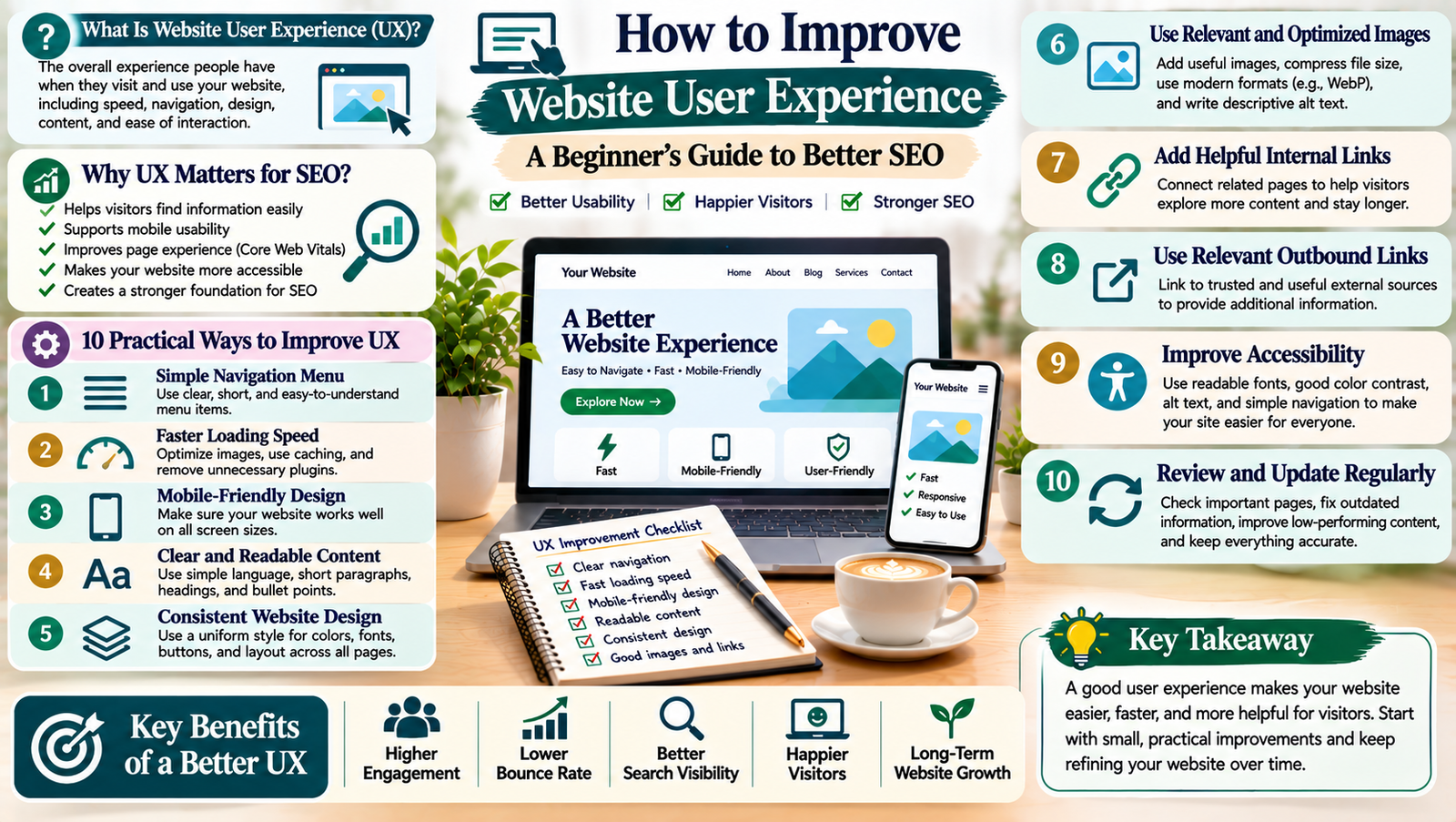
What Is Website User Experience?
Website user experience, also called UX, refers to how people feel when they visit and use your website.
It includes every part of their interaction, such as:
- How quickly pages load.
- How easily visitors find information.
- Whether the website works on mobile devices.
- How clearly content is presented.
- Whether buttons and links work properly.
- How easily visitors complete an action.
For example, a well-designed blog should make it easy for readers to open an article, read its sections, find related posts, and return to the main website.
Good user experience means making these activities simple and comfortable.
Why Is Website User Experience Important for SEO?
Website user experience and SEO are closely connected, although they are not the same thing.
SEO helps people discover your website through search engines. User experience helps them use your website after they arrive.
Here are some reasons why UX deserves attention.
1. Helps Visitors Find Information
Clear navigation, useful headings, and organised content help visitors find what they need.
When information is easy to access, people can explore your website more comfortably.
2. Supports Mobile Usability
Many people browse websites using smartphones. A website that works well on smaller screens makes reading and navigation easier.
3. Improves Page Experience
Page speed, mobile usability, and visual stability all affect how comfortable a website feels to use.
Google also considers Core Web Vitals as part of its page experience guidance.
4. Makes Your Website More Accessible
Accessible websites help more people understand and interact with your content.
For example, descriptive image text, readable fonts, and clear navigation can make a website easier to use.
5. Supports Your Overall SEO Strategy
Useful content, clear website structure, and a good technical experience create a stronger foundation for SEO.
However, improving UX does not guarantee higher Google rankings. Search visibility depends on several factors.
10 Practical Ways to Improve Website User Experience
You do not need to redesign your entire website to improve UX. Start with the areas that affect visitors most.
1. Create a Simple Website Navigation Menu
Your navigation menu should help visitors understand where to go.
Avoid adding too many menu items. Instead, organise important pages into clear categories.
For example, a digital marketing website may include:
- Home
- About
- Blogging
- SEO
- Digital Marketing
- Online Income
- Contact
Use simple labels that visitors can understand.
Also, make sure the navigation menu works properly on mobile devices.
2. Improve Website Loading Speed
Visitors may become frustrated when a website takes too long to load.
A faster website makes browsing more comfortable, especially on mobile connections.
You can improve loading speed by:
- Compressing large images.
- Using suitable image formats such as WebP.
- Choosing reliable hosting.
- Removing unnecessary plugins.
- Enabling browser caching.
- Reducing unnecessary scripts.
- Using a content delivery network when appropriate.
Test your website with Google PageSpeed Insights to identify possible performance problems.
3. Make Your Website Mobile-Friendly
Your website should work well on different screen sizes.
Check whether:
- Text is easy to read.
- Images fit the screen.
- Buttons are easy to tap.
- Menus open correctly.
- Content does not overflow horizontally.
- Forms work properly.
If you use WordPress and Elementor, preview your pages in desktop, tablet, and mobile views before publishing.
4. Use Clear and Readable Content
Visitors should not struggle to understand your website content.
Use simple language and organise information into short sections.
Follow these writing practices:
- Keep paragraphs short.
- Use descriptive headings.
- Explain technical terms.
- Add examples where useful.
- Use bullet points for lists.
- Highlight important information naturally.
For blog articles, a clear structure helps readers find the sections they need.
5. Use a Consistent Website Design
A consistent design makes your website feel organised and professional.
Choose a small set of colours, fonts, button styles, and spacing rules.
Use the same design approach across important pages.
For example, your headings, navigation menu, and buttons should look consistent throughout the website.
Avoid using too many colours or decorative elements. They can distract visitors from your content.
6. Add Clear Calls to Action
A call to action, or CTA, tells visitors what they can do next.
Examples include:
- Read the Full Guide
- Explore Our Services
- Contact Us
- Subscribe to Our Newsletter
- View Related Articles
Use clear button labels that explain the action.
Place calls to action where they make sense. Avoid filling every section with promotional buttons.
7. Improve Your Internal Linking Structure
Internal links connect related pages on your website.
They help visitors discover additional information without returning to the main menu.
For example, a blog about SEO can link to related articles about keyword research, on-page SEO, and technical SEO.
Use meaningful anchor text so readers understand what they will find after clicking.
Internal links also help search engines discover and understand relationships between your pages.
8. Make Your Website Accessible
Website accessibility means making your website easier for people with different needs and abilities to use.
Start with these improvements:
- Add descriptive alt text to meaningful images.
- Use sufficient colour contrast.
- Choose readable font sizes.
- Make links easy to identify.
- Provide labels for form fields.
- Support keyboard navigation.
- Use clear and descriptive headings.
For more guidance, explore the Web Content Accessibility Guidelines (WCAG).
9. Improve Forms and Contact Options
Forms should be simple and easy to complete.
Ask visitors only for the information you actually need.
For example, a basic contact form may include:
- Name
- Email address
- Subject
- Message
Use clear field labels and helpful error messages.
Also, check that your contact form works correctly on mobile devices.
10. Review Your Website Regularly
User experience can change as your website grows.
New plugins, design updates, and additional content may create problems.
Review your website regularly and check:
- Broken links.
- Missing images.
- Slow-loading pages.
- Confusing navigation.
- Outdated information.
- Mobile display problems.
- Forms and buttons that do not work.
Use feedback and website analytics to identify areas that need attention.
How to Measure Website User Experience
You can use several tools to understand how visitors interact with your website.
Google PageSpeed Insights
This tool checks page performance on mobile and desktop devices.
It also reports Core Web Vitals and provides suggestions for improving performance.
Google Search Console
Search Console helps you monitor search performance and review Core Web Vitals reports where data is available.
You can also identify indexing problems and pages that need attention.
Google Analytics 4
Google Analytics 4 helps you understand website traffic and visitor interactions.
You can review reports to understand which pages people visit and how they interact with your website.
Manual Website Testing
Do not depend only on tools.
Visit your website as a normal visitor would. Open important pages, test menus, click buttons, complete forms, and read content on your phone.
This simple process can reveal problems that automated reports may not explain.
Common Website User Experience Mistakes to Avoid
Even a visually attractive website can create a poor experience when important details are ignored.
Avoid these common mistakes:
- Complicated navigation: Too many menu options can confuse visitors.
- Large uncompressed images: They may slow down page loading.
- Small mobile text: Visitors should not need to zoom in to read content.
- Too many pop-ups: Frequent interruptions can make browsing frustrating.
- Unclear buttons: Visitors should understand what happens when they click.
- Broken links: Check important links regularly.
- Inconsistent design: Different styles across pages can make a website feel disorganised.
- Ignoring accessibility: Make your content usable by a wider audience.
Improving website user experience is an ongoing process. It involves making your website easier to navigate, faster to load, simpler to read, and more comfortable to use.
Start with the basics. Improve your navigation, check mobile usability, optimise images, organise content, and make important actions clear.
You do not need to change everything at once. Review your most important pages first and make improvements step by step.
A website that puts visitors first creates a better experience and builds a stronger foundation for long-term SEO growth.
Add a Comment