

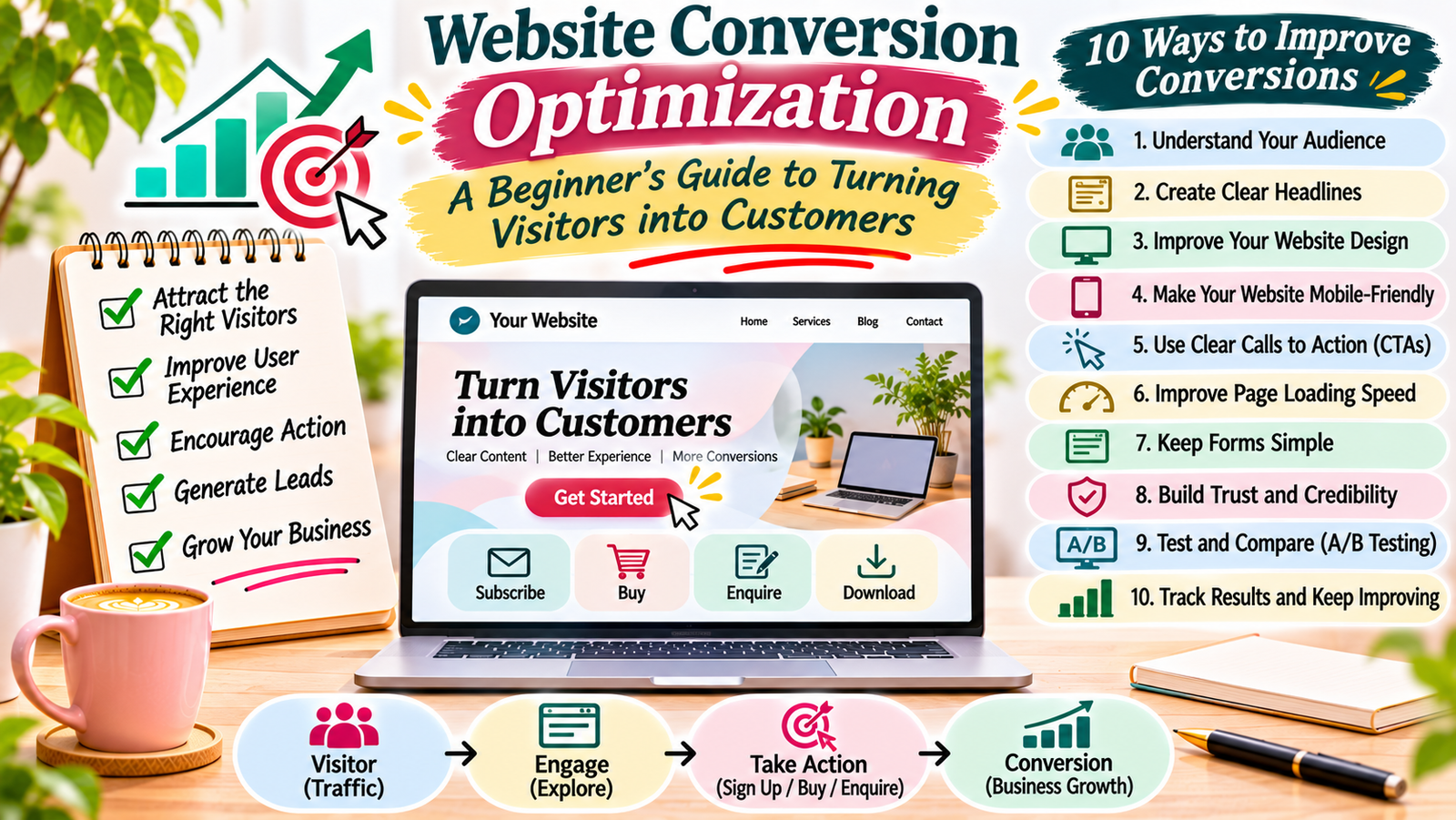
Getting visitors to your website is important. However, traffic alone does not guarantee business growth. You also need visitors to take meaningful actions, such as purchasing a product, submitting an enquiry, signing up for a newsletter, or downloading a resource.
This is where website conversion optimization becomes important.
A well-designed website should not only attract visitors but also help them understand what you offer and what they should do next. Even small improvements to your website content, design, and navigation can make the visitor experience better.
In this beginner-friendly guide, you will learn what conversion optimization means, why it matters, and how to improve your website step by step.
What Is Website Conversion Optimization?
Website conversion optimization is the process of improving your website so that more visitors complete a desired action.
A conversion happens when a visitor takes an action that supports your website or business goals.
For example:
- An online store visitor purchases a product.
- A blog reader subscribes to an email newsletter.
- A potential customer submits a contact form.
- A visitor downloads a free guide.
- A business owner requests a service quotation.
The desired action depends on your website’s purpose.
Conversion optimization focuses on understanding visitor behaviour and removing problems that may prevent people from taking action.
Why Is Conversion Optimization Important?
Many website owners focus mainly on increasing traffic. However, attracting more visitors is not always the best solution if your website does not encourage them to take action.
Conversion optimization helps you make better use of your existing traffic.
Here are some important benefits.
1. Make Better Use of Website Traffic
You may already receive visitors through Google, social media, or referrals. Improving your website experience can help more of those visitors complete useful actions.
2. Improve User Experience
A clear website structure, readable content, and simple navigation make it easier for people to find what they need.
As a result, visitors can understand your website without unnecessary confusion.
3. Generate More Leads
If you offer services, a well-designed contact page and clear enquiry form can encourage potential customers to get in touch.
4. Support Business Growth
More completed actions can support sales, enquiries, registrations, and other business goals.
However, conversions should be relevant and valuable. The aim is not simply to increase numbers but to attract the right actions from the right audience.
5. Understand Your Audience
By reviewing website data and collecting feedback, you can learn what visitors prefer, where they face problems, and which pages need improvement.
10 Practical Ways to Improve Website Conversions
You do not need to redesign your entire website to begin. Start with the areas that have the biggest effect on the visitor experience.
1. Understand Your Target Audience
First, identify the people you want to reach.
Think about their needs, interests, problems, and reasons for visiting your website.
For example, visitors to a beginner-focused digital marketing blog may want simple tutorials, practical examples, and free resources.
On the other hand, visitors to a business website may want service details, pricing information, and contact options.
You can understand your audience through:
- Website analytics.
- Customer feedback.
- Contact form enquiries.
- Search queries.
- Social media comments.
- Frequently asked questions from customers.
Use this information to create website content that matches visitor expectations.
2. Create Clear Headlines
Your headline should explain what the page offers.
When visitors arrive on a page, they should quickly understand its main purpose.
Avoid vague headlines that do not explain the benefit.
For example:
Unclear headline: Welcome to Our Website
Clear headline: Practical Digital Marketing Services to Help Your Business Grow
The second headline gives visitors a better idea of what the business offers.
Use simple words and focus on the main benefit.
3. Improve Your Website Design
A clean and organised design helps visitors focus on important information.
You do not need complicated animations or too many design elements. Instead, use a consistent layout that supports easy browsing.
Focus on these areas:
- Keep your layout simple.
- Use readable font sizes.
- Choose colours with good contrast.
- Add enough space between sections.
- Highlight important information.
- Avoid unnecessary pop-ups.
- Keep buttons easy to identify.
A professional design should support your content rather than distract visitors from it.
4. Make Your Website Mobile-Friendly
Many people browse websites using smartphones. Therefore, your website should work properly on different screen sizes.
A mobile-friendly website makes it easier for visitors to read content, explore services, and complete forms.
Check the following:
- Text should be readable without zooming.
- Images should fit the screen.
- Buttons should be easy to tap.
- Menus should work properly.
- Forms should be simple to complete.
- Important content should not be hidden.
Test your website on both mobile and desktop devices. Fix any layout problems you find.
5. Improve Website Loading Speed
Slow websites can create a poor visitor experience. People may leave if important pages take too long to load.
You can improve website speed by:
- Compressing large images.
- Using suitable image formats.
- Removing unnecessary plugins.
- Choosing reliable hosting.
- Reducing unused scripts.
- Using caching where appropriate.
You can check your website performance using Google PageSpeed Insights.
The tool provides performance information and suggestions for improving your pages.
6. Write Useful and Persuasive Content
Your website content should answer visitor questions and explain why your product, service, or resource is useful.
Avoid writing only about your business. Instead, focus on what visitors need to know before taking action.
For example, a service page should explain:
- What service you provide.
- Who can benefit from it.
- What problem it helps solve.
- How the process works.
- How visitors can contact you.
Use short paragraphs, clear headings, and relevant examples. Also, avoid making promises that you cannot support.
7. Add Clear Calls to Action
A call to action (CTA) tells visitors what to do next.
Examples include:
- Subscribe to Our Newsletter
- Download the Free Guide
- Explore Our Services
- Contact Our Team
- Get Started Today
Place your CTA where it makes sense within the page.
For example, a service page may include a contact button after explaining the service benefits. A blog post may invite readers to download a related checklist.
Keep the action clear and avoid giving visitors too many choices at once.
8. Simplify Contact and Sign-Up Forms
Long or confusing forms can discourage visitors from completing them.
Only ask for information that you genuinely need.
For example, a basic contact form may include:
- Name.
- Email address.
- Subject.
- Message.
Explain why you need the information and what happens after someone submits the form.
Also, check that the form works properly on mobile devices and displays a clear confirmation message.
9. Build Trust With Visitors
People may hesitate before purchasing a product, submitting personal details, or contacting a business.
Your website should provide clear and honest information that helps visitors feel confident.
You can build trust by adding:
- A detailed About page.
- Accurate contact information.
- Genuine customer reviews.
- Clear service descriptions.
- Privacy and refund policies where relevant.
- Secure website connections.
- Examples of your work.
Only publish real testimonials, genuine results, and accurate business information.
10. Use Analytics to Find Problems
Website analytics can help you understand how visitors interact with your pages.
For example, you can review which pages receive traffic, where visitors come from, and which pages encourage useful actions.
If a page receives many visitors but very few enquiries, review its content, CTA, layout, and contact process.
Do not make changes based on assumptions alone. Use data and visitor feedback to identify areas that need attention.
What Is a Website Conversion Rate?
Website conversion rate measures the percentage of visitors who complete a desired action.
You can calculate it using this formula:
Conversion Rate = (Number of Conversions ÷ Total Visitors) × 100
For example, suppose your website receives 2,000 visitors in a month and 100 of them submit an enquiry form.
Your conversion rate is:
100 ÷ 2,000 × 100 = 5%
This means 5% of your visitors completed the selected action.
Remember that the calculation depends on how you define and measure a visitor and a conversion. Choose a consistent method when comparing results.
How to Test Website Changes
After identifying a problem, test possible improvements instead of changing everything at once.
One useful method is A/B testing.
A/B testing compares two versions of a page or element to see which one performs better.
For example, you could compare:
- Two different headlines.
- Different CTA button text.
- Two landing page layouts.
- Different images.
- Short and long contact forms.
Change one important element at a time where possible. Also, collect enough data before deciding which version performs better.
If your website receives very little traffic, you may need to combine basic analytics with visitor feedback and usability testing.
Common Website Conversion Mistakes to Avoid
Some website problems can make it difficult for visitors to complete an action.
Avoid these common mistakes:
- Using unclear headlines.
- Adding too many buttons.
- Hiding important contact information.
- Writing complicated website content.
- Using large images that slow down pages.
- Ignoring mobile visitors.
- Creating long and confusing forms.
- Publishing unsupported claims.
- Failing to test website changes.
- Ignoring visitor feedback.
Review your website regularly to identify and fix these problems.
Simple Website Conversion Optimization Checklist
Use this checklist to review your website:
- My homepage clearly explains what I offer.
- My website has simple navigation.
- My content answers visitor questions.
- My pages work well on mobile devices.
- My website loads at a reasonable speed.
- My CTA buttons are clear and visible.
- My contact forms are easy to complete.
- My website includes accurate trust information.
- I track important website actions.
- I review performance and improve pages regularly.
Website conversion optimization is an ongoing process. It starts with understanding your visitors and making it easier for them to take meaningful actions.
Begin with simple improvements. Make your headlines clearer, improve your mobile layout, simplify forms, and add relevant calls to action.
Then use analytics and visitor feedback to understand what works.
You do not need to change everything at once. Small, well-planned improvements can help create a better website experience and support long-term business growth.
Add a Comment