

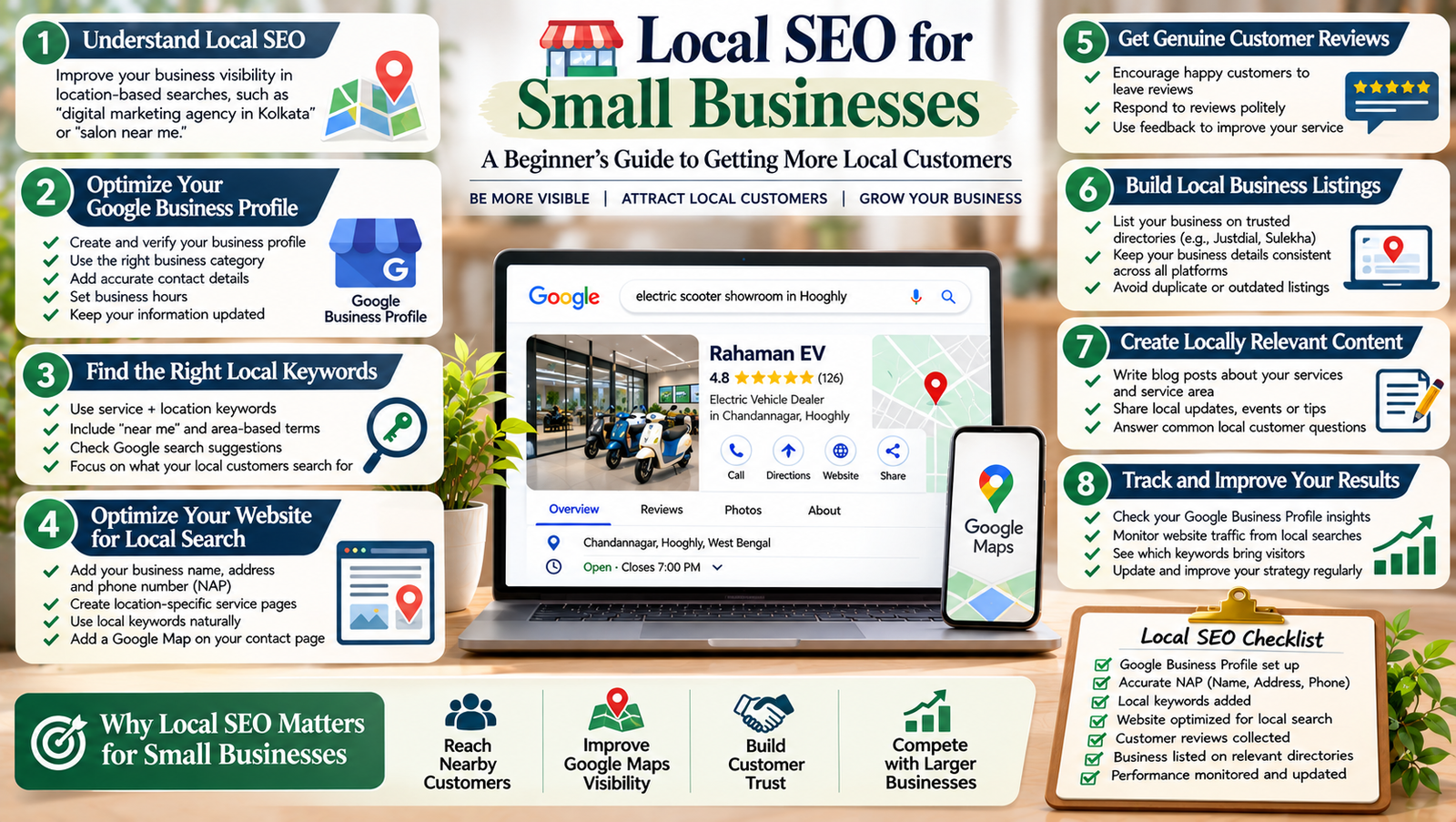
When people need a nearby service, they often search on Google before making a decision. They may look for a restaurant, digital marketing agency, salon, repair shop, or other local business.
If your business does not appear in relevant local search results, potential customers may find your competitors instead.
This is where local SEO for small businesses becomes important. It helps your business become more visible when people search for products or services in a specific location.
The good news is that you do not need a large marketing budget to get started. You can improve your local online presence by optimizing your Google Business Profile, using location-based keywords, collecting genuine customer reviews, and building accurate business listings.
In this guide, you will learn how local SEO works and how to use simple strategies to attract more local customers.
What Is Local SEO for Small Businesses?
Local SEO for small businesses is the process of improving a business’s visibility in search results for location-based searches.
For example, imagine someone searches for:
- Digital marketing agency in Kolkata.
- Best bakery near me.
- Electric scooter showroom in Hooghly.
- Website designer in Chandannagar.
Google may show relevant local businesses, map results, and regular website listings.
Local SEO helps your business provide the information Google and potential customers need to understand your services and location.
It is useful for businesses such as:
- Restaurants and cafes.
- Retail shops.
- Digital marketing agencies.
- Salons and beauty services.
- Electric vehicle dealerships.
- Repair and maintenance services.
- Freelancers serving a specific area.
Even a small business can build a stronger local presence with consistent effort.
Why Is Local SEO Important for Small Businesses?
Local SEO can help small businesses reach people who are already looking for nearby products or services.
Here are some important benefits.
1. Reach Nearby Customers
People often include a city, area, or neighbourhood in their searches.
For example, someone searching for a photography studio in Kolkata may be more interested in local options than businesses located in another state.
Local SEO helps your business appear for relevant searches in the areas you serve.
2. Improve Google Maps Visibility
Google Maps helps people discover nearby businesses, check locations, and find directions.
An accurate business profile can help potential customers understand where your business operates and how to contact you.
However, appearing in Maps is not guaranteed. Google considers factors such as relevance, distance, and prominence.
3. Build Trust With Customers
Customers often check business details and reviews before choosing a service.
A complete online presence with accurate contact information, genuine reviews, and useful photographs can help people make informed decisions.
4. Compete With Larger Businesses
Small businesses may not have the same advertising budgets as large companies.
However, they can focus on specific locations, services, and customer needs.
For example, a local web design agency can create useful content about website design services in its service area rather than trying to compete for every broad industry keyword.
1. Create and Optimize Your Google Business Profile
Your Google Business Profile is an important part of local SEO.
It allows eligible businesses to display information such as their name, address or service area, phone number, website, opening hours, and customer reviews.
Start by visiting Google Business Profile.
Follow these steps:
- Sign in with your Google account.
- Add your business name.
- Select the most accurate business category.
- Enter your business address or service area, as appropriate.
- Add your phone number and website.
- Set your business hours.
- Complete the verification process offered by Google.
- Review your profile regularly.
Choose the Right Business Category
Your primary category should describe the main service your business provides.
For example, a business that mainly provides website design services should choose a category that accurately represents that activity.
You can add relevant additional categories where appropriate. However, avoid selecting unrelated categories just to appear in more searches.
Add Accurate Business Information
Keep your business name, contact details, location, and opening hours accurate.
If your business changes its address or phone number, update the information promptly.
Do not add unnecessary keywords to your business name. Use your real business name as it appears in the real world.
2. Find the Right Local Keywords
Keywords help you understand what people search for when looking for nearby products or services.
For local SEO, focus on search terms that combine your service with a location or customer need.
For example:
| Business type | Example local keyword |
|---|---|
| Digital agency | Digital marketing agency in Kolkata |
| Bakery | Bakery in Chandannagar |
| Electric vehicle showroom | Electric scooter showroom in Hooghly |
| Web designer | Website designer near me |
| Salon | Beauty salon in Howrah |
Think about the services you offer and the locations you genuinely serve.
You can also explore Google’s search suggestions and related searches to discover useful phrases.
Avoid targeting locations where your business does not operate. Your keywords should match your actual service area.
3. Create Location-Based Website Content
Your website should clearly explain what your business offers and where it operates.
Create useful pages for your main services. If you serve several areas, you can also create location pages when each page provides genuinely useful information.
For example, a digital marketing agency might create pages about:
- SEO services in Kolkata.
- Website design services in Hooghly.
- Social media marketing for local businesses.
Each page should contain original information about the relevant service and location.
Include details such as:
- Services available.
- Areas served.
- Business contact information.
- Examples of relevant work.
- Answers to common customer questions.
Do not create many nearly identical pages by changing only the city name. Such pages offer little value to visitors.
For more guidance on organizing website content, read our SEO for Beginners guide.
4. Keep Your Business Information Consistent
Your business information may appear on Google, social media, business directories, and other websites.
Important details include:
- Business name.
- Address.
- Phone number.
- Website URL.
Try to keep these details accurate and consistent wherever your business is listed.
For example, if your business has moved to a new address, update important online listings instead of leaving outdated information across the internet.
Consistency helps customers find the correct details. It also makes it easier for search engines to understand your business information.
5. Collect Genuine Customer Reviews
Customer reviews can influence how people evaluate local businesses.
A business with useful, genuine reviews may give potential customers more confidence when comparing local options.
Here are some practical ways to encourage reviews:
- Ask customers for honest feedback after a completed purchase or service.
- Share your official review link.
- Make the process simple.
- Respond politely to customer feedback.
- Address genuine complaints professionally.
Avoid buying reviews, creating fake accounts, or offering rewards in exchange for positive ratings.
When responding to a negative review, remain calm and helpful. If appropriate, invite the customer to discuss the issue through a suitable private channel.
Your goal should be to build trust, not simply collect a high review count.
6. Build Quality Local Business Listings
Local business listings are profiles that display information about your business on online directories and platforms.
Depending on your industry and location, relevant listings may include:
- Local business directories.
- Industry-specific directories.
- Professional associations.
- Local business organizations.
- Relevant regional platforms.
When creating a listing, use accurate business details and a suitable business description.
Do not submit your website to hundreds of unrelated directories. Focus on reputable platforms that people in your area may actually use.
For every listing, check that the business name, contact details, address, and website are correct.
7. Make Your Website Mobile-Friendly
Many people search for local services using smartphones.
They may be standing outside a shop, travelling through a neighbourhood, or looking for a nearby service.
Therefore, your website should work well on smaller screens.
Check that:
- Text is easy to read.
- Menus are simple to use.
- Contact buttons are easy to find.
- Phone numbers are clickable.
- Maps display correctly.
- Images fit the screen.
- Pages load without unnecessary delays.
Also, make sure your business address and contact details are easy to find.
For more website design tips, explore our guide on blog website design for beginners.
8. Use Local Business Schema Markup
Structured data helps search engines understand information about your website.
For eligible businesses, LocalBusiness structured data can describe details such as business name, address, phone number, and opening hours.
You can learn more through Google’s Local Business structured data documentation.
However, adding structured data does not guarantee special search appearances or higher rankings.
Make sure the information in your structured data matches the visible information on your website.
If you are unfamiliar with technical SEO, use a trusted WordPress SEO tool or ask a developer to help implement it correctly.
9. Track Your Local SEO Performance
Local SEO takes time, so review your progress regularly.
You can use several free tools to understand how people find and use your website.
Google Search Console
Google Search Console helps you review search queries, impressions, clicks, and indexing information.
Look for queries that include your service and location.
For example, you may discover that people find your website through searches related to website design in your city.
Google Analytics
Google Analytics helps you understand website visitors and their interactions.
You can review:
- Website traffic.
- Traffic sources.
- Popular pages.
- User engagement.
- Important actions and conversions.
Google Business Profile Performance
Eligible businesses can also review performance information available in their Business Profile.
Depending on the report, this may include searches, profile views, calls, website clicks, and other customer interactions.
Review these results to understand which services and customer actions matter most to your business.
Common Local SEO Mistakes to Avoid
Small businesses often make simple mistakes that can weaken their local presence.
Using incorrect business information: Keep your contact details and address accurate.
Choosing unrelated business categories: Select categories that describe your real services.
Stuffing keywords into business names: Use your genuine business name.
Creating duplicate listings: Review existing profiles before creating new ones.
Buying fake reviews: Focus on genuine customer feedback.
Creating low-quality location pages: Each page should provide useful information.
Ignoring mobile users: Make sure visitors can easily contact your business from a smartphone.
Expecting instant results: Local SEO requires regular improvements and monitoring.
Local SEO for small businesses helps you reach people searching for nearby products and services. By improving your Google Business Profile, choosing relevant local keywords, creating useful website content, and collecting genuine customer reviews, you can build a stronger local online presence.
Start with the basics. Make sure your business information is accurate, your website works well on mobile devices, and your important service pages explain what you offer.
Next, review your search performance and update your strategy based on what customers are searching for.
You do not need to do everything at once. Consistent improvements can help your small business become easier to discover online.
Add a Comment