
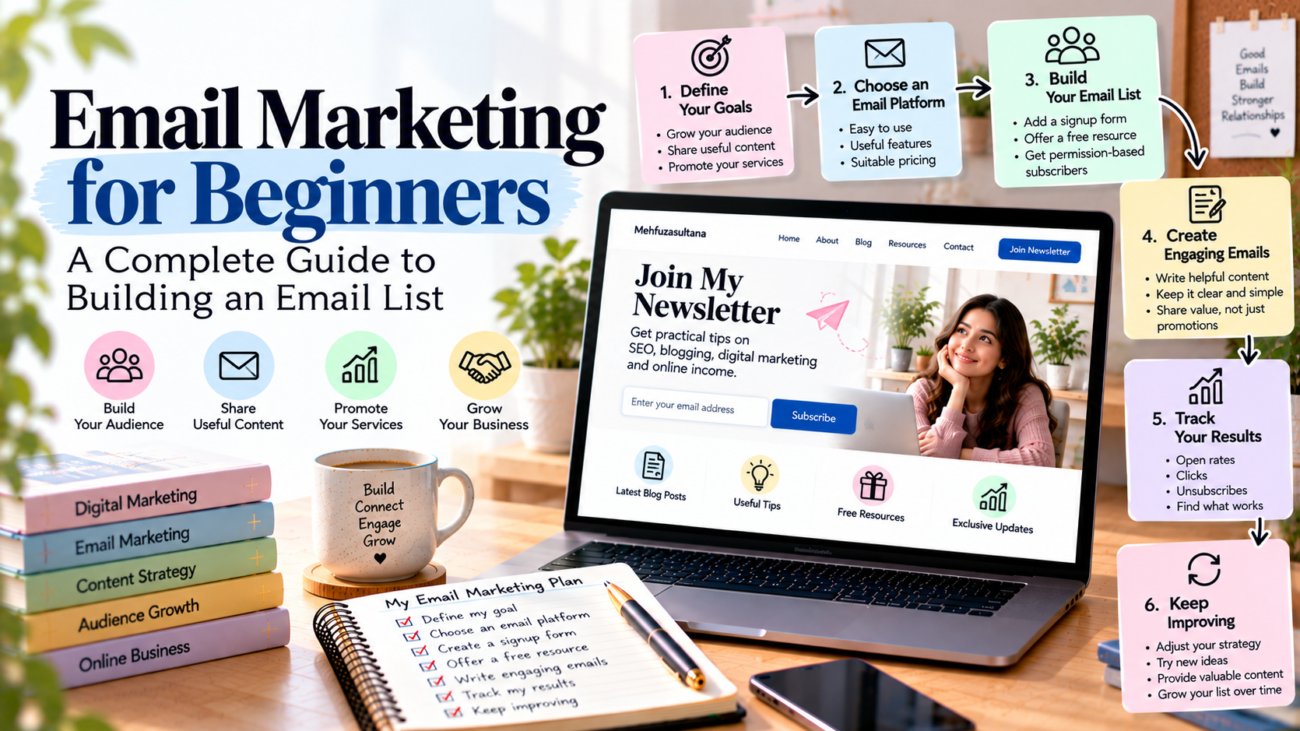
Email marketing for beginners guide showing how to build an email list, create engaging newsletters, choose an email marketing platform, automate welcome emails, and track campaign performance.

Email Marketing for Beginners: A Complete Guide to Building an Email List

Email marketing can help you build stronger relationships with your audience, share useful information, and promote your products or services. However, if you are new to digital marketing, you may not know where to begin.

Email marketing for beginners does not need to be complicated. You can start with a simple email list, useful messages, and a clear plan. Over time, you can use email to connect with readers, nurture potential customers, and support your business goals.

In this guide, you will learn how email marketing works, how to build an email list, how to write effective emails, and how to measure your results. You will also discover common mistakes to avoid when starting your email marketing journey.

What Is Email Marketing?

Email marketing is a digital marketing method that uses email to communicate with people who have agreed to receive your messages.

Businesses, bloggers, freelancers, and creators use email to share updates, educate subscribers, announce new products, and build customer relationships.

For example, a blogger can send a weekly newsletter with helpful tips and links to new articles. A freelancer can share useful resources with subscribers who want to learn about their services. An online store can send product updates or order-related messages.

Unlike social media, where your posts compete for attention in a public feed, email gives you a direct communication channel with your subscribers. However, messages may still land in spam folders or go unread.

The goal is not to send as many emails as possible. Instead, focus on sending relevant information that people actually want to receive.

Why Is Email Marketing Important for Beginners?

Email marketing can support your online growth in several ways.

1. Build Direct Relationships With Your Audience

An email list gives you a way to communicate with people who have chosen to hear from you.

You can share practical advice, answer common questions, and provide useful updates. As a result, subscribers have more opportunities to become familiar with your work.

2. Bring Readers Back to Your Website

If you publish blog posts regularly, email can help you bring readers back to your website.

For example, you can send a newsletter that highlights a new article about SEO, blogging, or digital marketing. Interested subscribers can then visit your website to read the full post.

3. Promote Your Services or Products

Email can help freelancers and small businesses explain their services, share relevant examples, and introduce new offers.

However, promotional messages should not be the only emails you send. A useful balance of educational and promotional content can make your newsletter more valuable.

4. Measure Your Marketing Results

Most email marketing platforms provide reports about delivery, clicks, unsubscribes, and other useful metrics.

These insights can help you understand which topics interest your audience and where you may need to improve.

Step 1: Define Your Email Marketing Goals

Before choosing an email marketing platform, decide what you want to achieve.

A clear goal helps you choose the right type of emails and measure your progress.

For example, your goal might be to:

  • Send new blog posts to subscribers.
  • Build a community around your website.
  • Share helpful tips with your audience.
  • Generate enquiries for freelance services.
  • Promote relevant products or digital resources.
  • Encourage previous customers to return.

Choose one primary goal when you begin. You can add more goals as your email list grows.

For example, if your main goal is to grow your blog, start with a newsletter that shares useful content and links to your latest articles. This gives subscribers a clear reason to stay connected.

Step 2: Choose an Email Marketing Platform

An email marketing platform helps you collect subscribers, create emails, organize contacts, and review campaign performance.

Several platforms offer tools for beginners, although their features and pricing can change.

When comparing platforms, consider these factors:

  • Ease of use.
  • Signup form options.
  • Email templates.
  • Contact management.
  • Automation features.
  • Performance reports.
  • Pricing as your list grows.

Choose a platform that meets your current needs rather than paying for advanced features you may not use.

Before signing up, check its current plan limits and rules for sending emails. Also, review how it handles subscriber consent, unsubscribes, and contact data.

Your first setup can remain simple. You need a way to collect permission-based subscribers, send useful emails, and monitor results.

Step 3: Build an Email List From Scratch

Your email list contains people who have agreed to receive your messages. Building this list takes time, but you can start with a few simple steps.

Add a Signup Form to Your Website

Place a clear signup form on your website. You might add it to your homepage, blog sidebar, or the end of relevant articles.

Explain what people will receive after subscribing.

For example:

“Join our newsletter for beginner-friendly SEO tips, blogging advice, and practical digital marketing strategies.”

A clear description helps visitors decide whether the newsletter matches their interests.

Offer a Useful Free Resource

A free resource, often called a lead magnet, gives people an extra reason to subscribe.

You could offer:

  • A blog content calendar template.
  • A beginner’s SEO checklist.
  • A social media planning worksheet.
  • A simple freelance proposal template.
  • A short educational guide.

Choose a resource that solves a specific problem for your target audience. Make sure it delivers the value you promise.

Promote Your Newsletter on Relevant Channels

You can share your signup page through your blog, social media profiles, and professional network.

For example, a social media post could explain what your newsletter covers and invite interested readers to subscribe.

Do not buy email lists or add people without permission. These practices can damage trust, increase spam complaints, and violate applicable rules.

For more ideas, read our guide on how to build an email list from scratch.

Step 4: Write Emails That People Want to Read

Once people subscribe, focus on creating useful messages. A long email is not always better. Clear writing and relevant information matter more.

A basic marketing email usually contains four elements.

A Clear Subject Line

The subject line tells readers what the email is about.

For example:

  • “5 Simple Ways to Improve Your Blog Posts”
  • “Your Weekly SEO Checklist”
  • “A Beginner’s Guide to Content Planning”

Keep subject lines relevant to the message. Avoid misleading claims or promises that the email does not fulfil.

A Friendly Opening

Start with a short introduction that explains why you are writing.

You can introduce a new article, discuss a common problem, or share a useful tip. Get to the main point quickly.

Useful Main Content

Give readers something they can learn, use, or explore.

For example, a newsletter for beginner bloggers might explain one simple SEO tip and link to a detailed guide on your website.

Use short paragraphs, clear language, and relevant links. If you have several topics to cover, organize them with headings or bullet points.

A Clear Call to Action

A call to action tells readers what they can do next.

Examples include:

  • Read the full article.
  • Download the checklist.
  • Explore the service page.
  • Reply with a question.
  • View the latest resource.

Choose one main action for each email. This helps readers understand the next step without feeling overwhelmed.

Step 5: Create a Simple Email Marketing Plan

You do not need to send emails every day to get started. Choose a schedule that you can maintain consistently.

For example, a beginner blogger could follow this monthly plan:

WeekEmail ideaMain purpose
Week 1Share a useful beginner’s guideEducate subscribers
Week 2Send practical tips or a checklistProvide value
Week 3Share a new blog postBring readers to your website
Week 4Answer a common audience questionBuild trust

Treat this as a starting point, not a strict rule. Your ideal schedule depends on your audience, available time, and the value you can provide.

You can plan email topics alongside your blog content. This makes it easier to reuse useful ideas without copying entire articles into every message.

For more help with planning, explore our guide on creating a content strategy for your blog.

Step 6: Use Email Automation When You Are Ready

Email automation allows certain messages to be sent automatically when a subscriber takes an action or meets a condition.

For beginners, a simple welcome email is a useful place to start.

For example, when someone joins your newsletter, they could receive a welcome message that explains what to expect and links to a useful resource.

Other possible workflows include:

  • A short educational email series.
  • A follow-up after someone downloads a guide.
  • A reminder for a permitted event or activity.
  • A relevant sequence introducing your services.

Start with one simple workflow and test it carefully. Make sure the timing, links, and content work as intended.

Automation should make communication more useful, not overwhelm subscribers with unnecessary messages.

As your email strategy grows, you can explore our upcoming guide on email marketing automation for beginners.

Step 7: Measure Your Email Marketing Performance

Tracking results helps you understand whether your emails are meeting their goals.

Start with a few useful metrics.

Delivery rate: The percentage of sent emails that were successfully delivered. Check this alongside bounce reports.

Click-through rate: The percentage of delivered emails that generated clicks on links, based on your platform’s reporting method.

Conversion rate: The percentage of recipients or visitors who completed a desired action, such as submitting an enquiry or making a purchase. Define the measurement clearly before comparing results.

Unsubscribe rate: The percentage of subscribers who opt out of future emails.

Spam complaint rate: The rate at which recipients report your messages as spam.

Open rates can also appear in reports, but privacy features and automated email activity can make them less reliable. Do not use open rates alone to judge success.

Review the results over time. If readers rarely click a particular type of link, consider whether the topic, email structure, or call to action needs improvement.

Focus on useful outcomes rather than trying to improve every metric at once.

Common Email Marketing Mistakes to Avoid

Beginners often make a few mistakes that can weaken their email marketing efforts.

Sending Too Many Promotional Emails

If every email tries to sell something, subscribers may lose interest. Share helpful information alongside relevant promotions.

Ignoring Subscriber Permission

Only send marketing emails to people who have agreed to receive them. Follow the rules that apply to your audience and location.

Writing Vague Subject Lines

A subject line should help readers understand the message. Avoid unclear wording and misleading promises.

Ignoring Mobile Readers

Many people check email on their phones. Use readable text, short paragraphs, and links or buttons that are easy to tap.

Forgetting to Test Emails

Before sending a campaign, check the subject line, links, spelling, formatting, and mobile layout. Also, make sure the unsubscribe option works.

Failing to Review Results

Sending emails without checking performance makes it harder to learn what your audience values. Review your reports and improve your next campaign.

Conclusion

Email marketing for beginners becomes easier when you start with a clear goal and a simple plan.

Choose a suitable platform, build a permission-based email list, and send useful messages that match your audience’s interests. Then create a realistic schedule, introduce automation when needed, and review your results regularly.

You do not need a huge subscriber list to begin. Focus on attracting people who genuinely want your content and giving them a good reason to stay subscribed.

With consistent effort and thoughtful communication, email marketing can become a useful part of your broader digital marketing strategy.
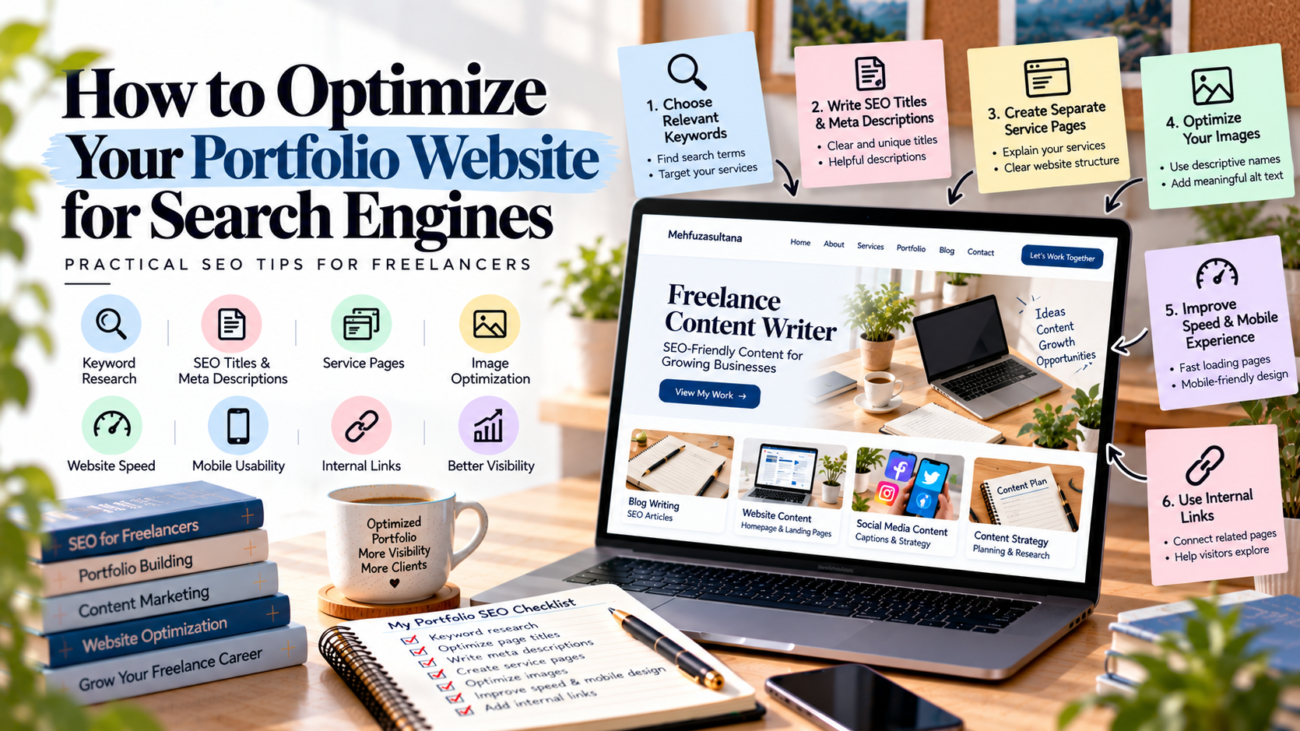

Portfolio website SEO guide illustrating keyword research, SEO titles, meta descriptions, service pages, image optimization, website speed, mobile usability, and internal linking to improve search visibility and attract freelance clients.

How to Optimize Your Portfolio Website for Search Engines

Your portfolio website can showcase your skills, but how will potential clients find it on Google? Portfolio website SEO helps search engines understand your work and makes it easier for people to discover your services.

If you are a freelancer, designer, content writer, or digital marketer, a well-optimized portfolio can support your online presence. You do not need advanced technical knowledge to get started. Instead, focus on useful content, clear page titles, relevant keywords, and a website that visitors can navigate easily.

In this guide, you will learn how to improve your portfolio website step by step.

What Is Portfolio Website SEO?

Portfolio website SEO means improving your portfolio so search engines can understand its content and potentially show it in relevant search results.

For example, a freelance content writer may want potential clients to find their website when searching for blog writing services. Similarly, a graphic designer may want to reach businesses looking for social media designs.

SEO does not guarantee first-page rankings. However, it can help search engines understand your pages and help visitors find information about your work.

1. Choose Relevant Keywords for Your Portfolio Website SEO

Keywords are the words people type into search engines when looking for information or services. Choosing relevant keywords helps you understand what your potential clients may search for.

Start by identifying your main service and target audience.

For example:

  • Freelance content writer for small businesses
  • SEO content writing services
  • Social media graphic designer
  • Freelance video editor
  • Website designer for startups

Next, use these phrases naturally in your website content. Your homepage can describe your main service, while separate service pages can explain specific offerings.

You can discover keyword ideas through Google search suggestions and keyword research tools. Choose phrases that match your skills and the services you actually provide.

Avoid repeating the same keyword too often. Clear and useful content matters more than keyword stuffing.

2. Write Clear SEO Titles and Meta Descriptions

Your SEO title tells search engines and visitors what a page is about. It may appear as the clickable headline in Google search results.

For example, a freelance content writer could use this title:

Freelance Content Writer for Small Businesses | Your Name

Keep each page title relevant and unique. Include your main service naturally, and avoid vague titles such as “Home” or “My Work.”

A meta description gives readers a short summary of your page. Write a clear description that explains what you offer and why someone might visit.

For example:

“Explore blog writing and website content services designed to help businesses share useful information with their audiences.”

Google may use your meta description or select other text from the page for its search snippet. Therefore, make sure the page itself also explains your services clearly.

3. Create Separate Pages for Your Services

If you offer several freelance services, explain them in separate sections or pages where appropriate.

For example, a content writer could create:

  • A homepage introducing their services.
  • A blog writing services page.
  • A website copywriting page.
  • A portfolio page displaying selected projects.
  • An About page explaining their background.
  • A Contact page for enquiries.

Each page should have a clear purpose. Explain what you offer, who you help, and what clients can expect.

This structure makes your website easier to navigate. It also helps search engines understand the difference between your pages.

However, do not create several pages with almost identical content just to target different keywords. Every page should provide useful and distinct information.

4. Optimize Your Portfolio Images

Images help visitors evaluate your work. However, large files and unclear image descriptions can affect the user experience.

Follow these simple image optimization tips:

Use descriptive file names. For example, use social-media-design-sample.jpg instead of IMG001.jpg when it accurately describes the image.

Add meaningful alt text. Describe the image clearly, such as “Instagram campaign design for a local bakery.”

Compress images. Reduce file sizes while keeping the work looking good.

Choose suitable dimensions. Upload images that fit the space where they will appear.

Display your work clearly. Make sure visitors can see important details in your designs, screenshots, or project samples.

Alt text should describe the image for people who use screen readers and for situations where an image cannot load. Do not fill it with repeated keywords.

5. Improve Website Speed and Mobile Experience

A portfolio should be easy to use on both computers and mobile phones. Visitors may leave if pages load slowly or the layout is difficult to navigate.

Start by checking your website on different screen sizes.

Make sure your text is readable, images fit the screen, and navigation works properly. Also, check that contact forms and important links function correctly.

You can use Google PageSpeed Insights to check website performance and find possible improvements.

Fix the most important problems first. For example, compressing large images may help improve loading speed.

A fast and user-friendly website gives potential clients a better experience. It also supports your broader SEO efforts.

6. Use Internal Links to Connect Your Pages

Internal links connect one page of your website to another. They help visitors discover related content and help search engines understand how your pages are connected.

For example, your homepage can link to your services page and portfolio. A project page can link to the service related to that project. A relevant blog article can also direct readers to a useful service page.

Use descriptive link text so visitors know what to expect.

For example, “explore my blog writing services” is more helpful than “click here.”

Keep your navigation simple and make sure important pages are easy to reach. Check your links regularly to find and fix broken URLs.

7. Publish Helpful Content Related to Your Skills

Your portfolio shows examples of your work. Helpful blog content can give potential clients more ways to discover your expertise.

Choose topics related to your services and your audience’s questions.

For example, a content writer could publish articles about blog writing, content planning, and website copy. An SEO freelancer could explain keyword research, on-page SEO, and website optimization.

Each article should answer a real question or solve a useful problem. Include clear headings, practical examples, and links to relevant pages on your website.

You can also update older articles when information changes. For more guidance, read Google’s SEO Starter Guide.

8. Set Up Google Search Console

Google Search Console is a free tool that helps website owners understand how their sites perform in Google Search.

After verifying your website, you can review search queries, impressions, clicks, and available indexing information.

Start with these steps:

  1. Verify ownership of your website.
  2. Submit your XML sitemap if you have one.
  3. Check whether important pages are indexed.
  4. Review the searches that bring visitors to your website.
  5. Investigate any relevant indexing problems.

Visit Google Search Console to get started.

Remember that submitting a sitemap does not guarantee indexing or rankings. Use the information available to identify issues and improve your website over time.

9. Build Trust Through Genuine Work Samples

SEO can help people discover your portfolio, but your work must also give them a reason to contact you.

Display relevant projects and explain your role in each one. Include an accurate About page, clear service descriptions, and working contact information.

If you have genuine client testimonials, add them with permission. If you are a beginner, create practice projects and label them honestly as sample work.

Never invent clients, results, or qualifications. Honest presentation helps potential clients understand your abilities and builds trust.

10. Review and Improve Your SEO Regularly

SEO is an ongoing process. Your portfolio may take time to gain search visibility, so review its performance regularly rather than expecting immediate results.

Use Google Search Console to identify pages receiving impressions but few clicks. Improve unclear page titles, update outdated content, fix broken links, and add useful internal links.

You should also review your project samples as your skills grow. Remove outdated information and make sure your service descriptions match what you currently offer.

Focus on useful improvements instead of making random changes every few days.

Common Portfolio Website SEO Mistakes

Avoid these common mistakes when optimizing your portfolio:

  • Using broad keywords: Choose terms related to your actual services.
  • Repeating keywords unnaturally: Write for people first.
  • Uploading oversized images: Compress files and use suitable dimensions.
  • Creating weak service pages: Explain your services clearly.
  • Ignoring mobile users: Test your website on smaller screens.
  • Expecting instant results: SEO takes time, and rankings are never guaranteed.

Small, consistent improvements can help you build a stronger website over time.

Portfolio website SEO can help potential clients discover your work and understand your services.

Start with relevant keywords, clear titles, useful service pages, optimized images, and a simple website structure. Then connect related pages with internal links and use Google Search Console to monitor your progress.

You do not need to do everything at once. Improve your website step by step, keep your information accurate, and focus on providing a helpful experience.

A clear, useful portfolio can support your professional reputation and make it easier for the right clients to find your work.

Online portfolio for freelancers showcasing skills, sample projects, services, professional experience, and contact information to build trust and attract potential clients.

How to Create an Online Portfolio That Attracts Clients

Finding clients can be difficult when you are starting your freelance career. You may have useful skills, but potential clients still need a reason to trust your work.

This is where an online portfolio can help. It allows you to showcase your skills, share examples of your work, and explain how you can help businesses solve their problems.

An online portfolio for freelancers is more than a collection of projects. It is a professional space where clients can understand your strengths and decide whether you are the right person for their needs.

The good news is that you do not need years of experience or an expensive website to get started. With the right structure and a few strong examples, you can build a portfolio that presents your work clearly.

In this guide, you will learn how to create a professional portfolio, choose the right projects, organize your pages, and make it easier for potential clients to contact you.

What Is an Online Portfolio for Freelancers?

An online portfolio is a digital collection of your work, skills, services, and professional achievements. It helps potential clients understand what you can do before they hire you.

For example, a freelance content writer might showcase blog articles, website copy, and product descriptions. A graphic designer could display logos, social media designs, and brand identity projects.

Similarly, a digital marketer might present campaign plans, sample content calendars, and marketing case studies.

A portfolio can take several forms:

  • A personal website with dedicated portfolio pages.
  • A professional profile on a portfolio platform.
  • A collection of selected work hosted online.
  • A simple landing page that presents your services and examples.

You can start with a simple option and improve it as your freelance career grows.

1. Choose Your Freelance Niche

Before building your portfolio, decide which services you want to offer.

A clear niche helps clients understand your expertise. It also makes it easier to select relevant examples for your portfolio.

For instance, instead of presenting yourself as someone who can do every type of writing, you might focus on SEO blog writing, website content, or product descriptions.

Consider these questions:

  • Which skills do you enjoy using?
  • What problems can you solve for clients?
  • Which services match your current abilities?
  • What type of client would benefit from your work?

You do not need to choose a niche forever. You can expand your services as you gain experience.

However, start with a clear direction. A focused portfolio often communicates your value more effectively than a page filled with unrelated skills.

2. Create Samples That Demonstrate Your Skills

Your portfolio should show what you can do, not simply list your abilities.

If you already have client work, select a few strong examples that match the services you want to offer.

But what if you have no clients yet?

You can create practice projects to demonstrate your skills. These are often called sample projects or portfolio projects.

For example, a beginner content writer could create:

  • A sample SEO blog post.
  • A homepage introduction for a fictional business.
  • A product description for an imaginary online store.
  • A short content plan for a small business.

A graphic designer could create a sample brand identity, while a social media manager could prepare a sample monthly content calendar.

Make sure your examples demonstrate the type of work you want to receive.

Also, label practice projects honestly. Never present fictional projects as paid client work or claim results that you have not achieved.

3. Select the Best Work for Your Portfolio

More projects do not always make a portfolio stronger. Clients usually need a clear view of your abilities rather than a large collection of unrelated examples.

Start with three to five strong projects if you have enough suitable work. You can add more as your skills develop.

For each project, explain:

Project overview: What did you create?

Goal: What problem was the project intended to solve?

Your role: Which parts did you complete yourself?

Approach: What steps did you follow?

Final result: What did you produce, and what did you learn?

For example, if you created a sample blog post, explain the intended audience, the main topic, and the writing approach.

If you worked on a real client project, share measurable results only when you have reliable evidence and permission to disclose them.

Remember to respect client confidentiality. Ask for permission before displaying private work, business information, or unpublished materials.

4. Build a Simple and Professional Portfolio Website

You do not need a complicated website to attract clients. A clear layout and useful information are more important than unnecessary design features.

You can create your portfolio using a personal website or a suitable portfolio platform. Choose an option that fits your budget, technical skills, and long-term plans.

A basic portfolio website should include these sections.

Homepage

Your homepage should quickly explain who you are, what you do, and whom you help.

For example:

“I help small businesses publish clear, SEO-friendly blog content that answers customer questions.”

This tells visitors what service you offer and who may benefit from it.

Avoid vague introductions that make clients guess what you actually do.

About Page

Use this section to introduce yourself and explain your professional approach.

You can mention your skills, relevant training, experience, and interests. If you are a beginner, focus on your commitment to quality, your working process, and the value you can offer.

You do not need to share every personal detail. Keep the information relevant to your professional goals.

Portfolio Page

Display your best projects in an organized format.

Use clear project titles and short descriptions. Where appropriate, include images, document previews, or links to published work.

Make sure visitors can understand each example without needing a long explanation.

Services Page

Explain the services you provide and what clients can expect.

For example, a freelance writer might offer blog writing, website content, and article editing.

You can also describe your process, typical deliverables, and how clients can request a quote.

Contact Page

Make it easy for potential clients to reach you.

Include a professional email address or a simple contact form. You can also add relevant professional profile links.

Test your contact form before publishing your portfolio. A broken form can prevent interested clients from contacting you.

5. Write Clear Project Descriptions

A project description should explain more than what the final design or article looks like. It should help clients understand your thinking and the value of your work.

Use simple language and focus on the details that matter.

For example, instead of writing:

“Created a blog post about digital marketing.”

You could write:

“Created a beginner-friendly digital marketing article with clear headings, practical examples, and SEO-focused content structure.”

The second description gives potential clients a better understanding of your approach.

For each project, explain the challenge, your contribution, and the final deliverable.

If you have real results, such as improved engagement or increased conversions, include them when they are accurate and can be shared. If you do not have performance data, focus on the quality of the work rather than making unsupported claims.

6. Optimize Your Portfolio for Search Engines

A portfolio website can also attract clients through search engines. Basic SEO helps search engines understand your pages and may improve their visibility for relevant searches.

Start with a clear page title that describes your service.

For example, a freelance content writer might use a title such as “Freelance Content Writer for Blogs and Websites.”

Next, write a short meta description that explains what you offer. Use relevant terms naturally in your headings and page content.

You should also:

  • Create a clear URL structure.
  • Add descriptive alt text to meaningful images.
  • Link related pages within your website.
  • Make your portfolio mobile-friendly.
  • Keep important information easy to find.
  • Check whether your pages can be indexed.

Avoid repeating the same keyword in every paragraph. Your portfolio should sound natural and help visitors understand your services.

For additional guidance, read Google’s SEO Starter Guide.

SEO takes time, and a well-optimized portfolio is not guaranteed to rank immediately. You can also share your portfolio directly with suitable clients while building its search visibility.

7. Build Trust With Potential Clients

Clients often compare several freelancers before making a decision. Your portfolio should help them feel confident about your professionalism and reliability.

You can build trust by providing accurate information and making your work easy to evaluate.

Try these practical steps:

  • Use a professional email address.
  • Keep your portfolio updated.
  • Show relevant and original work.
  • Explain your process clearly.
  • Include genuine testimonials when you have permission.
  • Make your contact information easy to find.
  • Check every link before publishing.

If you are new to freelancing, do not worry about having no testimonials yet. Strong sample projects, honest descriptions, and clear communication can still demonstrate your potential.

You can also link to a relevant professional profile, such as your LinkedIn profile, to help clients learn more about your background.

8. Promote Your Portfolio to Find Clients

Creating a portfolio is only the first step. You also need to help potential clients discover it.

Start with the platforms and methods that suit your freelance niche.

For example, content writers can share useful writing insights on LinkedIn. Designers can display selected work on visual platforms. Freelancers can also use relevant job platforms and professional communities to find opportunities.

Try these approaches:

Update your professional profiles: Add your portfolio link to relevant profiles and introductions.

Contact suitable businesses: Identify businesses that may need your services and send a short, personalized message.

Share useful content: Publish tips or examples that demonstrate your knowledge.

Apply for relevant projects: Include your portfolio link when a job application allows it.

Build professional relationships: Participate in relevant communities and connect with people in your field.

Avoid sending the same generic message to every business. Explain why your service may be useful to that particular client.

Your portfolio supports your outreach, but it does not replace clear communication, relevant skills, or consistent effort.

9. Keep Your Portfolio Updated

Your portfolio should develop as your skills and experience improve.

Review it every few months or whenever you complete a strong new project.

Remove outdated examples, fix broken links, and improve descriptions that no longer represent your abilities.

You can also check which portfolio pages receive visits and whether visitors use your contact form.

If people visit your portfolio but rarely contact you, review your service descriptions and calls to action. Make sure visitors understand what you offer and how to get in touch.

If your portfolio receives very little traffic, focus on promotion, professional networking, and basic SEO.

Make improvements based on what you observe instead of changing everything at once.

Common Portfolio Mistakes to Avoid

When creating an online portfolio for freelancers, watch out for these common mistakes.

Showing too many unrelated projects: Select work that matches your target services.

Using vague descriptions: Explain what you created and how it demonstrates your skills.

Copying someone else’s work: Use original projects or materials you have permission to display.

Making unsupported claims: Share genuine results and label practice projects honestly.

Ignoring mobile users: Check that your portfolio works well on smaller screens.

Making contact difficult: Give visitors a clear way to ask questions or discuss a project.

Avoiding these mistakes can make your portfolio easier to understand and more professional.

Creating an online portfolio for freelancers does not have to be complicated. Start by choosing your services, creating a few strong samples, and organizing your work into a clear and professional presentation.

Next, explain your projects, optimize your pages for search engines, and make it easy for potential clients to contact you. Finally, share your portfolio through professional networks and update it as you gain experience.

You do not need a perfect portfolio before looking for clients. Start with what you can create today, improve it over time, and let your work demonstrate the value you can offer.

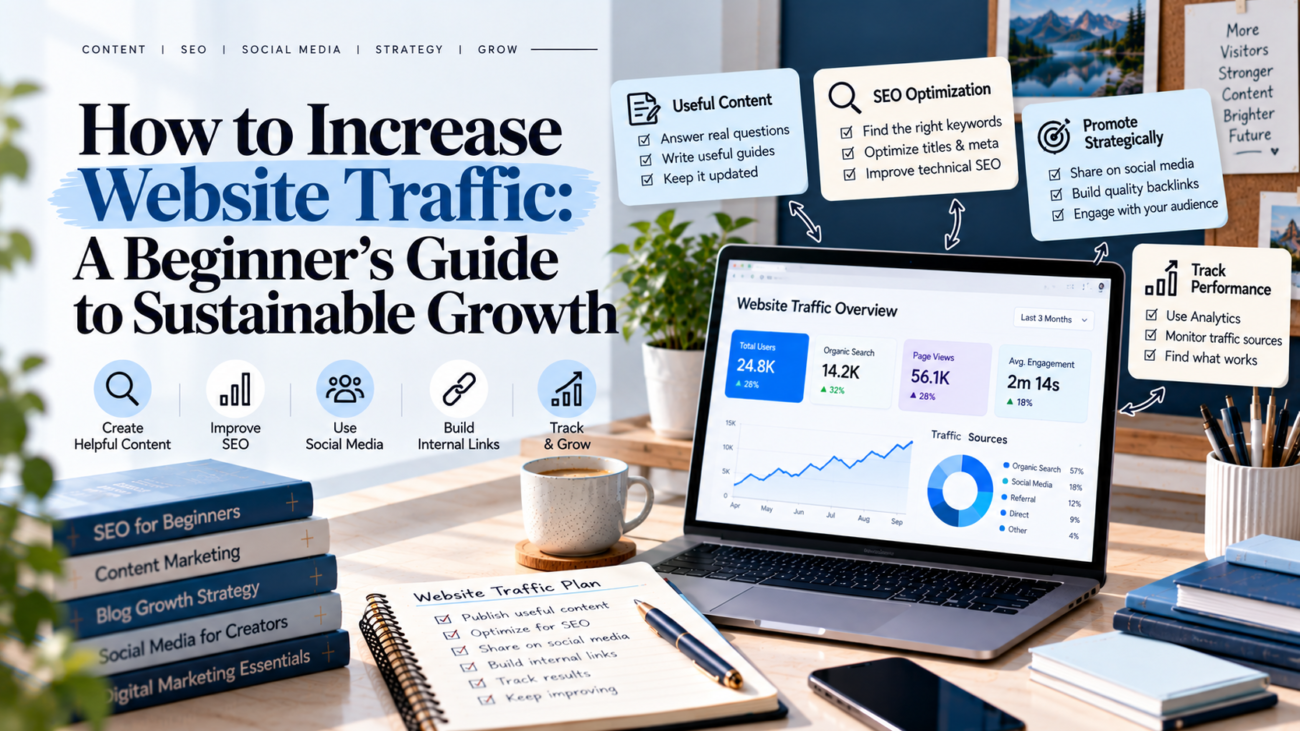
How to increase website traffic using SEO, helpful blog content, social media promotion, internal linking, and website analytics for sustainable growth.

How to Increase Website Traffic: A Beginner’s Guide to Sustainable Growth

Building a website is only the beginning. The real challenge is getting people to visit it, explore your content, and return for more.

If your website receives very few visitors, you are not alone. Many beginners publish blog posts regularly but struggle to attract consistent traffic. The problem is often not a lack of effort. Instead, they may need a clearer content strategy, better SEO, or more effective ways to promote their articles.

The good news is that you do not always need paid advertising to grow your audience. You can increase website traffic by creating helpful content, understanding what people search for, improving your website, and sharing your work on the right platforms.

In this guide, you will learn practical ways to attract relevant visitors and build sustainable website growth.

What Is Website Traffic?

Website traffic refers to the people who visit your website. These visitors may arrive through Google Search, social media, links on other websites, email newsletters, or direct visits.

Understanding your traffic sources helps you identify which strategies are working.

Here are four common sources of website traffic:

  • Organic traffic: Visitors who find your website through unpaid search results.
  • Social traffic: Visitors who click links shared on social media platforms.
  • Referral traffic: Visitors who arrive through links on other websites.
  • Direct traffic: Visits recorded when people access your website directly or when the source cannot be identified.

Each source can support your growth in a different way. For example, SEO can help your articles appear in search results, while social media can introduce your content to new audiences.

A balanced approach reduces your dependence on a single traffic source.

1. Create Content People Actually Want to Read

Useful content is the foundation of sustainable website traffic. People visit websites because they want answers, solutions, ideas, or information.

Before writing a new article, think about your target audience. What problems do they face? Which questions do they ask? What information would make their work easier?

For example, if your website covers blogging and digital marketing, your audience may want to learn how to choose blog topics, improve search rankings, or create a content calendar.

Turn these needs into practical articles.

Follow these tips when creating content:

  • Answer one main question in each article.
  • Use clear headings to organize information.
  • Include examples that readers can follow.
  • Explain difficult concepts in simple language.
  • Update information when it becomes outdated.
  • Avoid adding unnecessary words just to make an article longer.

Also, focus on usefulness rather than publishing as often as possible. Three well-planned articles may serve your audience better than several rushed posts.

2. Use SEO to Attract Organic Traffic

Search engine optimization, or SEO, helps search engines understand your content and helps people discover relevant pages.

If you want to increase website traffic over time, make SEO part of your regular publishing process.

Choose Relevant Keywords

Keyword research helps you understand the words and phrases people use when searching online.

Start by choosing one main topic for your article. Then explore related questions and search phrases. Look for keywords that match your content and the needs of your intended audience.

For example, a broad phrase such as “SEO” may be difficult to target. A more specific phrase, such as “SEO tips for new bloggers,” may better match a beginner’s needs.

However, do not choose keywords based on competition alone. Make sure you can create a useful page that satisfies the searcher’s intent.

Optimize Your Blog Posts

Once you select a keyword, use it naturally in important places, including:

  • The SEO title.
  • The page URL.
  • The introduction.
  • Relevant headings.
  • The meta description.
  • Image alt text, where appropriate.

Keep your writing natural. Repeating the same keyword unnecessarily can make an article difficult to read.

You should also make your URLs clear, use descriptive headings, and provide useful internal links.

Improve Technical SEO

Your website should be easy for search engines to access and for visitors to use.

Check that your important pages can be indexed, your website works on mobile devices, and your pages load efficiently. Submit an XML sitemap through Google Search Console when appropriate.

Google’s SEO Starter Guide provides helpful guidance for improving your site’s search visibility.

Remember that SEO takes time. Rankings and traffic depend on several factors, so no single change guarantees results.

3. Publish Supporting Articles Around Main Topics

Publishing random articles can make it harder to build a clear content structure. Instead, organize your blog around a few important topics.

This approach is often called a topic cluster.

A topic cluster includes one comprehensive main article and several supporting articles that explore related questions.

For example, a main article about blog SEO could connect to supporting posts about keyword research, on-page SEO, internal linking, and website performance.

This structure offers several benefits:

  • Readers can explore related topics.
  • Search engines can discover connections between pages.
  • You can cover a subject more thoroughly.
  • Your content planning becomes more organized.

Start by selecting a main topic that closely matches your website’s purpose. Then identify three to six useful supporting topics.

Link the articles together where the links help readers. Avoid adding links simply to increase their number.

4. Improve Internal Linking

Internal links connect one page of your website to another. They help readers discover related information and help search engines understand your site’s structure.

For example, an article about writing blog posts could link to a guide on finding blog topics. A keyword research article could link to a related SEO planning guide.

To improve your internal linking:

  1. Identify your most important pages.
  2. Find related articles that naturally support them.
  3. Add links where readers may want more information.
  4. Use descriptive anchor text.
  5. Check that every link leads to the correct page.

Avoid generic anchor text such as “click here” when a more descriptive phrase would help readers understand the destination.

Internal links can improve content discovery, but they do not guarantee higher rankings. Their main purpose is to make your website easier to navigate and understand.

5. Share Your Content on Social Media

Search engines are not the only way to attract website visitors. Social media can help you reach people who may never have discovered your website otherwise.

Choose platforms based on your audience and content style.

For example, LinkedIn may suit professional articles and business insights. Pinterest can help people discover visual guides and evergreen content. Instagram can support short educational posts, while YouTube can introduce your ideas through videos.

You do not need to publish everywhere. Start with one or two platforms you can manage consistently.

Try these practical methods:

  • Turn a blog’s main lessons into a carousel post.
  • Share a useful tip and link to the complete guide.
  • Create a short video explaining one idea from an article.
  • Design a Pinterest graphic for a helpful tutorial.
  • Answer relevant audience questions and share resources when appropriate.

Avoid posting the same message everywhere without adapting it. Each platform has different formats and audience expectations.

Most importantly, give people a reason to click. Explain what they will learn rather than simply announcing that a new article is available.

6. Update Older Blog Posts

New content can attract visitors, but your existing articles may also offer growth opportunities.

Some posts may have outdated examples, incomplete explanations, broken links, or titles that no longer match what readers search for.

Review your older articles regularly.

Start by checking their performance in Google Search Console. Look for pages that receive impressions but few clicks, pages that have lost traffic, and articles that could answer related questions more clearly.

Then make meaningful improvements.

You might update statistics, add practical examples, improve headings, fix broken links, or clarify the introduction.

Do not change a page simply because it is old. Focus on updates that improve accuracy, relevance, or usability.

After making changes, monitor the page over time. Search performance can fluctuate, so evaluate results using comparable date ranges.

7. Make Your Website Easy to Use

Attracting visitors is only part of website growth. People also need to find information easily once they arrive.

A confusing website can make readers leave before discovering your best content.

Improve the visitor experience with these simple steps:

  • Use a clear navigation menu.
  • Organize articles into relevant categories.
  • Choose readable fonts and suitable text sizes.
  • Keep paragraphs short.
  • Make your website mobile-friendly.
  • Fix broken links and missing pages.
  • Avoid intrusive pop-ups that interrupt reading.

Your homepage should explain what your website offers and who it helps. Your blog page should make it easy to explore articles by topic.

Also, link to relevant resources throughout your content. This gives readers a natural next step and helps them discover more of your work.

A good user experience does not guarantee more search traffic, but it can help visitors use your website more comfortably.

8. Use Analytics to Understand Your Traffic

You cannot improve what you never measure. Analytics helps you understand where visitors come from, which pages they read, and how your website performs over time.

Two useful free tools are Google Search Console and Google Analytics.

Google Search Console

Use Google Search Console to monitor your website’s performance in Google Search.

Pay attention to:

  • Total clicks.
  • Total impressions.
  • Click-through rate.
  • Average search position.
  • Queries bringing visitors to your pages.

These metrics can help you identify content that performs well and pages that need improvement.

Google Analytics

Use Google Analytics to understand website visits and visitor behaviour.

You can review traffic sources, landing pages, engagement, and conversions when the relevant tracking is configured.

For example, you may discover that certain articles attract visitors from search engines, while others receive more visits from social media.

Use these findings to guide your next steps. Improve promising pages, investigate sudden declines, and create more content around topics that serve your audience.

9. Build an Email Audience

Social media platforms and search engines can change over time. An email list gives you another way to stay connected with people who want to hear from you.

You can invite readers to subscribe to a newsletter that shares useful tips, new articles, resources, or updates.

To encourage sign-ups:

  • Offer a relevant checklist or guide.
  • Place a clear subscription form on your website.
  • Explain what subscribers will receive.
  • Send useful emails at a manageable frequency.
  • Make unsubscribing easy.

For example, a blogging website could offer a simple blog content planning checklist.

Avoid collecting email addresses without permission or sending messages people did not agree to receive. Build your list with clear consent and useful content.

An email audience may not produce immediate traffic growth, but it can help you bring interested readers back to your website.

10. Create a Simple Website Traffic Growth Plan

You do not need to use every strategy at once. A simple plan can help you work consistently without becoming overwhelmed.

Here is a practical four-week starting plan.

WeekMain taskActions
Week 1Review your websiteCheck your top pages, traffic sources, and technical issues
Week 2Improve existing contentUpdate two useful articles and add relevant internal links
Week 3Publish and promotePublish a helpful article and share it on suitable platforms
Week 4Measure resultsReview clicks, impressions, organic visits, and engagement

At the end of the month, decide what to prioritize next.

Use the plan as a starting point, then adapt it to your schedule and results.

Common Mistakes to Avoid

When trying to increase website traffic, avoid these common mistakes:

Publishing without a plan: Random topics can make it harder to build a connected content library.

Expecting instant results: SEO and audience growth often take time.

Focusing only on visitor numbers: Relevant visitors and meaningful actions matter more than traffic alone.

Ignoring existing content: Older articles may offer useful opportunities for improvement.

Using misleading headlines: Titles should accurately represent the content and set realistic expectations.

Trying every platform at once: Concentrate on the channels that suit your audience and available time.

Learning how to increase website traffic starts with understanding your audience and creating content that meets their needs.

Build a clear SEO strategy, choose relevant keywords, connect related articles, and promote your work on suitable platforms. At the same time, keep your website easy to use and review your performance regularly.

You do not need to apply every tactic immediately. Start with a few practical improvements, measure the results, and build on what works.

Consistent, useful content and thoughtful optimization can help you develop a stronger online presence over time.

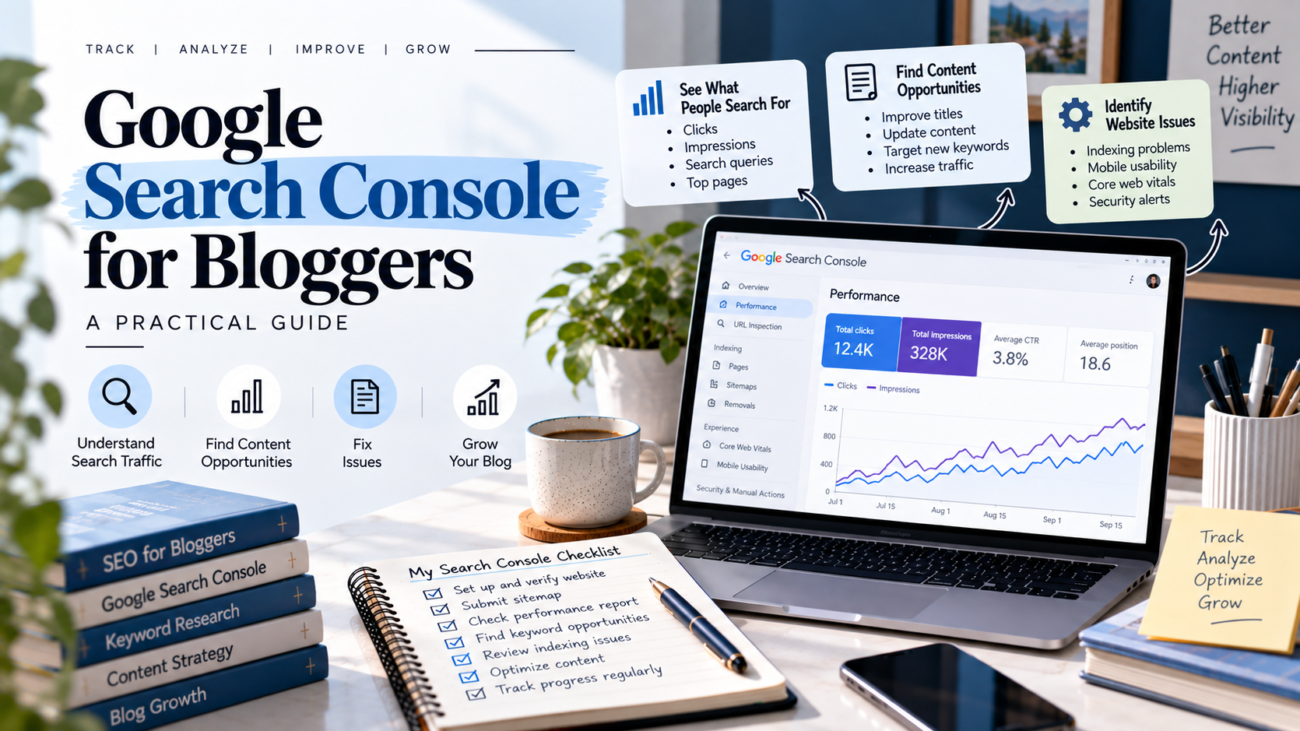
Finding useful search queries to improve blog content

Google Search Console for Bloggers: A Practical Guide to Growing Search Traffic

Are you publishing blog posts but struggling to understand how people find your website? You may be writing useful content, yet your search traffic remains low. The problem is not always your writing. Sometimes, you need better information about how your website performs in Google Search.

Google Search Console for bloggers is a useful starting point. This free Google tool helps you understand which searches bring people to your website, which pages appear in search results, and where you may need to improve your content.

In this guide, you will learn how to set up Google Search Console, understand its main reports, find content opportunities, and use real search data to improve your blog.

What Is Google Search Console?

Google Search Console is a free tool that helps website owners monitor their website’s presence in Google Search. It provides information about search visibility, clicks, impressions, indexing, and certain website issues.

For bloggers, this information can help answer important questions:

  • Which blog posts appear in Google Search?
  • What search terms help people discover my content?
  • Which pages receive impressions but few clicks?
  • Are some important pages missing from Google’s index?
  • Is my search performance improving over time?

For example, imagine that you publish an article about keyword research. After a few weeks, the article begins appearing for several related searches. Search Console can help you identify those queries and decide whether the article needs better headings, clearer explanations, or a more useful title.

However, the tool does not guarantee higher rankings. It provides data that helps you make better decisions.

You can access it through Google Search Console.

Why Should Bloggers Use Google Search Console?

Many beginners judge their blogs only by page views or social media engagement. These numbers can be useful, but they do not explain everything about organic search performance.

Search Console gives you another view of your website’s growth.

First, it helps you understand search visibility. You can see how often your pages appear in Google Search and which queries show them.

Second, it reveals content opportunities. Some articles may appear for relevant searches that you did not specifically target when writing them.

Third, it helps you review performance. You can compare clicks, impressions, click-through rate, and average position across different periods.

Finally, it helps you identify technical problems. Reports can highlight certain indexing, mobile usability, and other search-related issues when applicable.

Together, these insights can support a more informed content strategy.

How to Set Up Google Search Console for Your Blog

If you have never used the tool, follow these steps to get started.

Step 1: Open Google Search Console

Visit Google Search Console and sign in with your Google account.

Choose the option to add a property. A property represents the website or website section you want to monitor.

Step 2: Add Your Website

Google offers two main property types: Domain and URL prefix.

A Domain property covers the website across its subdomains and protocols. It usually requires DNS verification.

A URL-prefix property covers URLs that begin with the exact prefix you enter. Verification methods may include an HTML file, an HTML tag, or other supported options.

Choose the option that fits your website and follow Google’s instructions.

Step 3: Verify Ownership

Google needs to confirm that you own or control the website before it provides access to its data.

Follow the verification instructions shown in Search Console. If you use WordPress, you may be able to verify through an available site verification method or your hosting setup.

Once verification is complete, allow time for reports to collect data. You may not see every report immediately.

Step 4: Submit Your Sitemap

A sitemap lists important URLs on your website and can help Google discover your pages.

If your WordPress SEO plugin creates a sitemap, open the sitemap URL and confirm that it works. Then enter the sitemap path in the Sitemaps section of Search Console.

Submitting a sitemap does not guarantee that Google will index every URL. Google still decides which pages to crawl and index.

Step 5: Check Important Pages

Use the URL Inspection tool to check a specific page.

You can review whether Google has information about the URL, inspect available indexing details, and request indexing when appropriate.

This is particularly useful after publishing an important article or making significant changes to an existing page.

How to Understand the Performance Report

The Performance report is one of the most useful places for bloggers to begin. It shows how your website performs in Google Search through several key metrics.

1. Clicks

Clicks show how often people click through from Google Search to your website.

If a blog post receives more clicks over time, it may be attracting more search visitors. However, compare the date range and search conditions before deciding what caused the change.

2. Impressions

Impressions show how often your website’s result appears in search results under Google’s counting rules.

A page with growing impressions may be gaining visibility for relevant searches. If impressions increase but clicks remain low, review the queries, title, and description to understand what may be happening.

3. Click-Through Rate (CTR)

CTR is the percentage of impressions that result in clicks.

For example, if a page receives 1,000 impressions and 30 clicks, its CTR is 3%.

A low CTR does not automatically mean your title is poor. Search intent, ranking position, competition, and the type of search result can all influence clicks.

Still, CTR can help you identify pages that deserve a closer review.

4. Average Position

Average position gives you an average measure of where your result appeared in Google Search for the recorded impressions.

A lower numerical position generally indicates a higher placement. However, the average can vary across queries, locations, devices, and search features. It is not a fixed ranking for every search.

Google explains these metrics in its official Search Console documentation.

How to Find Content Opportunities in Search Console

Once your blog has collected enough data, use the Performance report to find ways to improve existing content.

Step 1: Review Search Queries

Open the Performance report and select the Queries tab.

You will see search terms associated with your website’s performance. Look for queries that are closely related to your published articles.

For example, an article about content planning might appear for searches related to creating a weekly content calendar.

These queries can reveal what readers want to learn. Use them to improve your explanations or identify relevant supporting articles.

Step 2: Find Pages With Growing Impressions

Select the Pages tab and review which URLs receive impressions.

Compare a recent period with an earlier period of similar length. This can help you spot articles gaining visibility.

Next, inspect the queries associated with those pages. If the queries match the article’s purpose, consider strengthening the content with clearer explanations, relevant examples, or useful internal links.

Step 3: Investigate Pages With Low CTR

Look for pages with meaningful impressions but relatively few clicks.

Review the queries first. Then ask whether the title clearly communicates the article’s value and matches the search intent.

You may be able to improve the title or meta description. However, do not make changes based on one small data sample. Check the page’s average position and the types of queries involved before deciding.

Step 4: Identify Related Search Terms

Search Console can also reveal relevant queries that you did not include in your original keyword plan.

Use these terms as ideas for improving the existing article or planning a separate article when the search intent is different.

Before creating another post, check your existing content. You want to avoid publishing multiple pages that answer the same question in nearly the same way.

For more guidance, read this guide on choosing the right keywords for your blog posts.

How to Use Search Console to Improve Blog Posts

Finding data is only the beginning. The next step is turning that information into useful improvements.

Try this simple process:

  1. Choose one page: Start with an article that has enough impressions to provide useful information.
  2. Review its queries: Identify the searches most closely related to the article.
  3. Check search intent: Decide whether the article answers what those searchers appear to want.
  4. Review the content: Look for missing explanations, outdated details, or sections that need clearer examples.
  5. Improve the page: Make focused changes to the content, headings, title, or internal links where needed.
  6. Measure the results: Review performance again after enough time has passed to collect meaningful data.

Avoid changing everything at once. If you make several major changes together, it becomes harder to understand which changes may have helped.

You should also avoid editing a useful article simply because its average position changes slightly. Search performance can fluctuate, and not every change requires action.

Google Search Console and AI Search Visibility

Search is evolving beyond traditional blue links. Google now provides a Generative AI performance report for eligible websites, with information about visibility in supported AI-powered Search features.

According to Google’s documentation, the report includes impressions for AI Overviews and AI Mode, along with dimensions such as pages, dates, devices, and countries where available. https://support.google.com/webmasters/answer/16984139.

This information can help you understand whether your content appears in these search experiences. However, the availability of detailed metrics varies, and impressions alone do not show the full impact on traffic or business results.

To prepare your content for changing search experiences, focus on clear explanations, accurate information, useful examples, and content that directly answers readers’ questions. Google also publishes guidance in its AI Search optimization documentation.

Common Google Search Console Mistakes Bloggers Should Avoid

Beginners can misread search data when they focus on only one metric. Keep these mistakes in mind.

Checking data too frequently: Daily fluctuations can distract you from meaningful trends. Review performance over suitable periods.

Treating average position as an exact ranking: It represents an average across recorded impressions, not a fixed position for every search.

Changing titles without checking queries: Understand the search terms and intent before rewriting a title.

Assuming every page must be indexed: Focus on valuable pages that should be available in search. Some URLs may be duplicates, redirected, or intentionally excluded.

Creating new articles for every query: First determine whether an existing page can answer the question well.

Expecting instant results: SEO changes can take time to be reflected in search performance. Continue reviewing results and improving your content thoughtfully.

A Simple Monthly Search Console Routine

You do not need to spend hours studying reports every day. A monthly review is a useful starting point for many small blogs.

TaskWhat to check
Review performanceCompare clicks, impressions, CTR, and average position
Check top pagesIdentify articles gaining or losing visibility
Review queriesFind relevant search terms and reader questions
Inspect important URLsInvestigate indexing issues when necessary
Improve one articleMake a focused, evidence-based update
Record changesNote what you changed and when

Keep a simple spreadsheet to track the pages you update. Over time, it can help you connect your work with changes in search performance, although it cannot prove that one change caused every result.

Google Search Console for bloggers is more than a reporting tool. It helps you understand how people discover your website and where your content may need attention.

Start by setting up your property and checking the Performance report. Then, review your queries, identify useful opportunities, and improve existing articles when the data supports a change.

You do not need to fix every issue or chase every search term. Focus on helping readers find accurate, relevant information.

With regular reviews and thoughtful updates, you can make better content decisions and build a stronger foundation for long-term organic growth.

content writing skills for beginners, including research, audience understanding, clear writing, content structure, SEO, editing, and publishing

Content Writing Skills: A Complete Guide for Beginners

Good content does more than fill a page. It answers questions, solves problems, and helps readers make informed decisions. However, creating useful content takes more than knowing how to write sentences. You also need to understand your audience, research topics, organize ideas, and edit your work.

The good news is that you can develop these abilities with regular practice. You do not need to be a professional writer to begin.

In this guide, you will learn the essential content writing skills every beginner should develop. You will also discover practical ways to improve your writing and create content that readers find useful.

What Are Content Writing Skills?

Content writing skills are the abilities you use to plan, research, write, and improve content for a specific audience. These skills help you communicate information clearly and achieve a purpose.

For example, a blog writer may explain a topic in detail. A website writer may describe a service. Meanwhile, a social media writer may create a short post that encourages people to take action.

Although these formats are different, they share several basic skills. Writers need clear communication, good research habits, an understanding of readers, and attention to detail.

Content writing can also support different career goals. You may use these skills to start a blog, work as a freelance writer, create website content, or promote a business online.

Why Are Content Writing Skills Important?

Strong writing makes information easier to understand. It also helps readers decide whether your content deserves their time.

Here are some important benefits.

1. Better communication: Clear writing helps you explain ideas without confusing your audience.

2. Improved reader engagement: Useful information and relatable examples encourage people to keep reading.

3. Stronger SEO: Well-organized content helps search engines understand your page. It also helps readers find answers to their questions.

4. More career opportunities: Businesses need blog posts, website pages, email newsletters, product descriptions, and social media content.

5. Greater trust: Accurate information, honest explanations, and consistent quality help you build credibility.

However, good writing is not only about ranking on Google or attracting clients. Your first priority should be helping the reader.

8 Essential Content Writing Skills Every Beginner Needs

You do not need to master everything at once. Start with the following eight skills and improve them step by step.

1. Research and Fact-Checking

Research is the foundation of useful content. Before writing, you need to understand the topic and identify reliable information.

Begin by reviewing trustworthy websites, official documents, expert publications, and relevant studies. Compare information from more than one source when necessary.

Next, check important facts, statistics, dates, and claims. Do not repeat a statement simply because several websites mention it. Look for the original source whenever possible.

For example, if you are writing about SEO, consult Google’s official Search Central documentation. It provides guidance on how Google Search works and how website owners can improve their content.

Keep your research notes organized. Record useful facts, source links, and questions that need further checking.

2. Understanding Your Audience

Every piece of content should have a clear target reader. Without this understanding, your writing may become too general or difficult to follow.

First, identify who will read your article. Consider their knowledge level, interests, challenges, and goals.

For example, beginners searching for blogging advice may need simple explanations and step-by-step instructions. Experienced marketers, on the other hand, may prefer detailed examples and advanced strategies.

Ask yourself three questions before writing:

  • What problem does my reader want to solve?
  • What information do they already know?
  • What should they be able to do after reading?

These questions help you choose the right tone, examples, and level of detail.

3. Clear and Simple Writing

Clear writing makes your message easy to understand. You do not need complicated vocabulary to sound professional.

Use familiar words whenever possible. Keep sentences focused on one main idea. If a sentence feels difficult to read, divide it into two shorter sentences.

For example:

Difficult: The implementation of an effective content development strategy facilitates the systematic production of audience-focused material.

Simpler: A good content strategy helps you create useful content for your audience.

The second version communicates the same general idea more directly.

Also, avoid repeating the same point in different words. Each paragraph should add something valuable.

Simple writing does not mean shallow writing. You can explain complex ideas in detail while keeping your language accessible.

4. Grammar, Spelling, and Punctuation

Grammar helps readers understand the relationship between your ideas. Spelling and punctuation also make your content look professional.

Common mistakes include missing commas, incorrect verb forms, repeated words, and inconsistent capitalization.

Fortunately, you can improve accuracy through regular practice. Read your sentences slowly and check whether they sound natural.

You can also use grammar-checking tools to identify possible errors. However, do not accept every suggestion automatically. Review each change to make sure it preserves your meaning.

For additional guidance, explore the Purdue Online Writing Lab. It offers writing resources covering grammar, punctuation, and academic writing.

Remember that editing tools support your judgment. They do not replace it.

5. SEO Writing Basics

Search engine optimization (SEO) helps your content become easier to discover through search engines. Writers do not need to be technical experts, but they should understand a few basic principles.

Start by identifying the main search query your article answers. Then, understand the reader’s search intent. Are they looking for an explanation, a comparison, a tutorial, or a product?

Use your primary keyword naturally in the title, introduction, URL slug, and relevant headings. Add related terms when they fit the topic.

You should also focus on:

  • Writing descriptive titles and meta descriptions.
  • Using clear headings to organize information.
  • Adding relevant internal links to related articles.
  • Including helpful images with descriptive alt text.
  • Answering the reader’s main question directly.

Avoid repeating keywords unnecessarily. Search engines aim to serve useful content, not pages filled with repeated phrases.

For a practical next step, read this guide on finding the right keywords for your blog posts.

6. Content Structure and Organization

Even useful information can lose readers when it is poorly organized. A clear structure helps people find what they need without reading every sentence.

Before writing, create a simple outline. Decide what the introduction should explain and which main points belong in the body.

Use headings to separate different topics. Place related ideas together and arrange sections in a logical order.

For example, a beginner’s guide might follow this structure:

  1. Introduce the topic and explain why it matters.
  2. Define important terms.
  3. Explain the main steps.
  4. Provide examples and practical tips.
  5. Summarize the key lessons.

Use short paragraphs and bullet points when they make information easier to scan. However, avoid turning every sentence into a separate bullet.

A good structure guides readers from their initial question to a useful answer.

7. Storytelling and Examples

Facts explain information, but examples show readers how to apply it. Storytelling can make your content more relatable and memorable.

Imagine you are writing about starting a blog. Instead of saying, “Create a consistent publishing schedule,” explain how a beginner might publish one useful article every week.

You could describe the process of choosing a topic, researching keywords, writing a draft, and publishing the finished post.

This example turns general advice into an action readers can follow.

You can use short case studies, realistic situations, comparisons, and personal experiences when they are relevant. Always be honest about your experience. Never invent a customer story or claim that an example represents real results when it does not.

For more practical writing techniques, explore how to write a blog post readers want to read.

8. Editing and Proofreading

Writing the first draft is only one part of the process. Editing helps you improve the message, while proofreading catches smaller errors before publication.

Start by reviewing the article’s overall structure. Does it answer the main question? Are any sections unnecessary? Have you explained important ideas clearly?

Next, improve individual sentences. Remove repeated words, simplify confusing phrases, and check transitions between paragraphs.

Finally, proofread for spelling, grammar, punctuation, links, and formatting.

If possible, take a short break before editing. Returning with fresh eyes can help you notice mistakes you missed earlier.

You can also read the article aloud. Awkward sentences often become easier to identify when you hear them.

How to Improve Your Content Writing Skills Step by Step

Knowing the main skills is useful, but improvement comes from applying them consistently. Follow this simple process to build your confidence.

Step 1: Read High-Quality Content

Read articles from reliable websites in your chosen niche. Notice how writers introduce topics, organize sections, explain difficult ideas, and support their claims.

Do not copy their work. Instead, study the techniques they use and learn how those techniques serve readers.

Step 2: Write a Little Every Day

Set aside 20 to 30 minutes for writing practice. You can write a short blog introduction, summarize an article, explain a concept, or draft a social media post.

Regular practice helps you become more comfortable expressing ideas. It also makes it easier to identify your common mistakes.

Step 3: Create an Outline Before Drafting

Write down your main topic and the questions your article needs to answer. Turn those questions into headings.

Then, add a few notes under each heading. This approach gives your article direction and reduces the chance of repeating information.

Step 4: Edit Every Draft

Do not publish your first draft without reviewing it. Check clarity, accuracy, structure, and grammar.

You can use a checklist to make the process easier. Over time, you will notice patterns in your mistakes and learn how to avoid them.

Step 5: Ask for Feedback

Share your work with a trusted reader, writing group, or experienced editor when possible.

Ask specific questions. For example, was the introduction clear? Did any section feel confusing? Did the article answer the main question?

Use feedback to improve your next draft instead of treating every correction as criticism.

Step 6: Build a Writing Portfolio

Save your best work in an organized portfolio. Include different formats when relevant, such as blog posts, website copy, product descriptions, and email content.

If you are new to writing, create sample articles on topics you understand. Clearly identify them as samples rather than published client work.

A portfolio helps potential clients or employers assess your writing style and subject knowledge.

Common Content Writing Mistakes to Avoid

Beginners often make a few avoidable mistakes. Recognizing them early can improve the quality of your work.

Writing without research: Start with reliable information instead of relying only on memory or assumptions.

Using complicated language: Choose words your target audience understands. Explain technical terms when needed.

Ignoring search intent: Make sure your article answers the question readers are actually asking.

Repeating keywords too often: Use your focus keyphrase naturally and include related terms only when they add meaning.

Writing long, unstructured paragraphs: Break complex ideas into manageable sections.

Skipping editing: Review your work before publishing, even when you feel confident about the draft.

Publishing without a clear purpose: Decide what readers should learn, understand, or do after reading.

Avoiding these mistakes will not make every article perfect. However, it will give you a stronger foundation for consistent improvement.

Your 7-Day Content Writing Practice Plan

You can begin developing your skills with a simple weekly plan. Spend around 20 to 30 minutes on each daily activity.

DayPractice activity
Day 1Read two useful articles in your chosen niche and study their structure.
Day 2Research one topic and collect reliable sources.
Day 3Create an outline with clear headings and supporting points.
Day 4Write a complete first draft without worrying about perfection.
Day 5Edit the draft for clarity, structure, and readability.
Day 6Check facts, grammar, links, and basic SEO elements.
Day 7Review the finished article and note three things to improve next time.

Repeat the process with a new topic each week. As you gain experience, you can increase the complexity of your projects and explore different content formats.

Final Thoughts

Developing strong content writing skills takes time, practice, and patience. You do not need to master every technique before publishing your first article.

Instead, focus on understanding your audience, researching carefully, writing clearly, organizing information, and editing your work. These habits will help you create content that serves readers and supports your long-term goals.

Start with one topic you understand. Write a useful article, review it carefully, and learn from the process. With consistent effort, you can become a more confident writer and open new opportunities in blogging, freelancing, and digital marketing.

Keep learning, keep practising, and let every new piece of content help you improve.

plan blog topics monthly planning process

How to Create a Content Calendar for Your Blog: A Complete Beginner’s Guide

Publishing a blog consistently can feel difficult when you do not know what to write next. One week, you may have many ideas. The next week, you may have nothing planned.

A content calendar for your blog can solve this problem. It gives you a clear place to organize topics, keywords, publishing dates, content goals, and updates. As a result, you can spend less time deciding what to publish and more time creating useful content.

In this guide, you will learn how to create a simple content calendar, choose the right topics, organize your publishing schedule, and keep your blog content moving.


What Is a Content Calendar for Your Blog?

A content calendar is a planning system that shows what you will publish and when you will publish it.

You can create one using a spreadsheet, calendar app, project management tool, or simple document.

A basic calendar can include:

Content DetailExample
Blog topicHow to Start a Blog
Focus keyphrasestart a blog
Search intentInformational
Content typeBlog post
Draft dateOctober 10
Editing dateOctober 12
Publish dateOctober 14
StatusReady
PromotionLinkedIn + Pinterest

You can add more columns as your needs grow.

However, do not make your calendar too complicated at the beginning. The best system is one you can actually maintain.


Why Your Blog Needs a Content Calendar

A content calendar can make blogging more organized.

Without a plan, you may publish random topics. You might also repeat the same subject or forget important content ideas.

A calendar helps you:

  • Plan topics in advance
  • Maintain a regular publishing schedule
  • Organize keywords
  • Connect related articles
  • Avoid duplicate topics
  • Balance different content types
  • Track publishing progress
  • Plan content promotion
  • Remember future updates

It also gives you a bigger picture of your blog.

Instead of looking at one article at a time, you can see how your content fits together.


Set Your Blogging Goal First

Before adding topics to your calendar, decide what you want your blog to achieve.

Your goal could be to:

  • Increase organic traffic
  • Build authority
  • Generate leads
  • Educate readers
  • Promote a service
  • Grow an email list
  • Support an online business
  • Build a personal brand

Your goal affects the type of content you should create.

For example, a new SEO blog may focus on beginner guides and practical tutorials. A business blog may use educational articles to support its products or services.

Therefore, define the main goal before filling your calendar with topics.


Understand Your Target Audience

Your content calendar should be based on your readers, not just your own ideas.

Think about the people you want to reach.

Ask yourself:

  • Who are they?
  • What are they trying to learn?
  • What problems do they have?
  • What questions do they ask?
  • What level of knowledge do they have?
  • What information can help them?

For example, if your audience includes beginner bloggers, topics such as keyword research, content planning, blog writing, and SEO basics may be useful.

Once you understand your audience, choosing topics becomes much easier.


Find Blog Topics Before Building the Calendar

Now start collecting topic ideas.

You can find ideas through:

  • Keyword research
  • Google searches
  • Reader questions
  • Social media discussions
  • Competitor research
  • Industry trends
  • Your own experience
  • Existing content gaps

Keyword research is especially useful because it can show what people search for.

You can use your keyword research guide to identify relevant search terms before adding topics to your calendar.

Do not choose a topic only because it has high search volume.

The topic should also match your audience and your website.


Group Related Topics Together

After collecting ideas, group related topics.

For example, a blogging website could have groups such as:

Blogging

  • How to Start a Blog
  • How to Choose a Blog Topic
  • How to Write a Blog Post

SEO

  • Keyword Research
  • On-Page SEO
  • Internal Linking

Content Strategy

  • Content Planning
  • Content Calendars
  • Content Refresh

This approach creates a more organized website.

It can also help you build related content around important subjects.

Your content strategy guide can help you connect topics with broader content goals.


Choose Your Publishing Frequency

You do not need to publish every day.

Instead, choose a schedule that matches your time and resources.

For example:

  • One post per week
  • Two posts per month
  • Three posts per month
  • Two posts per week

If you are working alone, one high-quality article each week may be easier to maintain than five rushed posts.

Consistency matters more than publishing as often as possible.

Once you choose your publishing frequency, your calendar becomes easier to fill.


Build Your Monthly Content Calendar

Now you can create your monthly plan.

Start by choosing four to eight topics based on your publishing schedule.

For example:

WeekTopicContent Goal
Week 1How to Find Blog TopicsAttract beginners
Week 2Keyword Research for BlogsEducate readers
Week 3How to Create a Content CalendarSolve a planning problem
Week 4How to Improve Blog SEOBuild search traffic

You can also add the focus keyphrase, search intent, status, and promotion channel.

This gives every article a clear purpose.


Match Topics With Search Intent

Search intent describes what a person wants when they search for something.

Common types include:

  • Informational
  • Commercial
  • Transactional
  • Navigational

For a beginner blog, informational content may be the most common.

For example, someone searching “what is keyword research” probably wants an explanation.

Someone searching “best keyword research tools” may be comparing options.

Therefore, understand the intent before adding a topic to your calendar.

The article should match what the reader expects to find.


Connect Related Articles

Your calendar should not only list individual posts.

It should also help you plan connections between them.

For example, you could plan:

Main topic: Content Strategy for Your Blog

Supporting articles:

  • How to Find Blog Topics
  • How to Create a Content Calendar
  • How to Choose Blog Keywords
  • How to Plan Blog Content

Later, you can connect these pages with internal links.

This creates a stronger content structure and helps readers move from one useful article to another.

For more information, see how to build a blog content workflow.


Add Different Content Types

A content calendar does not have to contain only standard blog posts.

You can include different formats when they fit your goals.

For example:

  • Beginner guides
  • How-to articles
  • List posts
  • Case studies
  • Tutorials
  • Comparisons
  • Checklists
  • Original research
  • Content updates

Different formats can serve different reader needs.

However, choose the format based on the topic. Do not create a list post simply because it looks popular.


Leave Space for New Ideas

A calendar should give you structure, but it should not trap you.

New topics may appear during the month.

A new question from a reader may reveal a useful article idea. A change in your industry may also create an opportunity.

Therefore, leave some space in your calendar.

You can mark a few dates as flexible.

This allows you to add timely topics without completely changing your plan.


Add Writing, Editing, and Publishing Dates

A good calendar should track more than the final publishing date.

For each article, consider adding:

  • Research date
  • Outline date
  • Draft date
  • Editing date
  • SEO date
  • Image date
  • Publishing date
  • Promotion date

This helps you avoid doing everything at the last minute.

For example, if you want to publish every Monday, you could finish the draft several days earlier.

Then you have time to edit and prepare the article properly.


Use a Simple Status System

A status column can make your calendar easier to manage.

You could use:

  • Idea
  • Researching
  • Outline Ready
  • Writing
  • Editing
  • SEO Ready
  • Scheduled
  • Published
  • Needs Update

This gives you a quick view of where each article stands.

You can also use filters in a spreadsheet to find posts that need attention.


Review Your Calendar Every Week

Your content calendar should not be something you create once and forget.

Review it regularly.

At the end of each week, check:

  • What was published?
  • What is still in progress?
  • What needs editing?
  • Are next week’s topics ready?
  • Did new ideas appear?
  • Do any topics need to change?

This short review keeps your plan realistic.

It also helps you notice problems before they become bigger.


Track Published Content

Once an article goes live, keep it in your calendar.

Add details such as:

  • Publication date
  • URL
  • Main keyword
  • Traffic
  • Search performance
  • Update date

This turns your calendar into more than a planning tool.

It becomes a simple content record.

Later, you can use this information to decide which articles need improvement.

For search performance, you can review your site using Google Search Console.


Update Old Content

Creating new articles is only one part of blogging.

Older content may also need attention.

Information can become outdated. Links can stop working. Search intent can change. You may also discover new information that would make an old article more useful.

Add future update dates to your calendar.

For example:

Published: October 2026
Review: April 2027

A regular review can help you keep important articles useful.

You can also read our content refresh strategy for a structured approach to updating older posts.


Common Content Calendar Mistakes

Planning Too Much Content

Do not create a schedule that you cannot maintain.

Start small and increase your publishing frequency later.

Choosing Topics Randomly

Every article should have a reason for being on your website.

Connect topics with your audience, goals, and content strategy.

Ignoring Search Intent

A keyword alone does not tell you what type of article to write.

Check what users expect to find.

Forgetting Internal Links

Plan related articles so you can connect them later.

Never Updating the Calendar

Your plan should change when your goals, audience, or content opportunities change.

Making the Calendar Too Complicated

You do not need dozens of columns.

Start with the information you actually need.


A Simple Content Calendar Template

Here is a basic structure you can copy into a spreadsheet:

DateTopicFocus KeyphraseIntentStatusPromotionUpdate
Oct 5Blog Topic Ideasblog topicsInformationalPublishedLinkedInApr 2027
Oct 12Keyword Researchkeyword researchInformationalWritingPinterestApr 2027
Oct 19Content Planningcontent planningInformationalResearchingLinkedInMay 2027
Oct 26Blog SEOblog SEOInformationalIdeaFacebookMay 2027

You can add columns for author, category, URL, word count, or traffic when needed.

Start with a simple version. You can expand it later

A content calendar for your blog gives you a simple way to plan, organize, and manage your content.

Start by defining your blogging goal and understanding your audience. Then collect topic ideas, research keywords, group related subjects, and choose a realistic publishing schedule.

Next, add topics to your calendar and include important details such as search intent, focus keyphrase, writing dates, publishing dates, and promotion tasks.

Finally, review your calendar regularly and keep space for new ideas.

You do not need a perfect plan.

You need a practical system that helps you publish useful content consistently.

blog content workflow from idea to publication

How to Build a Blog Content Workflow That Saves Time and Keeps You Consistent

Creating a blog post can take much longer when you do not have a clear process. You may spend time searching for topics, changing your outline, editing the same sections, or wondering what to do next.

A blog content workflow gives you a simple system to move from an idea to a published article. It helps you organize research, writing, editing, SEO, images, links, and publishing without starting from zero every time.

In this guide, you will learn how to build a practical blog content workflow that saves time, keeps your tasks organized, and helps you publish useful content more consistently.


What Is a Blog Content Workflow?

A blog content workflow is the process you follow to create and publish a blog post.

It can include:

  • Finding content ideas
  • Researching topics
  • Choosing keywords
  • Checking search intent
  • Creating an outline
  • Writing the article
  • Editing the draft
  • Optimizing the content
  • Adding images
  • Adding links
  • Publishing the post
  • Promoting the article
  • Reviewing its performance

The exact process can be different for every blogger.

However, the main purpose stays the same: create a repeatable system that makes content creation easier.

Instead of asking what to do next, you already have a clear path.


Why You Need a Blog Content Workflow

Writing without a process can create unnecessary work.

For example, you may start writing before researching the topic. Later, you may discover that the article does not match search intent. As a result, you need to rewrite large sections.

A workflow helps you avoid this problem.

It can help you:

  • Save research time
  • Reduce repeated tasks
  • Organize your ideas
  • Create better outlines
  • Improve content quality
  • Keep SEO tasks organized
  • Publish more consistently
  • Make editing easier

A good workflow also makes it easier to work on several articles without losing track of their progress.


Set Clear Content Goals

Before you start writing, decide what you want the article to achieve.

Your goal could be to:

  • Answer a common question
  • Attract organic traffic
  • Educate beginners
  • Generate leads
  • Promote a service
  • Build authority
  • Support another article
  • Help readers take a specific action

For example, a beginner-friendly SEO article may aim to attract readers who are learning about search optimization.

A service-related article may instead focus on generating inquiries.

Therefore, the goal should guide the topic, format, and call to action.


Collect and Organize Blog Ideas

The next part of your workflow is collecting ideas.

Do not rely on memory. Create one place where you can save useful ideas whenever they appear.

You can collect ideas from:

  • Keyword research
  • Google searches
  • Reader questions
  • Social media comments
  • Competitor research
  • Customer conversations
  • Industry discussions
  • Your own experience

For example, if you run a blogging website, you might collect ideas such as:

  • How to start a blog
  • How to find blog topics
  • How to create a content calendar
  • How to improve blog SEO
  • How to write better introductions

Later, you can review these ideas and choose the strongest ones.

A simple content idea list prevents you from starting every week with a blank page.


Research Topics and Keywords

Once you select an idea, research it before writing.

Start by understanding the topic itself. Then, look for keywords and related searches.

Check:

  • What people search for
  • Related questions
  • Search intent
  • Existing search results
  • Common topics covered by competitors
  • Information that may be missing

For example, if your topic is “blogging for beginners,” search for related questions that beginners may have.

You can also use keyword research tools to find related search terms.

Your keyword research guide can help you build this part of the process.

Do not stop at search volume. Relevance and search intent should also guide your decisions.


Create a Content Brief

After research, prepare a short content brief.

A brief gives your article a clear direction before you begin writing.

Include:

  • Target audience
  • Main topic
  • Focus keyphrase
  • Related keywords
  • Search intent
  • Article goal
  • H2 and H3 ideas
  • Questions to answer
  • Internal links
  • External sources
  • Image ideas

For example, if you are writing for beginners, your brief should remind you to use simple explanations and practical examples.

This small planning step can save time later.

For a detailed approach, read How to Create an SEO Content Brief.


Write Your Blog Post

Once your brief is ready, start writing.

Begin with the introduction. Explain the reader’s problem and tell them what they will learn.

Then, follow your planned structure.

While writing:

  • Keep paragraphs short
  • Use clear headings
  • Explain difficult terms
  • Add practical examples
  • Use simple language
  • Stay focused on the topic

Do not try to make every sentence perfect during the first draft.

Instead, focus on getting the main ideas onto the page.

You can improve the wording during editing.

This approach can make writing faster because you are not stopping after every sentence to make small changes.


Edit and Improve Your Draft

Editing is a separate stage from writing.

After finishing the first draft, read the article again with fresh eyes.

Check for:

  • Repeated ideas
  • Unclear sentences
  • Spelling mistakes
  • Grammar problems
  • Missing information
  • Long paragraphs
  • Weak transitions
  • Unnecessary sections

Also check whether the article actually answers the question it promises to answer.

If a section does not help the reader, shorten it or remove it.

A good edit can often improve an article more than adding another paragraph.


Optimize Your Content for SEO

After editing, complete your SEO work.

Check the following:

  • Focus keyphrase
  • SEO title
  • Meta description
  • URL slug
  • H1
  • H2 and H3 headings
  • Internal links
  • External links
  • Image alt text
  • Search intent

Use the focus keyphrase naturally.

Do not repeat it in every paragraph. Instead, use related terms where they make sense.

For more page-level guidance, read On-Page SEO: A Beginner’s Guide.

SEO should support the reader rather than make the article difficult to read.


Add Images and Internal Links

Visuals can make your content easier to scan.

Before publishing, add useful images that support the topic.

For example, a blog workflow article could include:

  • A content workflow diagram
  • A keyword research visual
  • A writing process graphic
  • A publishing checklist
  • A content planning calendar

Write descriptive alt text for each image.

You should also add internal links to relevant pages on your website.

For example, this article can connect to:

  • Keyword research
  • Content strategy
  • SEO content briefs
  • Content calendars
  • Content refresh
  • SEO guides

Internal links help readers discover related information and create stronger connections between your pages.


Create a Publishing Checklist

Before publishing, use a simple checklist.

Check that:

  • The article has one H1
  • The introduction is clear
  • Headings are organized
  • The focus keyphrase is used naturally
  • The SEO title is ready
  • The meta description is ready
  • The slug is clear
  • Internal links work
  • External links work
  • Images are added
  • Alt text is added
  • Formatting looks correct
  • The article works well on mobile
  • The call to action is clear

A checklist reduces small mistakes.

It also makes your workflow repeatable.


Promote Your Published Content

Publishing should not be the final task.

Once the article is live, share it with your audience.

Depending on your website, you can use:

  • LinkedIn
  • Facebook
  • Pinterest
  • Email
  • Relevant communities
  • Social media posts

You can also repurpose the article.

For example, one blog post can become:

  • Several social posts
  • A short video
  • An email
  • A checklist
  • An infographic

This gives one piece of content more opportunities to reach readers.


Review and Update Your Workflow

Your workflow does not need to stay the same forever.

After publishing several articles, look at where you spend the most time.

Maybe research takes too long. Perhaps editing is slow. You may also notice that you repeatedly forget image preparation or internal links.

Once you identify the problem, improve that part of the process.

For example, you could create:

  • A reusable content brief
  • An SEO checklist
  • An image checklist
  • A publishing template
  • A content calendar
  • A standard editing process

Small improvements can save a lot of time when you repeat them for every article.


Common Blog Workflow Mistakes

Starting Without Research

Writing before understanding the topic can lead to weak or unfocused content.

Doing Everything at Once

Researching, writing, editing, and SEO at the same time can slow you down.

Keep these tasks as separate stages.

Skipping the Content Brief

A short plan can prevent major changes later.

Ignoring SEO Until the End

SEO works better when it is considered during topic selection and planning, not only after writing.

Publishing Without Checking

Small mistakes in links, images, titles, or formatting can affect the reader experience.

Trying to Publish Too Often

Consistency is more useful than an unrealistic publishing schedule.


A Simple Blog Content Workflow

A practical workflow can be simple:

Idea → Research → Brief → Write → Edit → SEO → Images → Links → Publish → Promote → Review

Start by collecting useful ideas. Then research the topic and choose the best search terms.

Next, create a short brief and write the first draft. After that, edit the article and complete the SEO work.

Add images and internal links before publishing. Once the article is live, promote it and review its performance later.

This process gives every article a clear path from the first idea to future improvement.

A good blog content workflow does not have to be complicated.

The main goal is to create a repeatable process that helps you move from an idea to a useful published article.

Start with clear goals. Then research your topic, create a brief, write the draft, and edit it carefully. After that, complete your SEO work, add images and links, and use a publishing checklist.

Finally, review your results and improve the workflow when needed.

With a clear system, you can spend less time wondering what to do next and more time creating content that helps your readers.

SEO content strategy performance dashboard

SEO Content Strategy: How to Build a Plan for Organic Traffic

Creating blog content without a clear plan can waste time. You may publish useful articles, but they may not reach the right readers. A strong SEO content strategy helps you choose better topics, understand search intent, organize related content, and build steady organic traffic.

Instead of writing random posts, you can create content around the questions and problems your audience already searches for. You can also connect related articles so readers and search engines can understand your website more easily.

In this guide, you will learn how to build an SEO content strategy from the beginning. You will learn how to set goals, research topics, choose keywords, understand search intent, build content clusters, optimize articles, add internal links, and measure results.


What Is an SEO Content Strategy?

An SEO content strategy is a plan for creating and improving website content so it can reach the right audience through search engines.

It combines SEO research with content planning.

A useful strategy considers:

  • Your target audience
  • Their problems and questions
  • Search keywords
  • Search intent
  • Content topics
  • Content structure
  • Internal links
  • External sources
  • Content performance
  • Future updates

For example, a website about blogging could publish articles about starting a blog, keyword research, content planning, SEO, and traffic growth.

However, these articles should not exist as unrelated pages. They can support one another through related topics and internal links.

This creates a more organized content system.

If you are new to SEO, start with SEO for Beginners before building a detailed content plan.


Why Your Blog Needs an SEO Content Strategy

A blog can have great writing and still struggle to attract search traffic.

One reason is poor topic planning.

You might spend several hours writing an article that has little connection to what your audience wants. You may also create several posts that target almost the same search.

An SEO content strategy helps prevent these problems.

It can help you:

  • Choose useful topics
  • Understand your audience
  • Find relevant keywords
  • Match search intent
  • Build related content
  • Improve internal linking
  • Avoid duplicate topics
  • Update older articles
  • Measure content results

Most importantly, it gives your blog a clear direction.

You do not need hundreds of articles. Instead, focus on creating useful content that covers important topics in a clear and connected way.


Define Your SEO Content Goals

Before choosing keywords, decide what you want your content to achieve.

Your goals may include:

  • Growing organic traffic
  • Building topical authority
  • Increasing brand awareness
  • Generating leads
  • Promoting services
  • Growing an email list
  • Supporting product sales
  • Educating your audience

Your goal affects your content choices.

For example, an informational article can help attract people who are learning about a topic. A comparison article can help readers evaluate different options. A service page can target people who are ready to take action.

Therefore, do not choose keywords only because they have search volume. First, ask whether the topic supports your wider website goal.


Understand Your Target Audience

Your audience should be at the center of your content plan.

Start by understanding what your readers need.

Ask questions such as:

  • What problems do they have?
  • What questions do they ask?
  • What are they trying to achieve?
  • What level of knowledge do they have?
  • What information are they missing?
  • What might stop them from taking action?

For example, a beginner blogger may search for:

  • How to start a blog
  • How to find blog topics
  • How to write a blog post
  • How to find keywords
  • How to get blog traffic

These searches can become useful content opportunities.

You can also find topic ideas from comments, social media discussions, online communities, customer questions, and emails.

The closer your content is to a real audience problem, the more useful it can become.


Find Topics and Keywords

Keyword research helps you understand what people search for.

Start with broad ideas related to your website. Then expand them into specific search phrases.

For example:

Broad topic: Blogging

Specific topics:

  • Blogging for beginners
  • How to start a blog
  • Blog content ideas
  • Blog SEO
  • How to write a blog post
  • How to increase blog traffic

Next, review each keyword based on:

  • Relevance
  • Search intent
  • Competition
  • Search demand
  • Business value

Do not focus only on high-volume keywords. A smaller keyword can be valuable if it closely matches your audience and your content can answer the query well.

For a deeper process, see How to Conduct Effective Keyword Research for Your Blog.


Match Content With Search Intent

Search intent is the reason behind a search.

Understanding it helps you decide what type of content to create.

Informational Intent

The reader wants to learn something.

Examples include:

  • What is SEO?
  • What is content writing?
  • How does keyword research work?

A detailed guide is usually suitable for these searches.

Commercial Intent

The reader is researching before making a decision.

Examples include:

  • Best SEO tools for bloggers
  • SEO tools comparison
  • Best blogging platforms

Comparison posts, reviews, and detailed guides may work well.

Transactional Intent

The reader is ready to take action.

Examples include:

  • Buy SEO software
  • Hire a content writer
  • SEO services

A product or service page may be more suitable than a general blog post.

Navigational Intent

The user wants to find a particular website, company, or page.

Before writing, search for your target query. Look at the results and identify the type of content Google is showing.

This can help you understand what searchers expect.


Build Content Clusters

A strong SEO content strategy connects related articles.

This is where content clusters become useful.

A basic content cluster includes:

  • One main topic
  • Several supporting topics
  • Internal links between related pages

For example:

Main topic: SEO Content Strategy

Supporting topics:

  • SEO content topics
  • SEO content briefs
  • SEO content performance

Each supporting article covers a specific part of the wider subject.

Then, the articles link back to the main guide where appropriate.

This structure helps readers discover related information. It also gives your website a clearer content organization.

You can learn more in How to Build Topic Clusters for Your Blog.


Create an SEO Content Brief

Before writing an article, create a simple content brief.

A brief gives you a clear plan before you start drafting.

Include details such as:

  • Target audience
  • Main topic
  • Focus keyphrase
  • Related keywords
  • Search intent
  • Article goal
  • Suggested headings
  • Questions to answer
  • Internal links
  • External sources
  • Image ideas

For example, if you are writing a beginner SEO guide, your brief should make it clear that the article needs simple explanations and practical examples.

A good brief also helps prevent unnecessary sections.

Read How to Create an SEO Content Brief for a detailed process.


Optimize Your Blog Content

Once your article is ready, optimize it for both readers and search engines.

Start with the basics.

Use:

  • A clear SEO title
  • A useful meta description
  • One H1
  • Clear H2 and H3 headings
  • Natural keyword use
  • Related terms
  • Short paragraphs
  • Useful images
  • Descriptive alt text
  • Internal links
  • Relevant external sources

Your focus keyphrase should appear naturally in important places.

For example, it can appear in the introduction, SEO title, slug, and some relevant subheadings.

However, do not repeat it in every paragraph.

The article should still sound natural.

For more page-level guidance, read On-Page SEO: A Beginner’s Guide.


Build Internal Links

Internal links connect your pages.

They help readers move from one useful article to another. They can also help search engines understand how your content is connected.

For example, this main article can link to:

  • Keyword research
  • Topic clusters
  • SEO content briefs
  • On-page SEO
  • Content refresh
  • SEO performance

Use natural anchor text that describes the destination page.

Also, do not add links just to increase the number of links. Each link should help the reader.

A good internal-linking system creates a clear path through your website.


Promote Your Content

SEO is a long-term process, so you should not expect every article to rank immediately.

After publishing, you can also promote your content through suitable channels.

Depending on your audience, these may include:

  • LinkedIn
  • Facebook
  • Pinterest
  • Email newsletters
  • Relevant online communities
  • Social media posts

You can also repurpose one article into different formats.

For example, one detailed blog post can become:

  • Social media posts
  • A short video
  • An email
  • A checklist
  • An infographic

This gives your content more opportunities to reach your audience.


Measure SEO Content Performance

Publishing is not the final step.

You also need to understand how your content performs.

Useful metrics include:

  • Organic traffic
  • Search impressions
  • Clicks
  • Click-through rate
  • Keyword rankings
  • Engagement
  • Leads
  • Conversions

Google Search Console can show how your pages perform in Google Search. Google Analytics can help you understand website activity and user behavior.

Do not judge an article using only traffic.

For example, one article may attract 5,000 visitors but generate very few leads. Another may attract 1,000 visitors and generate several useful inquiries.

The better result depends on your goal.

You can learn more about this process in How to Measure SEO Content Performance.


Update Old Content

Your SEO content strategy should include content updates.

Information changes. Search results change. Your website also grows.

Therefore, an article that worked well last year may need improvement today.

Review older content for:

  • Outdated information
  • Broken links
  • Missing sections
  • Weak examples
  • Poor internal links
  • Old statistics
  • Changes in search intent
  • New keyword opportunities

Sometimes, updating an existing article is better than creating another article about the same topic.

For example, you may discover that an older article already ranks for several useful searches. Instead of publishing a duplicate page, improve the existing one.

Read Content Refresh Strategy for more guidance.


Common SEO Content Strategy Mistakes

Publishing Without a Clear Goal

If you do not know what an article should achieve, it can become unfocused.

Choosing Keywords Only by Search Volume

High-volume keywords are not always the best choice. Relevance matters too.

Ignoring Search Intent

A page can target a keyword but still fail to satisfy the searcher’s needs.

Creating Similar Articles

Publishing several pages about almost the same topic can create confusion.

Forgetting Internal Links

Related articles should support one another.

Ignoring Older Content

Not every SEO problem requires a new article. Sometimes an existing page needs an update.

Focusing Only on Rankings

Rankings are useful, but traffic, engagement, leads, and conversions can also matter.


A Simple SEO Content Strategy Workflow

Start by defining your audience and your main content goals.

Next, research topics and keywords that match those goals. Then, check search intent before choosing the content format.

After that, group related topics into content clusters. Create a content brief for each important article and plan its headings, links, questions, and images.

Once the article is written, optimize the page naturally. Add internal links, relevant external sources, useful images, and descriptive alt text.

After publishing, promote the article and monitor its performance.

Finally, update the content when you find new information, missing details, or better opportunities.

This process gives you a clear path from research to publishing, measurement, and improvement.


A successful SEO content strategy is not about publishing as many articles as possible.

It is about creating useful content around topics your audience actually needs.

Start with your readers. Then research keywords, understand search intent, and organize related topics into clear content groups.

After that, create useful briefs, optimize your articles, connect your pages with internal links, and measure what happens after publishing.

Most importantly, keep improving your content.

With a consistent process, your blog can become more organized, more useful to readers, and better prepared for long-term organic growth.

SEO content strategy performance report

How to Create an SEO Content Strategy That Drives Organic Traffic

Getting traffic from Google is not only about publishing more blog posts. You need to know what your audience searches for, what those searches mean, and what type of content can answer them well. That is where an SEO content strategy becomes useful.

A clear plan helps you choose better topics, target useful keywords, organize related articles, and improve your website over time. Instead of writing random posts, you can create content that supports your wider website goals.

In this guide, you will learn how to create an SEO content strategy from the ground up. You will also learn how to choose topics, understand search intent, build content clusters, create content briefs, optimize articles, and measure your results.


What Is an SEO Content Strategy?

An SEO content strategy is a plan for creating, optimizing, publishing, and improving content so that it can reach people through search engines.

The process connects content creation with SEO. Instead of asking only, “What should I write about?”, you also ask:

  • What does my audience need?
  • What are people searching for?
  • What problem does the searcher want to solve?
  • Which keywords are relevant?
  • What type of content should I create?
  • How can related pages support each other?
  • How will I measure the results?

For example, suppose you have a website about digital marketing. You could publish random articles about social media, SEO, blogging, and email marketing.

However, a better approach is to organize those topics into related groups. This makes your website easier for readers to navigate and gives search engines more context about your content.

You can start with our guide on SEO for Beginners to understand the wider SEO foundation.


Why Your Blog Needs an SEO Content Strategy

Without a plan, it is easy to spend hours writing articles that attract little traffic.

An SEO content strategy gives your blog direction. It helps you decide what to create and why each article matters.

A good strategy can help you:

  • Find topics with useful search demand
  • Understand your readers better
  • Match content with search intent
  • Avoid publishing similar articles
  • Build related content around important subjects
  • Create stronger internal links
  • Improve older articles
  • Track content performance
  • Support long-term organic growth

More importantly, it helps you focus on useful content rather than content volume.

Publishing ten unrelated articles may not be as valuable as publishing five connected articles that answer different questions around one important topic.


Define Your SEO Content Goals

Before researching keywords, decide what you want your content to achieve.

Your goal could be to:

  • Increase organic traffic
  • Generate leads
  • Build brand awareness
  • Educate your audience
  • Promote a service
  • Build authority in a topic
  • Support product sales
  • Grow an email list

Your goal affects the type of content you should create.

For example, an informational article may be useful for attracting new visitors. A comparison article may help readers make a buying decision. A service page, on the other hand, can target people who are already looking for a solution.

Therefore, do not choose keywords without first understanding the purpose of your content.


Understand What Your Audience Searches For

Your audience should guide your content decisions.

Start by thinking about the problems your readers face. Then consider the questions they might type into Google.

For example, a beginner interested in blogging may search for:

  • How to start a blog
  • How to find blog topics
  • How to write a blog post
  • How to get blog traffic
  • How to improve Google rankings

These searches reveal different needs.

Some people want to learn. Others may be comparing options. Some may already be ready to take action.

That difference matters because search intent should influence the content you create.

You can also use your existing audience questions, comments, emails, social media discussions, and customer conversations to discover useful topics.


Find Topics and Keywords With Real Search Demand

Keyword research helps you discover the words and phrases people use when searching online.

Start with broad ideas related to your website. These are often called seed keywords.

For example, a digital marketing website could begin with:

  • SEO
  • blogging
  • content marketing
  • social media
  • email marketing

Next, expand these ideas into more specific searches.

You can use keyword research tools, Google search suggestions, related searches, and competitor research to discover additional opportunities.

For a deeper process, read How to Conduct Effective Keyword Research for Your Blog.

Remember, search volume should not be your only deciding factor. A keyword with lower volume may still be valuable if it closely matches your audience and business goals.


Match Content With Search Intent

Search intent refers to the reason behind a search.

Understanding intent helps you create the right type of page for the searcher.

Common types include:

Informational Intent

The person wants to learn something.

Examples:

  • What is SEO?
  • How does keyword research work?
  • What is content writing?

A detailed guide is usually suitable here.

Commercial Intent

The person is researching options before making a decision.

Examples:

  • Best SEO tools for bloggers
  • Blogging platforms compared
  • Content writing services

Comparison articles, reviews, and detailed guides can work well for these searches.

Transactional Intent

The person is ready to take action.

Examples:

  • Buy SEO software
  • Hire a content writer
  • Subscribe to an email tool

Product, service, or landing pages may be more suitable.

Navigational Intent

The person wants to find a particular website or page.

For example, someone may search for a specific company, brand, or website.

Before writing an article, check the search results. The pages already ranking can give you useful clues about what Google believes searchers want.


Build Content Clusters Around Main Topics

A strong SEO content strategy should not treat every blog post as a separate piece.

Instead, connect related articles into content clusters.

A content cluster usually contains:

  • One main topic
  • Several supporting topics
  • Internal links connecting the pages

For example, a main article about SEO content strategy could connect to supporting articles about:

  • SEO content topics
  • SEO content briefs
  • SEO content performance

This creates a clear relationship between the pages.

It also gives readers a natural path to explore more information.

Our topic cluster guide explains how related articles can work together.


Create an SEO Content Brief

Before writing an article, create a simple content brief.

A brief gives you a clear direction before you start drafting. It can include:

  • Target audience
  • Main topic
  • Focus keyword
  • Related keywords
  • Search intent
  • Article goal
  • Suggested headings
  • Questions to answer
  • Internal links
  • External sources
  • Image ideas
  • Call to action

This process can save time because you know what the article needs before you begin.

It also makes content easier to keep focused.

For example, if your article targets an informational search, the brief should focus on answering the reader’s question rather than pushing a product too early.


Optimize Your Blog Posts for Search

Once your article is written, optimize it naturally.

Start with the basics:

  • Use a clear SEO title
  • Write a useful meta description
  • Use one clear H1
  • Organize sections with H2 and H3 headings
  • Include the main keyword naturally
  • Use related terms where appropriate
  • Write short and clear paragraphs
  • Add useful images
  • Write descriptive alt text
  • Add relevant internal links
  • Link to trustworthy external sources

However, avoid forcing keywords into every sentence.

Your first priority should be helping the reader. SEO should support that goal.

For example, instead of repeating one keyword many times, explain the topic using natural language and related terms.

You can also read On-Page SEO: A Beginner’s Guide for more detailed page-level optimization.


Connect Related Articles With Internal Links

Internal links connect one page of your website to another.

They help readers discover related information. They can also help search engines understand the relationship between your pages.

For example, an article about SEO content strategy could link to:

  • Keyword research
  • Topic clusters
  • Content planning
  • Internal linking
  • Content refresh

Use descriptive anchor text that tells readers what they will find on the linked page.

Also, avoid adding links just for the sake of having more links. Each link should be useful in context.

A well-connected website creates a smoother reading journey.


Promote and Distribute Your Content

SEO can bring organic traffic, but you do not have to wait for Google to discover every article.

After publishing, share your content through suitable channels.

Depending on your audience, you could use:

  • LinkedIn
  • Facebook
  • Pinterest
  • Email newsletters
  • Online communities
  • Relevant social media posts

You can also turn one article into several smaller pieces of content.

For example, a detailed blog post could become:

  • Three social media posts
  • A short video
  • An email
  • A checklist
  • A simple infographic

This gives your content more opportunities to reach the right audience.


Measure Your SEO Content Performance

Publishing is not the end of the process.

You also need to see how your content performs.

Useful metrics include:

  • Organic traffic
  • Search impressions
  • Clicks
  • Click-through rate
  • Keyword rankings
  • Engagement
  • Leads
  • Conversions

Google Search Console can help you understand how your pages perform in Google Search. Google Analytics can provide additional information about website visitors and their actions.

Do not focus on one number alone.

For example, a page may receive fewer visitors but generate more leads than a high-traffic informational article. The better result depends on your original goal.


Update and Improve Existing Content

An SEO content strategy should include regular content updates.

Search results change. Your industry may change. New information may become available. Your own website may also grow.

As a result, older articles can lose traffic or become less useful.

Review your existing content and look for:

  • Outdated information
  • Broken links
  • Missing sections
  • Weak introductions
  • Old examples
  • Poor internal linking
  • New keyword opportunities
  • Changes in search intent

You do not always need to write a new article.

Sometimes, improving an existing page is the better choice.

Read Content Refresh Strategy: How to Update Old Blog Posts for Better SEO to learn more about this process.


Common SEO Content Strategy Mistakes

Even a good plan can fail if you make avoidable mistakes.

Publishing Without a Clear Audience

If you do not know who you are writing for, your content can become too broad.

Choosing Keywords Only by Search Volume

High-volume keywords often have strong competition. A more specific keyword may bring better visitors.

Ignoring Search Intent

A page may target the right words but still fail if it does not satisfy what searchers want.

Creating Too Many Similar Articles

Similar topics can compete with each other. Plan your content carefully before publishing.

Forgetting Internal Links

Related articles should support each other through useful links.

Never Updating Old Content

Older posts can lose value when information becomes outdated.

Focusing Only on Rankings

Rankings matter, but your wider goal may be traffic, leads, sales, or audience growth.


A Simple SEO Content Strategy Workflow

A simple workflow can make your content process easier.

Start by defining your audience and deciding what you want your website to achieve. Next, research topics and keywords that match your audience’s needs.

Then, check the search intent before choosing an article format. After that, group related topics into content clusters.

Create a content brief before writing. Once the draft is ready, optimize the page with clear headings, natural keywords, internal links, external sources, images, and useful alt text.

After publishing, promote the article through suitable channels. Then, monitor its performance using search and website data.

Finally, review the article again when you find new information or better opportunities.

This approach turns SEO content creation into an ongoing process instead of a one-time task.


Final Thoughts

A successful SEO content strategy is not about publishing as many articles as possible. It is about creating useful content with a clear purpose.

Start with your audience. Research what they search for. Then, understand their intent before creating each article.

From there, organize related topics, create useful content briefs, optimize your pages, and connect your articles with internal links. After publishing, measure the results and improve your content over time.

With a consistent approach, your blog can build a stronger content foundation and create more opportunities for organic traffic.